


The landscape of data engineering and analytics has evolved dramatically, moving from ad-hoc querying to complex, mission-critical data pipelines that underpin strategic business decisions. In this intricate environment, merely writing SQL that "works" is no longer sufficient. A single new row, an unforeseen data anomaly, a changed assumption, or even a minor refactor can silently corrupt critical data outputs, leading to erroneous business intelligence, flawed machine learning models, and significant operational costs. This article explores a comprehensive workflow that advocates for treating SQL with the same rigor and discipline traditionally applied to software development: versioned, meticulously tested, and fully automated. By adopting these robust practices, data professionals can ensure their SQL queries not only function correctly today but continue to deliver reliable results consistently into the future.
The Evolving Landscape of Data Engineering

Modern enterprises rely heavily on data, making the integrity and reliability of data pipelines paramount. Industry reports consistently highlight the substantial financial impact of poor data quality, with estimates suggesting that businesses lose billions annually due to inaccurate or inconsistent data. A 2017 study by Gartner, for instance, indicated that poor data quality costs organizations an average of $15 million per year. As data volumes explode and the complexity of data transformations increases, the risk of undetected errors within SQL code escalates. Traditional data workflows, often characterized by manual validation and limited version control, are ill-equipped to handle these challenges. This necessitates a fundamental shift in approach, mirroring the advancements seen in software engineering over the past two decades. The emergence of movements like DataOps and the concept of "Data as a Product" underscore a growing industry consensus: data assets must be treated with the same engineering discipline as software applications, complete with automated testing, continuous integration, and robust deployment practices. This paradigm shift aims to bridge the historical gap between data professionals and software developers, fostering a culture of quality and reliability across the entire data lifecycle.
Bridging the Gap: SQL as Production Code
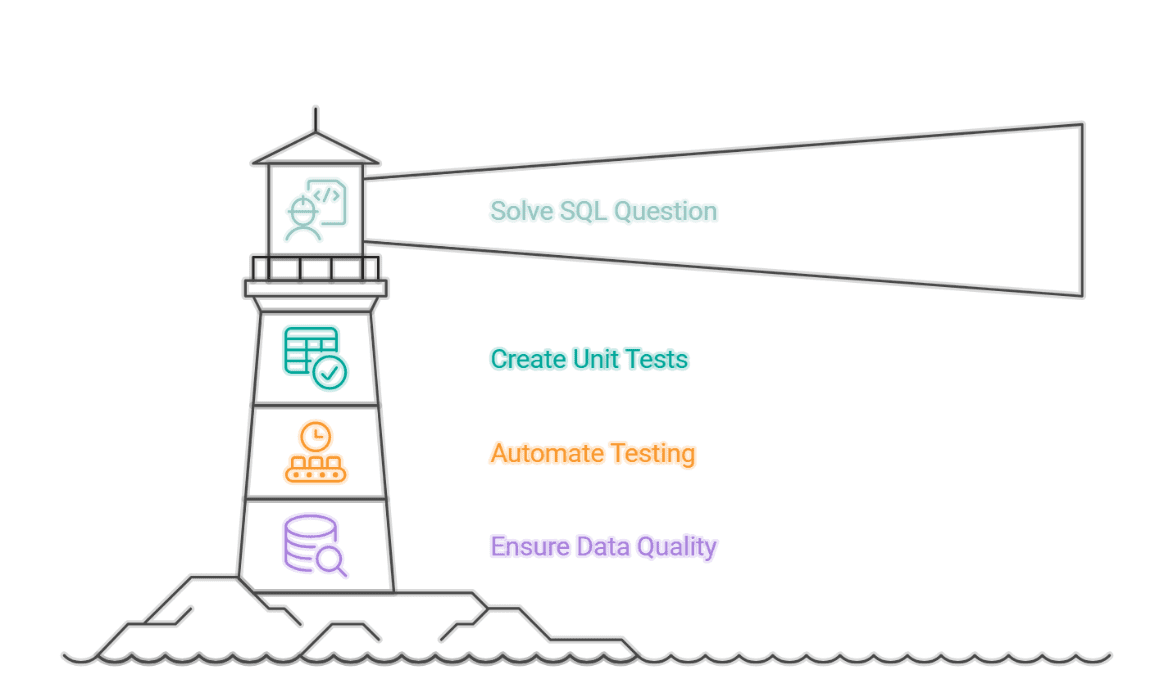
The journey to making SQL production-ready begins with a clear understanding that SQL is, in essence, code that executes business logic. Just as a software application needs to be resilient to changes in its environment or user input, SQL queries must be robust against variations in source data. To illustrate this methodology, we will deconstruct a real Amazon interview question designed to identify customers with the highest daily spending within a specific date range. This seemingly straightforward analytical task provides an excellent canvas to demonstrate how a SQL query can be transformed from a functional script into a testable, maintainable, and continuously validated component. The workflow unfolds in distinct, sequential steps: first, solving the core analytical problem; second, embedding the SQL logic within a comprehensive unit testing framework; third, automating these tests through Continuous Integration and Continuous Deployment (CI/CD); and finally, establishing automated data quality checks to safeguard against upstream data inconsistencies. This structured approach ensures that data solutions are not only accurate at inception but remain trustworthy throughout their operational lifespan.

Foundations of Reliability: Crafting and Validating SQL Queries
The initial phase involves solving the analytical problem with a well-crafted SQL query. For the Amazon interview scenario, the objective is to find customers who incurred the highest total order cost on any given day within a specified date range. This requires careful consideration of both customer and order data.
Understanding the Problem and Dataset:
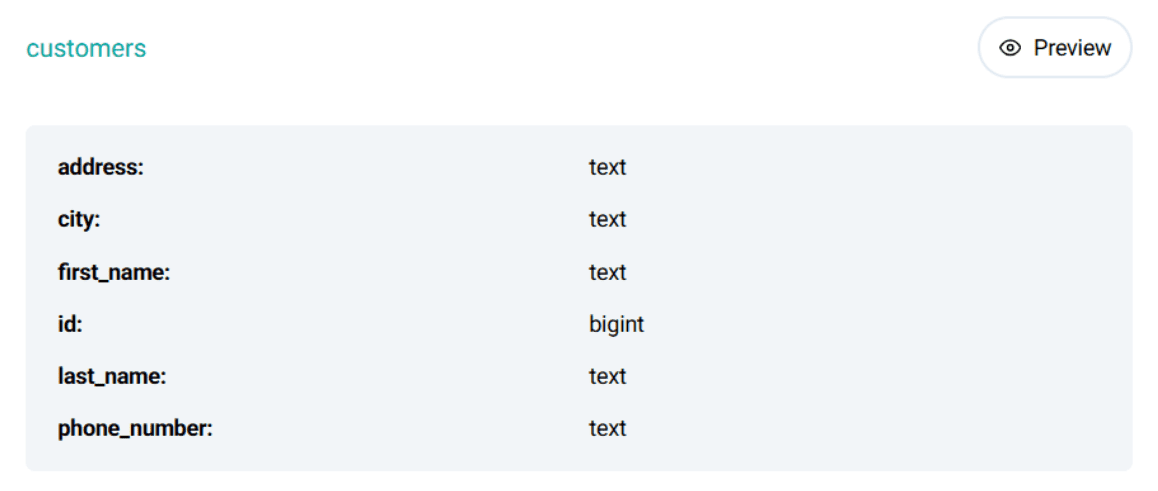
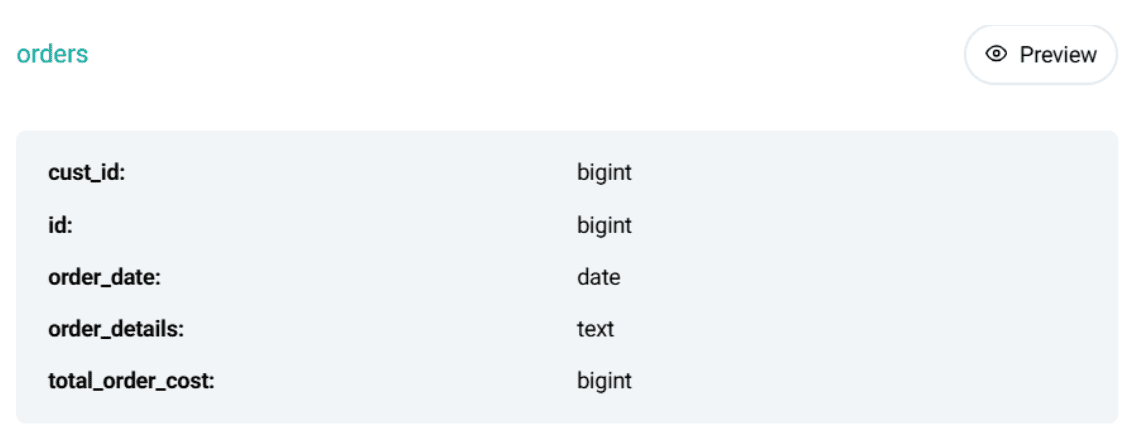
The problem statement from Amazon asks to identify customers with the highest daily total order cost between ‘2019-02-01’ and ‘2019-05-01’. This requires interaction with two core datasets: customers and orders.
The customers table typically contains id, first_name, last_name, city, etc., providing identifying information about each customer.
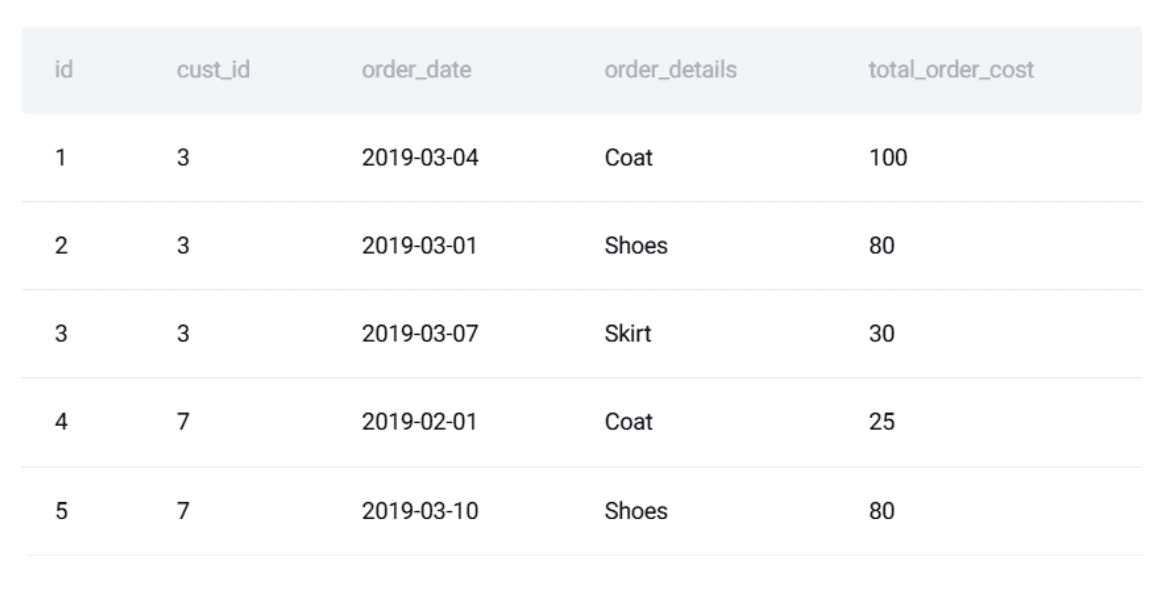
The orders table holds transactional details, including order_id, cust_id (linking to the customers table), order_date, and total_order_cost.
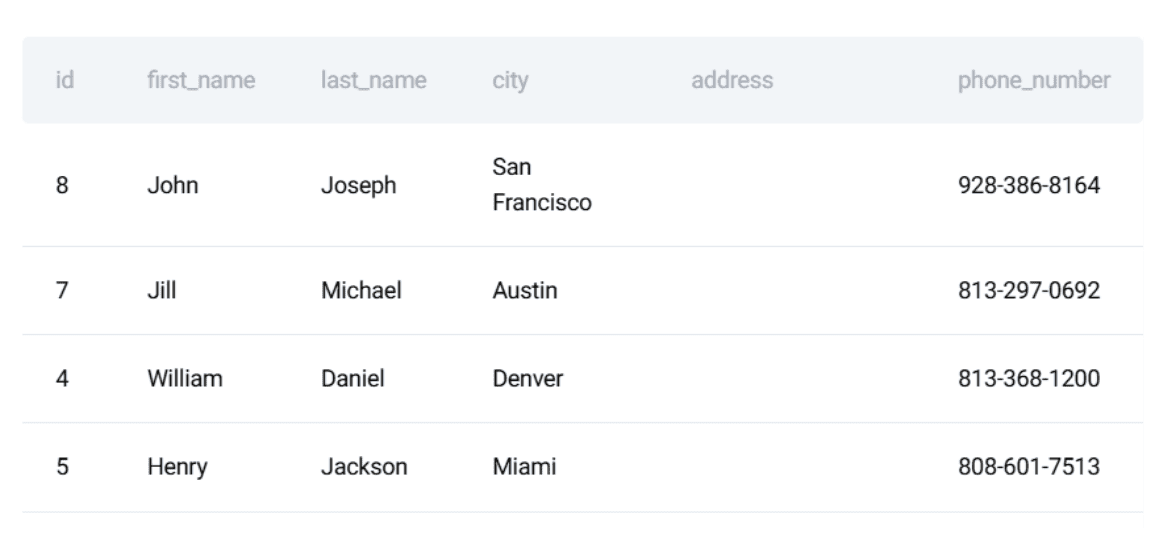
A preview of these datasets reveals the structure and types of data involved, underscoring the need for accurate joins and aggregations. The problem’s inherent need for correctness and stability makes it an ideal candidate for demonstrating software engineering principles applied to SQL.
Writing the SQL Solution (PostgreSQL):
The solution logic can be broken down into three key parts:
- Calculate daily totals for each customer: Aggregate
total_order_costbycust_idandorder_datewithin the specified date range. - Rank customers by daily cost: For each
order_date, rank customers based on theirtotal_daily_costin descending order. - Identify top daily spender: Filter for ranks equal to 1, then join back to the
customerstable to retrieve the customer’sfirst_name.
The resulting PostgreSQL query effectively addresses these steps using Common Table Expressions (CTEs) for clarity and modularity:
WITH customer_daily_totals AS (
  SELECT
    o.cust_id,
    o.order_date,
    SUM(o.total_order_cost) AS total_daily_cost
  FROM orders o
  WHERE o.order_date BETWEEN '2019-02-01' AND '2019-05-01'
  GROUP BY o.cust_id, o.order_date
),
ranked_daily_totals AS (
  SELECT
    cust_id,
    order_date,
    total_daily_cost,
    RANK() OVER (
      PARTITION BY order_date
      ORDER BY total_daily_cost DESC
    ) AS rnk
  FROM customer_daily_totals
)
SELECT
  c.first_name,
  rdt.order_date,
  rdt.total_daily_cost AS max_cost
FROM ranked_daily_totals rdt
JOIN customers c ON rdt.cust_id = c.id
WHERE rdt.rnk = 1
ORDER BY rdt.order_date;
Defining the Expected Output:
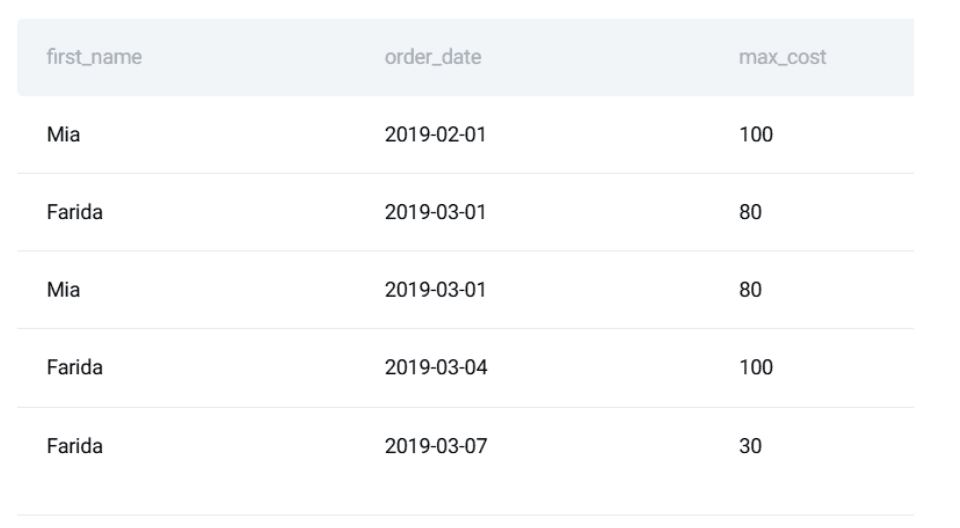
Crucially, after writing the query, the next step—and one often overlooked—is to precisely define the expected output for a given set of input data. This forms the benchmark against which all future tests will be run. For the sample data, the expected output would detail the first_name, order_date, and max_cost for each day’s highest spender. This manual verification, though seemingly basic, is the bedrock of unit testing. Without a clear, predetermined correct answer, the efficacy of any automated test is severely compromised. It forces the developer to explicitly state what "correct" means, eliminating ambiguity and providing a tangible target for validation.

Ensuring Logic Integrity: The Power of Unit Testing for SQL
While a correctly functioning SQL query is a good start, its reliability over time is not guaranteed. Data schema changes, upstream data source modifications, or even minor adjustments to the query itself can introduce regressions. This is where unit testing becomes indispensable. By isolating the SQL logic and testing it against controlled inputs, developers can catch errors early and ensure the query’s continued integrity.
Turning the Query into a Reusable Component:
To facilitate testing, the SQL query is encapsulated within a Python function. Python, with its extensive libraries and robust testing frameworks, serves as an excellent orchestrator for SQL tests. The unittest framework, a built-in Python module, provides a lightweight yet powerful structure for defining test suites. The SQL query itself is stored as a multi-line string within this Python context.
Defining Test Input and Expected Output:
The cornerstone of effective unit testing is the creation of a controlled test environment. This involves defining small, representative datasets for both customers and orders. These "mock" datasets are carefully crafted to cover various scenarios and edge cases relevant to the query’s logic. For example, the test_customers list would contain a few customer records, and test_orders would include a corresponding set of orders with varying costs and dates. Alongside these inputs, the exact expected output is meticulously defined. This explicit definition of expected results is critical, providing an objective standard against which the query’s actual output can be programmatically compared. This process transforms implicit assumptions about data behavior into explicit, verifiable assertions.
Writing SQL Unit Tests with Python:
The core of the unit test involves:
- Setting up an isolated database: Python’s
sqlite3module is used to create an in-memory SQLite database (:memory:). This ensures that each test run operates on a clean, consistent slate, eliminating dependencies on external databases or previous test states. This isolation is a hallmark of robust unit testing. - Schema creation and data insertion: Within this in-memory database, the necessary tables (
customers,orders) are recreated with schemas mirroring production. The carefully definedtest_customersandtest_ordersdata are then inserted into these tables. While a full production schema might be complex, mirroring relevant columns ensures test realism without unnecessary overhead. - Executing the query: The SQL query, now a string within the Python script, is executed against the populated in-memory database using Pandas’
read_sqlfunction. Pandas DataFrames provide a convenient and powerful way to handle and inspect the query results. - Verification: The
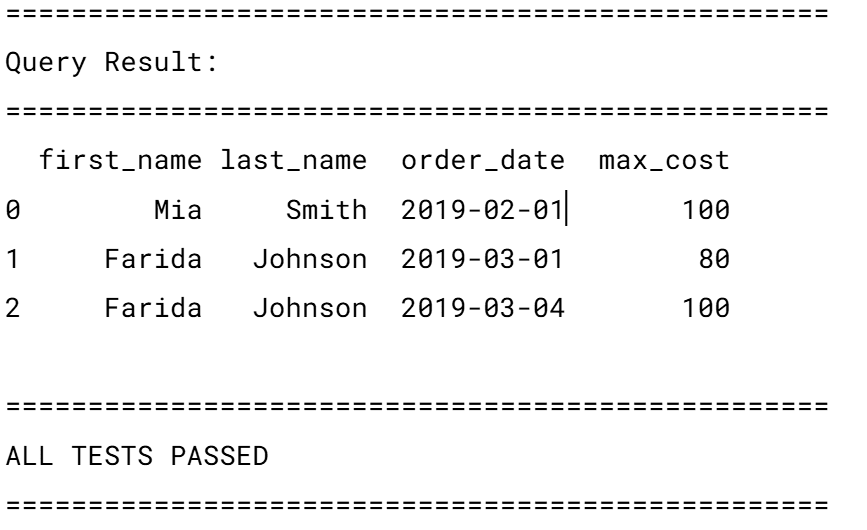
resultDataFrame is then compared row-by-row and column-by-column against theexpectedoutput. This involves checking both the number of rows and the specific values in each column (e.g.,first_name,order_date,max_cost). Any discrepancy triggers a test failure, immediately flagging an issue. - Reporting and Cleanup: A clear pass/fail message is printed, and the database connection is closed.
This detailed verification process, orchestrated by Python’s unittest framework, ensures that the SQL logic behaves as intended under specific, controlled conditions. It provides immediate feedback to developers, allowing for rapid iteration and debugging. The use of an in-memory SQLite database significantly speeds up test execution and guarantees test isolation, which are crucial for maintaining an efficient development workflow.
Automated Assurance: Integrating SQL Tests with CI/CD
A comprehensive suite of unit tests is only effective if it is consistently run. Manual execution is prone to human error and forgetfulness, especially in fast-paced development environments. This is where Continuous Integration and Continuous Deployment (CI/CD) pipelines become essential. CI/CD automates the execution of tests whenever code changes, ensuring that regressions are caught early in the development cycle.
Organizing the Project:
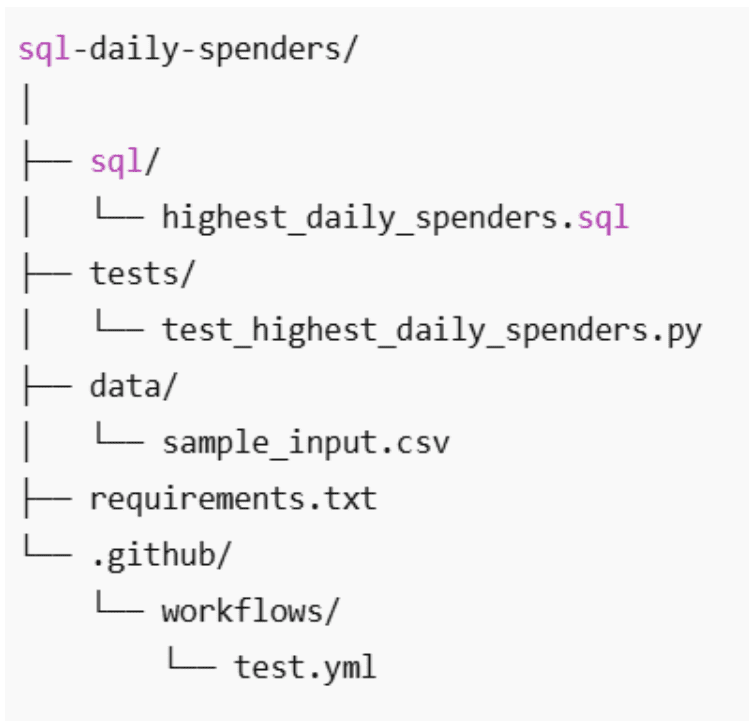
A well-structured repository is fundamental for CI/CD. A minimal structure might include:
- A
sql/directory for the SQL queries. - A
tests/directory for the Python unit test scripts. - A
requirements.txtfile listing Python dependencies (e.g., Pandas,sqlite3). - A
.github/workflows/directory for GitHub Actions configuration files.
Creating the GitHub Actions Workflow:
GitHub Actions provides a powerful, cloud-native CI/CD solution. A workflow file, typically named test_sql.yml and placed in .github/workflows/, defines the automation process.
Workflow Definition (test_sql.yml):
name: Run SQL Tests

on:
  push:
    branches: [ "main" ]
  pull_request:
    branches: [ "main" ]

jobs:
  test:
    runs-on: ubuntu-latest
    steps:
    - name: Checkout repository
      uses: actions/checkout@v4
    - name: Set up Python
      uses: actions/setup-python@v5
      with:
        python-version: "3.10"
    - name: Install dependencies
      run: |
        python -m pip install --upgrade pip
        pip install -r requirements.txt
    - name: Run unit tests
      run: python -m unittest discover
Workflow Explanation:
on: pushandon: pull_request: These triggers ensure that the workflow runs automatically whenever code is pushed to themainbranch or a pull request targetingmainis opened. This proactive feedback loop is critical for catching issues before they are merged into the main codebase.jobs: test: Defines a single job namedtest.runs-on: ubuntu-latest: Specifies that the job will execute on a fresh Ubuntu virtual machine, guaranteeing a consistent and clean environment for every run.steps:Checkout repository: Usesactions/checkout@v4to download the repository’s code onto the runner.Set up Python: Installs a specific Python version (e.g.,3.10) usingactions/setup-python@v5, ensuring a consistent Python runtime.Install dependencies: Executes shell commands to upgrade pip and install all Python libraries listed inrequirements.txt(e.g., Pandas).Run unit tests: Executes the Python commandpython -m unittest discover, which automatically finds and runs all unit tests defined in thetests/directory.
Once committed, this workflow automatically executes, providing immediate visual feedback in GitHub’s Actions tab on the pass/fail status of the SQL tests. This continuous validation loop drastically reduces the risk of introducing regressions, fostering a culture of high-quality code and rapid, confident deployments.
Beyond Logic: Safeguarding Data Quality in Production
While unit tests and CI/CD ensure the SQL logic itself is sound, they do not inherently guarantee the quality of the input data. In real-world data environments, the most robust SQL query can produce incorrect results if the underlying data is flawed. Issues like late-arriving rows, malformed dates, missing foreign keys, unexpected duplicates, or out-of-range values can silently corrupt analytical outputs. SQL queries, by design, often handle these anomalies gracefully (e.g., through NULLs or implicit conversions), meaning they don’t always raise explicit errors, allowing corrupted data to propagate unnoticed. This is where automated data quality checks become paramount, acting as a crucial safety net for the data itself.
Understanding Why Data Quality Checks Matter for SQL Workflows:
Consider the Amazon daily spenders query. Its correctness hinges not only on the SQL logic but also on inherent assumptions about the data:
- Customer first names are unique: If multiple customers share the same
first_nameand one is the top spender, the output becomes ambiguous or misleading. - Order costs are non-negative: Negative
total_order_costvalues typically indicate data ingestion errors or faulty upstream transformations, distorting financial aggregates. - Order dates are valid and within expected ranges: Dates that are
NULL, in the distant past, or in the future often signify synchronization or parsing issues, leading to incorrect temporal analysis. - Every order references a valid customer: Orders with
cust_idvalues that do not exist in thecustomerstable will be silently dropped inJOINoperations, leading to incomplete results.
Without automated data quality checks, these issues can silently compromise the integrity of the analytical results. Data quality automation extends the safety net beyond code changes to the data itself, preventing downstream failures before they impact critical business outcomes.
Turning Data Assumptions into Automated Rules:
The solution is to translate these implicit data assumptions into explicit, automated SQL rules. Each rule is a SQL query designed to identify violations of a specific data quality constraint. If any such query returns rows, it signifies a data quality issue.

Examples of automated data quality rules:
- Check for Duplicate First Names:
SELECT first_name, COUNT(*)
FROM customers
GROUP BY first_name
HAVING COUNT(*) > 1;
(If this returns rows, a non-unique
first_nameexists, potentially causing ambiguity). - Check for Negative Order Costs:
SELECT *
FROM orders
WHERE total_order_cost < 0;
(Any row here indicates invalid financial data).
- Check for Invalid Order Dates:
SELECT *
FROM orders
WHERE order_date IS NULL
   OR order_date < '2010-01-01'
   OR order_date > CURRENT_DATE;
(Identifies missing, historically implausible, or future-dated orders).
- Check for Orders without Corresponding Customers (Referential Integrity):
SELECT o.*
FROM orders o
LEFT JOIN customers c ON c.id = o.cust_id
WHERE c.id IS NULL;
(Ensures every order has a valid customer reference, preventing silent data loss during joins).
Converting Rules into an Automated Check:
These individual SQL data quality checks are then wrapped into a single Python function, run_data_quality_checks, which integrates seamlessly with the existing testing framework. This function iterates through a dictionary of data quality rule names and their corresponding SQL queries. For each rule, it executes the query against the database (the same in-memory SQLite database used for unit tests or a dedicated test database). If any rule query returns a non-empty result set, it signifies a data quality violation, and the function immediately raises a ValueError, effectively failing the check. If all queries return empty results, the function prints a "All data quality checks passed" message.
import pandas as pd
import sqlite3

def run_data_quality_checks(conn):
    checks =
        "Duplicate first names": """
            SELECT first_name
            FROM customers
            GROUP BY first_name
            HAVING COUNT(*) > 1;
        """,
        "Negative order costs": """
            SELECT *
            FROM orders
            WHERE total_order_cost < 0;
        """,
        "Invalid order dates": """
            SELECT *
            FROM orders
            WHERE order_date IS NULL
               OR order_date < '2010-01-01'
               OR order_date > CURRENT_DATE;
        """,
        "Orders without customers": """
            SELECT o.*
            FROM orders o
            LEFT JOIN customers c ON c.id = o.cust_id
            WHERE c.id IS NULL;
        """


    for rule_name, query in checks.items():
        result = pd.read_sql(query, conn)
        if not result.empty:
            raise ValueError(f"Data quality check failed: rule_name")

    print("All data quality checks passed.")
By integrating this run_data_quality_checks function into the unittest suite, the data quality checks become part of the automated CI/CD pipeline. If data quality issues are detected, the GitHub Actions workflow will immediately fail, halting the deployment or merge process. This prevents the execution of SQL logic on corrupted data, safeguarding the integrity of all downstream analytics and business processes. This proactive approach significantly reduces the time and effort spent debugging data-related issues in production and builds greater confidence in data-driven decisions.
The Broader Implications for Data Professionals and Organizations
The journey from a functional SQL query to a fully tested, version-controlled, and data-quality-assured data component represents a significant leap forward in data engineering maturity. This methodology moves beyond the traditional perception of SQL as merely a scripting language for data retrieval, elevating it to a first-class citizen in the software development ecosystem.

For individual data professionals—data analysts, data scientists, and data engineers—adopting these practices transforms their skill set. They transition from being reactive debuggers of data issues to proactive architects of robust, reliable data solutions. This shift not only enhances their productivity but also increases their value to organizations, as they become instrumental in building trustworthy data foundations. The demand for data professionals who can write production-grade SQL, backed by solid engineering principles, is rapidly increasing.
For organizations, the implications are profound:
- Enhanced Data Trustworthiness: Business leaders and decision-makers can have higher confidence in the reports, dashboards, and machine learning models powered by reliably processed data. This fosters a data-driven culture built on verifiable facts.
- Reduced Operational Costs and Risks: Automating tests and quality checks drastically reduces the time and resources spent on manual validation, debugging, and rectifying errors in production. It minimizes the risk of critical business decisions being based on flawed data, avoiding costly mistakes and reputational damage.
- Faster Innovation and Deployment: With automated checks providing continuous assurance, data teams can iterate faster, deploy changes more frequently, and bring new data products to market with greater agility and confidence.
- Improved Collaboration: Adopting shared software engineering practices fosters better collaboration between data teams and traditional software development teams, breaking down silos and promoting a unified approach to code quality.
- Scalability and Maintainability: Version-controlled, tested, and documented SQL solutions are inherently more scalable and easier to maintain over time, even as data volumes grow and business requirements evolve.
In conclusion, while producing a correct answer from a SQL query is a foundational requirement, ensuring its enduring reliability in dynamic data environments is essential. By meticulously combining version control, comprehensive unit testing, automated CI/CD pipelines, and proactive data quality checks, data professionals can elevate their SQL development to software engineering standards. This holistic approach ensures that data not only "works" but remains trustworthy, driving informed decisions and unlocking the full potential of data assets for sustained business success. Correctness is good, but reliability is paramount.
















Leave a Reply