

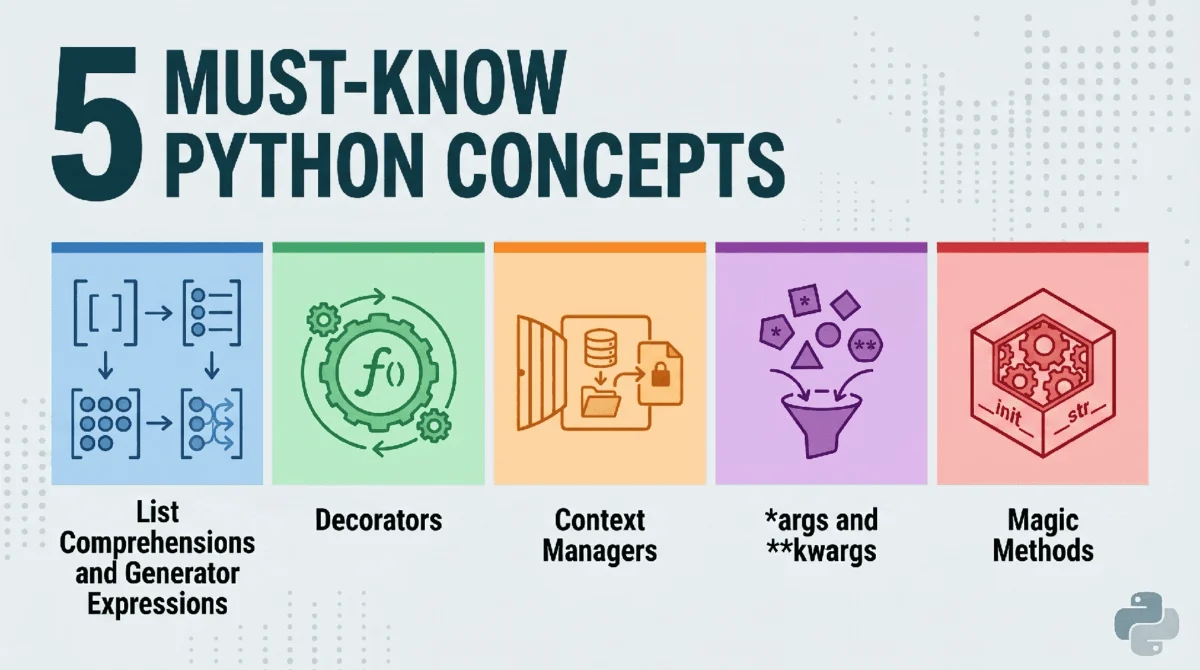
The widespread adoption of Python as a leading programming language, particularly within the burgeoning fields of data science, machine learning, and artificial intelligence, is a testament to its robust design and inherent versatility. Its foundational principles, emphasizing readability, a clear syntax, and a general-purpose applicability, have propelled it to the forefront of modern software development. While Python’s low barrier to entry allows novices to quickly produce functional code, the journey from a casual scripter to a proficient professional hinges on a deep understanding and skillful application of its core mechanisms. This article delineates five fundamental Python concepts that are not merely stylistic choices but essential tools for building efficient, maintainable, and high-performance systems. Mastering these elements signifies a crucial transition in a developer’s trajectory, enabling the creation of Pythonic solutions that are both elegant and robust.
The Genesis of Pythonic Efficiency: A Brief Chronology
Python’s evolution has consistently prioritized developer experience and code clarity. Many of the features discussed here were introduced or formalized through Python Enhancement Proposals (PEPs), reflecting a community-driven approach to language design. For instance, list comprehensions were formalized in PEP 202, marking a significant step towards more concise and performant data manipulation. Decorators, introduced in PEP 318, brought powerful metaprogramming capabilities, allowing functions to be modified or enhanced dynamically. The with statement, standardized in PEP 343, provided a robust mechanism for resource management, addressing common pitfalls associated with manual resource handling. These additions, introduced over various Python versions, have collectively shaped the modern Python ecosystem, moving it towards greater expressiveness, efficiency, and reliability. Understanding these historical context points underscores why these features are considered "must-knows" – they represent pivotal advancements in how Python code is conceived and executed.
1. List Comprehensions and Generator Expressions: Mastering Iteration and Memory
Python’s reputation for readability is significantly bolstered by constructs that simplify common programming patterns. Among these, list comprehensions and their memory-efficient counterparts, generator expressions, stand out as prime examples of Pythonic elegance and performance.
From Explicit Loops to Concise Constructs
Historically, iterating over collections and transforming data often involved explicit for loops, conditional checks, and append operations. Consider a scenario where one needs to square all even numbers within a large range:
numbers = range(1000000)
squared_list = []

for n in numbers:
    if n % 2 == 0:
        squared_list.append(n ** 2)
This approach, while functional, can be verbose and, for certain operations, less performant than more optimized alternatives. It explicitly details each step: initialization, iteration, conditional filtering, and appending.
The Pythonic Advantage: List Comprehensions
List comprehensions offer a more concise and often faster alternative, collapsing the loop, condition, and expression into a single, highly readable line. The equivalent Pythonic solution for the above example is:
# Concise and often faster execution
squared_list_comprehension = [n ** 2 for n in numbers if n % 2 == 0]
Beyond conciseness, list comprehensions are often implemented in C under the hood for CPython, leading to performance benefits over explicit for loops, especially for large datasets. Benchmarking studies consistently show list comprehensions outperforming traditional loops for simple transformations, sometimes by factors of 1.5x to 2x. This performance boost, combined with improved readability, makes them a cornerstone of efficient Python code.
The "Must-Know" Twist: Generator Expressions for Memory Efficiency
While list comprehensions are powerful, they construct the entire list in memory at once. For massive datasets, this can lead to significant memory consumption, potentially causing MemoryError exceptions or slowing down system performance. This is where generator expressions prove invaluable.
A generator expression uses parentheses instead of square brackets:
# Memory-efficient for large datasets or single-pass operations
squared_gen_expression = (n ** 2 for n in numbers if n % 2 == 0)
The critical distinction is that a generator expression does not compute and store all values immediately. Instead, it creates an iterator that yields values one at a time, only when requested. This "lazy" evaluation mechanism makes generator expressions incredibly memory efficient.
Consider the memory footprint for a million-number list:
# Assuming 'numbers' is range(1000000)
list_comprehension_result = [n**2 for n in numbers if n % 2 == 0]
generator_expression_result = (n**2 for n in numbers if n % 2 == 0)

# Example output for memory comparison (approximate)
# List size:      4,167,352 bytes (for a list of 500,000 integers)
# Generator size: 200 bytes (for the generator object itself)
The disparity in memory usage is dramatic. A generator object merely stores the instructions for generating values, not the values themselves. This makes them ideal for scenarios such as processing large log files, streaming data from network connections, or working with datasets that exceed available RAM. Values are computed on demand, typically using the next() function or by iterating over the generator in a for loop.
numbers = range(1000000)
squared_gen = (n ** 2 for n in numbers if n % 2 == 0)

print(next(squared_gen)) # Output: 0
print(next(squared_gen)) # Output: 4
print(next(squared_gen)) # Output: 16
Each call to next() computes and returns the subsequent value, freeing up memory from previous computations. The implication for data science and big data processing is profound: generator expressions enable the handling of datasets that would be impossible to load into memory entirely, facilitating scalable and resource-conscious solutions.
2. Decorators: Enhancing Functions with Metaprogramming
Decorators in Python provide a powerful and elegant way to modify or enhance the behavior of functions or methods without permanently altering their source code. They are essentially functions that take another function as an argument, add some functionality, and return a new function (or the modified original). This concept aligns perfectly with the "Don’t Repeat Yourself" (DRY) principle, promoting modularity and cleaner codebases.
The Manual, Repetitive Approach
Imagine a common requirement to log the execution time of several distinct functions. A naive approach would involve embedding timing code within each function:
import time

def process_data():
    start = time.time()
    # ... complex data processing logic ...
    time.sleep(0.1) # Simulate work
    end = time.time()
    print(f"process_data took end - start:.4fs")

def train_model():
    start = time.time()
    # ... machine learning model training logic ...
    time.sleep(0.2) # Simulate work
    end = time.time()
    print(f"train_model took end - start:.4fs")

def generate_report():
    start = time.time()
    # ... report generation logic ...
    time.sleep(0.05) # Simulate work
    end = time.time()
    print(f"generate_report took end - start:.4fs")

process_data()
train_model()
generate_report()
This "clunky" method introduces significant code duplication. Any change to the timing logic would necessitate modifications across multiple functions, increasing the risk of errors and making maintenance cumbersome.
The Pythonic Solution: Decorators
Decorators abstract away this repetitive logic. By defining a single decorator function, we can apply the timing functionality to any number of other functions with minimal effort.
import time
from functools import wraps

def timer_decorator(func):
    @wraps(func) # Preserves metadata of the original function
    def wrapper(*args, **kwargs):
        start = time.time()
        result = func(*args, **kwargs) # Execute the original function
        end = time.time()
        print(f"func.__name__ took end - start:.4fs")
        return result
    return wrapper

@timer_decorator
def heavy_computation():
    """Performs a CPU-bound operation."""
    return sum(range(10**7))

@timer_decorator
def api_call_simulation(user_id):
    """Simulates an API call with a user ID."""
    time.sleep(0.08) # Simulate network latency
    print(f"API call for user user_id completed.")
    return "status": "success", "user": user_id

heavy_computation()
api_call_simulation(123)
Output:
heavy_computation took 0.09XXs
API call for user 123 completed.
api_call_simulation took 0.08XXs
The @timer_decorator syntax is syntactic sugar for heavy_computation = timer_decorator(heavy_computation). When heavy_computation() is called, it’s actually wrapper() that executes, which in turn calls the original heavy_computation() function, logging its execution time before returning its result.
Decorators are not limited to timing. They are foundational for various cross-cutting concerns in software development:
- Logging: Automatically logging function calls, arguments, and return values.
- Authentication/Authorization: Restricting access to functions based on user roles or permissions (e.g.,
@login_requiredin web frameworks). - Caching: Storing the results of expensive function calls to avoid recomputing them for the same inputs (e.g.,
@functools.lru_cache). - API Routing: In web frameworks like Flask or Django, decorators (
@app.route('/path')) map URL paths to specific view functions.
The use of functools.wraps is crucial as it preserves the original function’s name, docstrings, and module, which is vital for debugging and introspection. Decorators promote separation of concerns, making code cleaner, more modular, and significantly easier to maintain and extend, especially in large-scale applications.
3. Context Managers (with Statements): Ensuring Resource Safety
Managing external resources—such as files, network connections, or database sessions—is a common source of bugs and resource leaks in programming. Forgetting to close a file handle, release a database connection, or unlock a thread can lead to system instability, performance degradation, or even deadlocks. Python’s context managers, implemented via the with statement, provide an elegant and robust solution to this challenge, ensuring that resources are properly acquired and released, even if errors occur.
The Peril of Manual Resource Management
Without context managers, handling resources often requires explicit setup and teardown, typically enclosed within try...finally blocks to guarantee cleanup:
f = open("data.txt", "w")
try:
    f.write("Hello World")
    # Potentially raise an error here
    # 1 / 0
finally:
    # This close() is crucial and easily forgotten,
    # or might be missed if an unhandled exception occurs before it.
    f.close()
print("File closed manually.")
While try...finally ensures cleanup, it adds boilerplate code and can still be prone to errors if the close() method is forgotten or incorrectly implemented. Moreover, the explicit close() call might be overlooked by developers, leading to subtle resource leaks that are hard to diagnose.
The Pythonic Way: Context Managers with with
The with statement simplifies resource management significantly. It guarantees that a specific setup action (resource acquisition) is performed when entering the with block and a corresponding teardown action (resource release) is performed when exiting the block, regardless of whether the block completes normally or an exception occurs.
# File is automatically closed here, even if an error occurs
with open("data.txt", "w") as f:
    f.write("Hello World")
    # Any exception here will still trigger f.close()
    # 1 / 0
print("File closed automatically by context manager.")
This approach is not only more concise but also inherently safer. The open() function returns an object that acts as a context manager. When the with block is entered, the context manager’s __enter__ method is called, returning the file object (f). When the block is exited (either normally or due to an exception), the __exit__ method is automatically invoked, ensuring f.close() is called.
Context managers are fundamental for:
- File I/O: The most common use case, ensuring files are always closed.
- Database Connections: Automatically committing transactions or rolling back on error, and closing the connection.
- Threading Locks: Acquiring and releasing locks to prevent race conditions.
- Network Sockets: Ensuring sockets are properly closed.
- Temporary Resources: Managing temporary files or directories that need to be cleaned up.
The contextlib module provides utilities for easily creating custom context managers, such as @contextlib.contextmanager decorator for function-based context managers. This mechanism significantly enhances the robustness and reliability of Python applications by systematically preventing resource leaks and ensuring predictable cleanup, particularly critical in high-concurrency or long-running systems.
4. Mastering *args and **kwargs: Flexible Function Signatures
In Python, function flexibility is greatly enhanced by the *args and **kwargs syntax, which allows functions to accept an arbitrary number of positional and keyword arguments, respectively. These "packing" operators are indispensable for creating adaptable APIs and designing functions that can handle varying inputs without requiring multiple overloads.
Understanding Packing and Unpacking
- *`args
(arbitrary positional arguments):** Whenargs` is used in a function definition, it collects all excess positional arguments into a tuple*. - `kwargs
(arbitrary keyword arguments):** When*kwargs` is used, it collects all excess keyword arguments into a dictionary*.
Consider a function designed to create a user profile, where some details are mandatory, and others are optional or variable:
def make_profile(name, *tags, **metadata):
    """
    Creates a user profile with a name, an arbitrary number of tags,
    and arbitrary key-value metadata.
    """
    print(f"User: name") # 'name' is a named argument

    # 'tags' collects all positional arguments after 'name' into a tuple
    print(f"Tags: tags")

    # 'metadata' collects all keyword arguments not explicitly named
    # into a dictionary
    print(f"Details: metadata")

# Example usage
make_profile("Alice", "DataScientist", "Pythonist", location="NY", seniority="Senior", active=True)
make_profile("Bob", "Developer", "GolangEnthusiast", team="Frontend")
make_profile("Charlie") # Can be called with no tags or metadata
Output:
User: Alice
Tags: ('DataScientist', 'Pythonist')
Details: 'location': 'NY', 'seniority': 'Senior', 'active': True
User: Bob
Tags: ('Developer', 'GolangEnthusiast')
Details: 'team': 'Frontend'
User: Charlie
Tags: ()
Details:
Here, name is a required positional argument. *tags captures "DataScientist" and "Pythonist" as a tuple ('DataScientist', 'Pythonist'). **metadata captures "location", "seniority", and "active" as a dictionary 'location': 'NY', 'seniority': 'Senior', 'active': True.
Unpacking Arguments
The * and ** operators also perform the inverse operation: unpacking. They can be used when calling a function to expand an iterable (for *) or a dictionary (for **) into individual arguments.
def print_coordinates(x, y, z):
    print(f"X: x, Y: y, Z: z")

coords_list = [10, 20, 30]
coords_dict = 'x': 1, 'y': 2, 'z': 3

print_coordinates(*coords_list) # Unpacks [10, 20, 30] into x=10, y=20, z=30
print_coordinates(**coords_dict) # Unpacks 'x': 1, 'y': 2, 'z': 3 into x=1, y=2, z=3
Implications for Library Design
The power of *args and **kwargs is particularly evident in the design of flexible and extensible libraries. Frameworks like Scikit-Learn and Matplotlib heavily rely on these constructs to allow users to pass an arbitrary number of configuration settings or plotting parameters to functions and classes. For example, plt.plot() can take various optional arguments for line style, color, markers, etc. without needing separate function definitions for each combination.
This mechanism ensures that functions can remain backward-compatible when new parameters are added, and it allows developers to create highly customizable components. Mastering *args and **kwargs is crucial for understanding how many sophisticated Python libraries are structured and for building equally robust and adaptable code.
5. Dunder Methods (Magic Methods): Customizing Object Behavior
"Dunder methods," short for "double underscore methods" (e.g., __init__, __len__, __str__), are Python’s special methods that allow custom objects to emulate the behavior of built-in types and operators. Officially known as "special methods" in Python’s data model, they are often colloquially referred to as "magic methods" due to their role in making custom classes behave intuitively within the Python ecosystem. They are the backbone of Python’s object protocol, enabling features like operator overloading, custom iteration, and context management.
Emulating Built-in Behavior
By implementing specific dunder methods, developers can define how their objects respond to standard Python operations such as addition (+), length queries (len()), string representation (str()), item access ([]), and even function calls (()).
Consider a custom Dataset class that encapsulates a list of data. Without dunder methods, basic operations like getting its length or printing a meaningful representation would require custom methods:
class BasicDataset:
    def __init__(self, data):
        self.data = data

    def get_length(self):
        return len(self.data)

    def to_string(self):
        return f"Basic Dataset with len(self.data) items"

my_basic_data = BasicDataset([10, 20, 30, 40])
print(my_basic_data.get_length()) # Output: 4
print(my_basic_data.to_string())  # Output: Basic Dataset with 4 items
This approach works, but it forces users of the class to learn custom method names for operations that have standard built-in equivalents.
The Pythonic Way: Leveraging Dunder Methods
By implementing __len__ and __str__, the Dataset class can integrate seamlessly with Python’s built-in functions:
class Dataset:
    def __init__(self, data):
        """Initializes the Dataset with data."""
        self.data = data

    def __len__(self):
        """Allows len() to be used on Dataset objects."""
        return len(self.data)

    def __str__(self):
        """Defines the string representation for Dataset objects."""
        return f"Dataset containing len(self.data) items"

    def __getitem__(self, key):
        """Allows item access (e.g., my_data[0]) and slicing."""
        return self.data[key]

    def __add__(self, other):
        """Defines behavior for the '+' operator."""
        if isinstance(other, Dataset):
            return Dataset(self.data + other.data)
        elif isinstance(other, list):
            return Dataset(self.data + other)
        else:
            raise TypeError("Can only add another Dataset or a list")

# Create a dataset instance
my_data = Dataset([1, 2, 3])

# Calls __len__
print(len(my_data)) # Output: 3

# Calls __str__
print(my_data) # Output: Dataset containing 3 items

# Calls __getitem__
print(my_data[0]) # Output: 1
print(my_data[1:3]) # Output: [2, 3]

# Calls __add__
another_data = Dataset([4, 5])
combined_data = my_data + another_data
print(combined_data) # Output: Dataset containing 5 items
print(combined_data[3]) # Output: 4
Output:
3
Dataset containing 3 items
1
[2, 3]
Dataset containing 5 items
4
This significantly improves the usability and intuitiveness of the Dataset class. Other common dunder methods include:
__repr__: Defines the "official" string representation, typically for debugging.__call__: Makes an instance of the class callable like a function (e.g.,my_object()).__eq__,__ne__,__lt__, etc.: Define comparison operators.__iter__,__next__: Enable custom iteration for objects.
Dunder methods are essential for building powerful abstractions and creating APIs that feel natural and consistent with the rest of Python. They underpin sophisticated features like Object-Relational Mappers (ORMs), numerical computing libraries, and custom data structures, allowing them to integrate seamlessly into Python’s rich object model.
Wrapping Up: The Professional Python Developer’s Toolkit
Mastering these five fundamental Python concepts marks a critical transition from merely writing functional scripts to architecting robust, efficient, and maintainable software. Each concept addresses distinct challenges in programming:
- List Comprehensions and Generator Expressions optimize data manipulation, balancing conciseness, performance, and memory efficiency, crucial for processing diverse datasets.
- Decorators promote modularity and the DRY principle, enabling elegant extension of function behavior without invasive code modifications, streamlining tasks like logging and authentication.
- Context Managers (
withstatements) ensure the safe and reliable handling of resources, preventing leaks and enhancing application stability, a cornerstone of robust system design. - *`args
andkwargs` empower developers to create highly flexible and adaptable function interfaces, essential for designing extensible libraries and APIs that can evolve gracefully. - Dunder Methods unlock the full power of Python’s object model, allowing custom classes to emulate and extend built-in behaviors, leading to more intuitive and expressive object-oriented designs.
Collectively, these concepts form the bedrock of Pythonic programming. Experienced Python developers consistently leverage these tools to write code that is not only effective but also elegant, scalable, and easy to understand. Investing time in deeply understanding and practically applying these principles is an indispensable step towards building a successful career in Python development, equipping professionals with the expertise demanded by modern software and data-intensive industries. As Python continues to evolve, these core principles remain constant, serving as the foundation upon which further expertise and innovation are built.


















Leave a Reply