
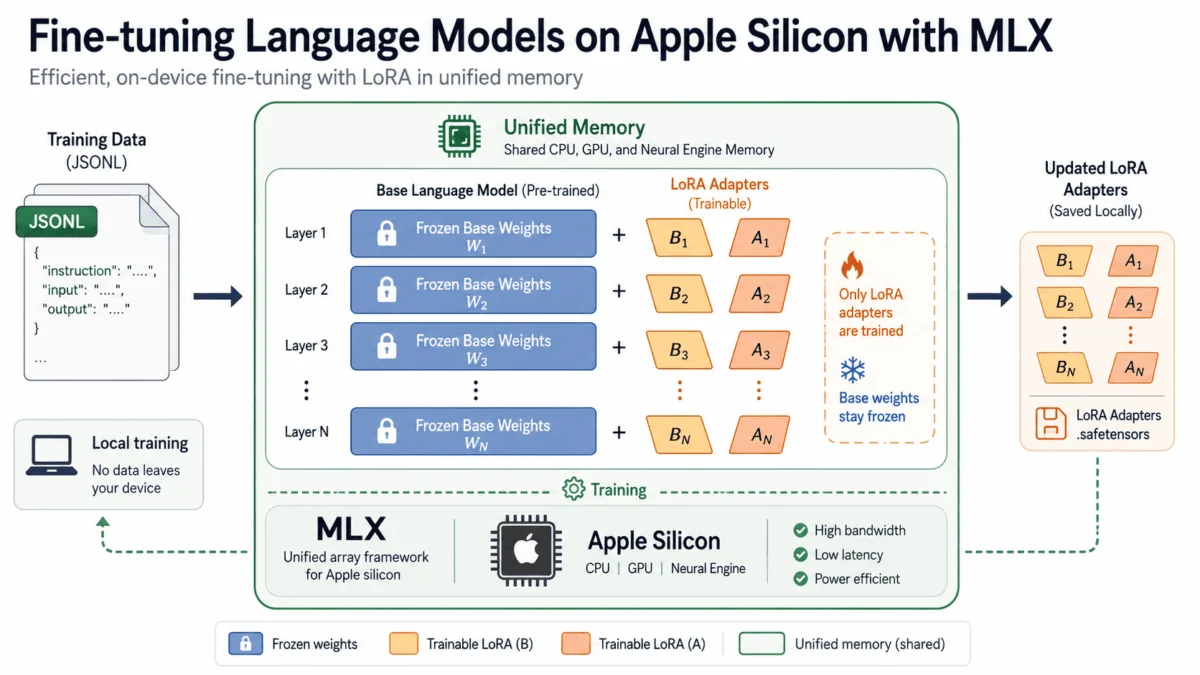
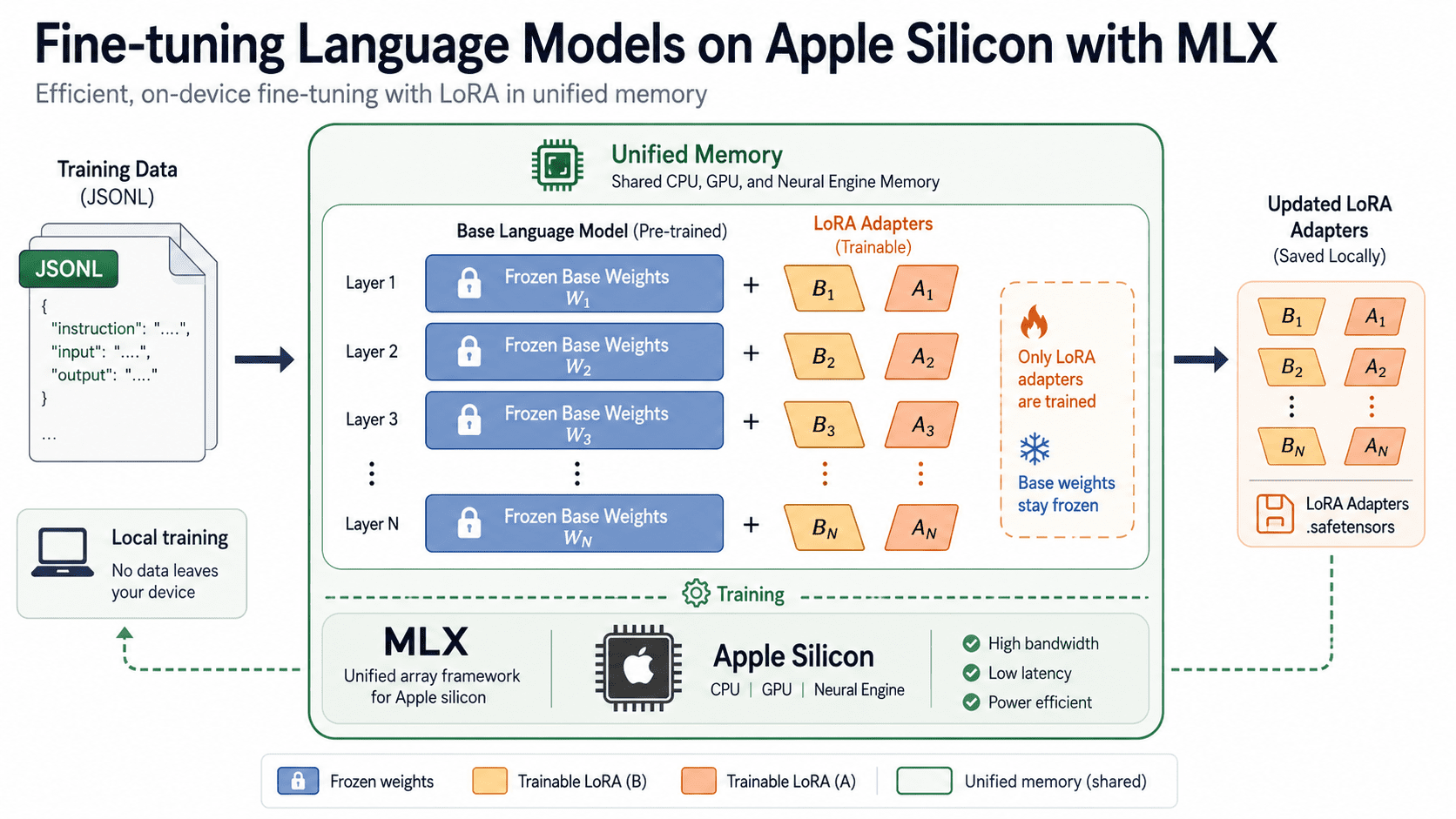
The landscape of artificial intelligence development is undergoing a profound transformation, with the once cloud-exclusive domain of language model fine-tuning now becoming accessible on local machines. This shift is largely driven by Apple’s innovative MLX framework, enabling users of Apple Silicon Macs to adapt advanced open-source language models to their specific data without incurring exorbitant cloud GPU costs or compromising data privacy. This capability marks a significant milestone in the democratization of AI, moving powerful computational tasks from remote data centers directly to the user’s desktop or laptop.
The Paradigm Shift in LLM Fine-Tuning
Historically, the process of fine-tuning large language models (LLMs) was an expensive and resource-intensive endeavor, predominantly confined to cloud environments. Developers and researchers would rent powerful graphics processing units (GPUs) from providers like Amazon Web Services (AWS), Google Cloud Platform (GCP), or Microsoft Azure, paying by the hour. These costs could quickly escalate into hundreds or even thousands of dollars for a single project, creating a substantial barrier to entry for independent developers, academic researchers, and small businesses. Beyond the financial burden, the necessity of uploading proprietary or sensitive data to third-party cloud servers raised significant concerns regarding data security and privacy.
The advent of Apple Silicon, beginning with the M1 chip in 2020, heralded a new era for personal computing, characterized by unprecedented performance and energy efficiency, particularly for machine learning workloads. The integrated architecture of these chips, where the CPU, GPU, and Neural Engine share a unified memory pool, laid the groundwork for a different approach to AI development. This hardware innovation, coupled with the release of MLX, an open-source machine learning framework specifically designed for Apple Silicon, has now unlocked the potential for on-device LLM fine-tuning, effectively eliminating cloud costs and mitigating data privacy risks.
MLX: Apple’s Custom-Built ML Framework for Unified Memory
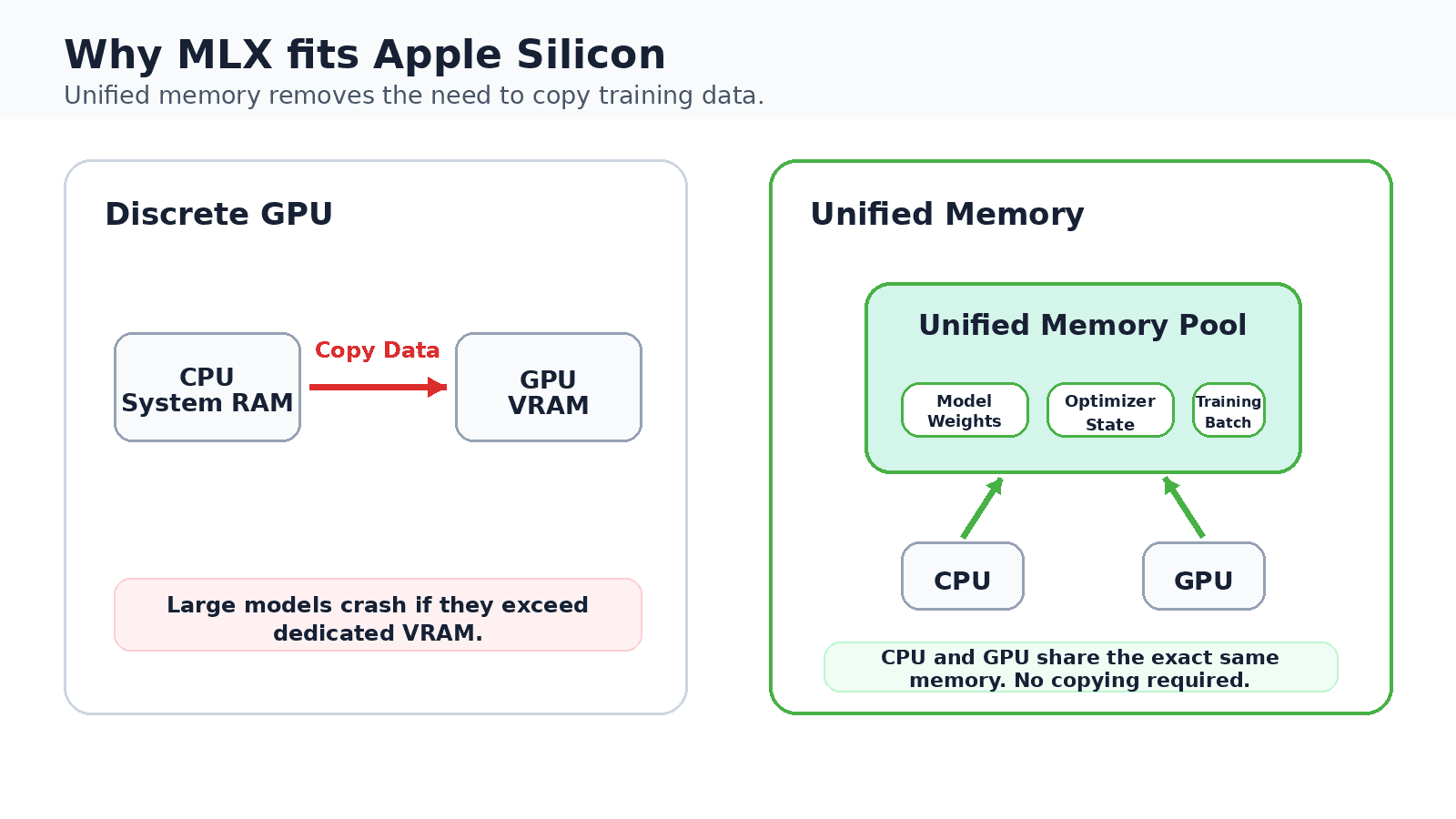
Unlike many machine learning tools that were initially developed for NVIDIA’s CUDA architecture and subsequently ported to other platforms, MLX was conceived from the ground up by Apple’s machine learning research team with the unique unified memory architecture of Apple Silicon in mind. This design philosophy is central to its efficiency. In traditional systems with discrete GPUs, data must constantly be copied between the system’s main memory (RAM) and the GPU’s dedicated video memory (VRAM). This copying process introduces latency and consumes valuable processing time, especially for large models.
Apple Silicon’s unified memory architecture fundamentally bypasses this bottleneck. The CPU and GPU share a single, high-bandwidth memory pool, meaning model weights, optimizer states, and training batches all reside in the same physical space. This eliminates the need for data shuttling, drastically improving performance and enabling larger models to fit into more modest memory configurations. For instance, a MacBook with 16 GB of unified memory can comfortably fine-tune models that would traditionally require a dedicated GPU with a comparable amount of VRAM, a feat previously impractical without a specialized workstation or cloud instance.
The MLX API itself draws inspiration from popular numerical computing libraries like NumPy, making it intuitive for developers already familiar with Python-based data science tools. It seamlessly integrates automatic differentiation, a cornerstone for training neural networks, and leverages Apple’s Metal framework for low-level GPU acceleration, all while maintaining the unified memory view. This cohesive integration of hardware and software is a hallmark of Apple’s ecosystem, and with MLX, it is now paying dividends in the realm of advanced AI.
To embark on this local AI journey, users require an Apple Silicon Mac (M1, M2, M3 series, or newer), macOS Ventura 13.5 or later, and Python 3.10 or above. The framework explicitly does not support Intel-based Macs, underscoring its hardware-specific optimization.
Setting the Stage: Prerequisites and Initial Setup
The initial setup for MLX-powered fine-tuning is remarkably straightforward, reflecting Apple’s commitment to developer accessibility. The core component is the mlx-lm package, which provides utilities for text generation and fine-tuning across thousands of open models. Installation is achieved via a simple pip command:
pip install "mlx-lm[train]"This command installs the necessary mlx-lm package along with its training-specific dependencies. To confirm a successful installation and witness the framework in action, a quick test generation can be performed using a pre-quantized model from the MLX Community organization on Hugging Face:
mlx_lm.generate
--model mlx-community/Mistral-7B-Instruct-v0.3-4bit
--prompt "Explain LoRA in two sentences."
--max-tokens 120
The first execution of this command triggers the download of the specified 4-bit quantized Mistral model, caching it locally for future use. This process exemplifies the efficiency built into mlx-lm: it leverages a vast repository of pre-converted models, minimizing the need for users to perform complex weight conversions themselves. The MLX Community on Hugging Face hosts an ever-growing collection of models optimized for Apple Silicon, including popular architectures like Llama, Mistral, Qwen2, Phi, Gemma, and Mixtral.
It is crucial to note a specific data format requirement for MLX fine-tuning: models must be in Hugging Face’s safetensors format. While GGUF files are common for local inference tools and offer excellent memory efficiency, they are not currently supported for training within MLX. This distinction is important for users accustomed to other local LLM ecosystems.
Data Preparation: The Foundation of Customization
The quality and format of training data are paramount to the success of any fine-tuning endeavor. MLX LM simplifies this process by expecting training data in a structured jsonl format, organized within a designated folder. This folder should contain three key files: train.jsonl (required), valid.jsonl (optional, for validation loss tracking), and test.jsonl (optional, for post-training evaluation). Each line within these files represents a single JSON example.
MLX LM supports three primary data formats: chat, completions, and plain text. The chat format is generally recommended for its robustness, allowing for role-tagged messages per line, which enables the framework to apply the model’s native chat template. This ensures that the fine-tuning data aligns with how the base model was originally trained to handle conversational inputs. An example of the chat format is:
"messages": ["role": "user", "content": "What is LoRA?", "role": "assistant", "content": "An efficient way to fine-tune a model."]For more direct input-output mappings, particularly for instruction-following tasks, the completions format offers a simpler structure:
"prompt": "Summarize: The market rose sharply today.", "completion": "Markets gained."
"prompt": "Translate to French: good morning", "completion": "bonjour"
A critical parameter in data preparation is the --mask-prompt flag. By default, the trainer computes loss over the entire example (both prompt and completion), which can sometimes lead the model to expend effort learning to reproduce the input prompt. Activating --mask-prompt directs the model to compute loss solely on the completion segment, ensuring that training focuses exclusively on generating the desired response. This often results in a model that adheres more reliably to instructions. For chat data, the final message in the list is automatically treated as the completion.
Data integrity is maintained by keeping each example on a single line, preventing internal line breaks from being misinterpreted as separate records. For effective fine-tuning, a typical data split involves allocating approximately 80% of examples to train.jsonl and the remaining 10-20% to valid.jsonl. While there’s no strict minimum, a dataset of 200 to 500 examples is generally considered a sensible starting point to induce meaningful behavioral changes in a model without leading to overfitting, where the model merely memorizes the training data rather than generalizing.
LoRA and QLoRA: Efficiency Through Adaptation
The core innovation that makes local fine-tuning of large models practical is Low-Rank Adaptation (LoRA). Developed by Hu et al. (2021), LoRA is a parameter-efficient fine-tuning technique that significantly reduces the computational and memory footprint compared to full fine-tuning. Instead of updating every single weight in the colossal pretrained model, LoRA freezes the original weights and introduces small, trainable adapter matrices alongside them. These adapter matrices, typically much smaller in dimension, are then updated during training.
This method dramatically cuts down on memory and storage requirements. For instance, a 7-billion parameter model might have billions of weights. With LoRA, only a fraction of parameters (the adapter matrices) need to be stored and updated, reducing the memory footprint for optimizer states and gradients by orders of magnitude. The visual analogy often used is that of adding small, customizable "plugs" to a large, unchangeable machine.
Initiating a LoRA training run with MLX LM is executed via a single command, pointing to the base model and the prepared data folder:
mlx_lm.lora
--model mlx-community/Mistral-7B-Instruct-v0.3-4bit
--train
--data ./data
--iters 600
--batch-size 1
During the training process, MLX LM provides real-time feedback, displaying training loss, validation loss, tokens processed, and iterations per second. The trained adapter weights are saved by default to an adapters folder. Key customizable flags include --fine-tune-type (accepting lora, dora, or full), --num-layers (to specify how many transformer layers receive adapters, default 16), and --iters (to control the total number of training iterations).
The --batch-size 1 setting in the example is a deliberate choice for memory-constrained environments, particularly 16 GB machines. While a larger batch size generally offers a more stable gradient estimate, a batch size of 1 minimizes peak memory usage, preventing out-of-memory errors. For users with more generous memory (e.g., 64 GB), increasing the batch size to 2 or 4 can accelerate training. When memory is tight but the benefits of a larger effective batch size are desired, --grad-accumulation-steps can be employed. This parameter allows gradients to be accumulated over several mini-batches before a single optimization step, effectively simulating a larger batch without the corresponding memory overhead.
For those who prefer visual tracking of training progress, the --report-to wandb flag integrates with Weights & Biases, a popular platform for machine learning experiment tracking. Should memory pressure become an issue, reducing --num-layers (e.g., to 8 or 4) or adding --grad-checkpoint (which trades computation for lower memory usage by recomputing activations during the backward pass) are effective strategies to fit jobs that would otherwise exceed available resources.
Building upon LoRA, Quantized LoRA (QLoRA), introduced by Dettmers et al. (2023), pushes memory efficiency even further. QLoRA involves training LoRA adapters on top of a quantized base model. MLX seamlessly integrates this, meaning the same mlx_lm.lora command can train adapters directly on 4-bit quantized weights without any additional setup. The practical benefit is substantial: a 4-bit 7-billion parameter model reduces weight memory by approximately 3.5 times compared to its full-precision counterpart. This brings the fine-tuning of a 7B model comfortably within 8 GB of working memory, leaving ample headroom on a 16 GB MacBook for the operating system and training batch.
For users who wish to quantize a full-precision model themselves before training, the mlx_lm.convert command provides this functionality:
mlx_lm.convert
--hf-path mistralai/Mistral-7B-Instruct-v0.3
--mlx-path ./mistral-4bit
-q
This command converts the specified Hugging Face model to a 4-bit quantized MLX format, saving it to a local folder, which can then be passed to the --model flag during training.
Strategic Model and Adapter Configuration
Effective fine-tuning involves thoughtful decisions regarding the base model and adapter settings. For beginners, an 8-billion parameter model in 4-bit quantized form represents an ideal balance between performance and resource requirements. As familiarity with the workflow grows, users can progressively scale up to 13B or 14B models, which typically require 14 to 18 GB of working memory, fitting comfortably on a 32 GB Apple Silicon machine.
The capacity of the LoRA adapter to learn new behaviors is primarily controlled by two parameters: the number of trained layers (--num-layers) and the adapter rank. More layers and a higher rank allow the adapter greater expressiveness, but at the expense of increased memory consumption and training time. A common starting point is 16 layers with a moderate rank, which can then be adjusted based on the validation loss. A crucial indicator of effective training is when both training loss and validation loss decrease. If training loss continues to drop while validation loss begins to climb, it often signals that the adapter is overfitting, memorizing the training examples rather than learning generalizable patterns.
The learning rate is another critical hyperparameter. Values typically ranging from 1e-5 to 5e-5 are effective for most LoRA fine-tuning runs. A learning rate that is too high can lead to unstable training, causing the model’s performance to oscillate or diverge, while a rate that is too low will result in sluggish training progress, where the model barely updates its weights. To effectively attribute improvements or degradations, it is best practice to alter only one setting at a time when experimenting with hyperparameters.
Validation and Generation: Testing the Custom Model
Once training is complete, evaluating the adapter’s performance is essential. The mlx_lm.lora command can be used in test mode to score the fine-tuned model against the held-out test.jsonl dataset:
mlx_lm.lora
--model mlx-community/Mistral-7B-Instruct-v0.3-4bit
--adapter-path ./adapters
--data ./data
--test
This provides a quantifiable metric that can be tracked across different experiments and adapter configurations. To qualitatively assess the model’s responses, the mlx_lm.generate command is used, again pointing to the trained adapter:
mlx_lm.generate
--model mlx-community/Mistral-7B-Instruct-v0.3-4bit
--adapter-path ./adapters
--prompt "Summarize: Our quarterly revenue grew twelve percent."
By running the same prompt with and without the adapter, users can directly compare the responses. If the fine-tuning was successful and the dataset well-aligned with the target task, the adapted model’s responses should exhibit a noticeable improvement in relevance, accuracy, or style compared to the base model.
Deployment and Serving: From Training to Application
While adapters are invaluable during the experimentation and development phases, for deployment, a single, self-contained model is often preferred. The mlx_lm.fuse command addresses this by merging the trained adapter weights back into the base model:
mlx_lm.fuse
--model mlx-community/Mistral-7B-Instruct-v0.3-4bit
--adapter-path ./adapters
--save-path ./fused-model
The output is a new folder containing the fused model, which behaves identically to any other MLX model. This fused model can then be served locally through an OpenAI-compatible endpoint, making it accessible to existing client applications with minimal code changes:
mlx_lm.server --model ./fused-model --port 8080This capability allows developers to integrate their custom, fine-tuned models into applications using familiar OpenAI API calls, simply by redirecting the base URL to their local server. For those preferring a graphical user interface, tools like LM Studio offer a one-click local server and a chat interface, providing a convenient way to interact with and compare fine-tuned MLX models alongside other local LLMs. This ease of deployment further democratizes access to sophisticated AI capabilities.
Broader Implications and the Democratization of AI
The ability to fine-tune LLMs locally on Apple Silicon Macs carries profound implications across several domains.
Firstly, data privacy and security are significantly enhanced. By processing sensitive or proprietary data entirely on-device, organizations and individuals can maintain full control over their information, eliminating the risks associated with uploading data to third-party cloud providers. This is particularly relevant for sectors dealing with confidential client data, medical records, or intellectual property.
Secondly, the cost savings are substantial. The elimination of hourly cloud GPU rentals translates directly into reduced operational expenses, making advanced AI development accessible to a much broader audience. This empowers students, hobbyists, and startups to experiment and innovate without financial constraints that previously limited such endeavors to well-funded entities. Over the lifecycle of a project, these savings can amount to thousands of dollars, considering that high-end cloud GPUs can cost upwards of $3-5 per hour.
Thirdly, it empowers individual developers and researchers. A personal computer transforms into a powerful AI development workstation, fostering innovation and rapid prototyping. This shift aligns with the broader open-source movement in AI, where readily available models and frameworks accelerate progress and reduce reliance on proprietary ecosystems.
Fourthly, this development contributes to environmental sustainability. By leveraging the energy-efficient Apple Silicon chips for local processing, the demand for energy-intensive cloud data centers is potentially reduced, aligning with efforts to minimize the carbon footprint of AI.
Finally, Apple’s strategic move with MLX underscores its commitment to nurturing its developer ecosystem for AI. While not directly competing with frameworks like PyTorch or TensorFlow for all use cases, MLX carves out a niche by offering unparalleled performance on Apple hardware. This positions Apple Silicon as a compelling platform for on-device AI inference and fine-tuning, potentially attracting a new generation of machine learning practitioners to the Mac ecosystem.
The Future Landscape of Local AI Development
The complete local fine-tuning workflow offered by MLX LM — from installation and data preparation to training, testing, fusing, and serving — represents a pivotal moment in AI accessibility. The seamless integration of Apple’s hardware and software, a journey that began over a decade ago with the author’s initial switch to Mac, has quietly matured into a robust platform for serious machine learning work at the user’s desk.
Looking ahead, several avenues for further exploration present themselves. Experimenting with different fine-tuning types, such as dora, and comparing its results against lora can yield insights into optimal adaptation strategies. Adjusting the number of trained layers and iteration counts allows for a balance between model quality and training speed. Swapping in different base architectures from the extensive MLX Community library—including Llama, Qwen, Phi, and Gemma—all using the same intuitive commands, offers endless possibilities for customization. Each experiment, now inexpensive and entirely contained on local hardware, fosters a culture of iterative development and learning, which is the profound practical change MLX brings to the adaptation of language models.
Vinod Chugani, an expert in AI and data science education, emphasizes the bridging of emerging AI technologies with practical application. His insights into agentic AI, machine learning applications, and automation workflows provide invaluable context for understanding the real-world impact of such advancements. Chugani’s focus on actionable strategies and frameworks resonates deeply with the tangible benefits offered by MLX, empowering data professionals through skill development and career transitions in the evolving AI landscape.