

Data science notebooks have long served as the digital scratchpads of modern analytics, allowing researchers, engineers, and analysts to experiment rapidly and visualize insights on the fly. However, this flexibility introduces a notorious vulnerability: the illusion of reproducibility. A notebook often dies the precise moment an engineer clicks Restart Kernel and Run All and encounters an unhandled exception. This silent failure mode typically remains undiscovered for days or weeks. An analysis is completed, a chart is embedded into an executive slide deck, and a final dataset is pushed to production, only for a stakeholder to question an underlying metric weeks later. Opening the notebook and executing it sequentially from the top can suddenly trigger a KeyError on a column renamed in cell 31 and inadvertently deleted in cell 44. Because cached output cells retain legacy calculations, the document appears functional while remaining entirely unrunnable.
To combat this widespread vulnerability in computational research, industry practitioners are increasingly adopting strict structural discipline. By enforcing a set of lightweight, deterministic habits—all while keeping the core logic under 100 lines of Pandas—analysts can safeguard their workflows against the fragility of interactive computing environments. This methodology transforms fragile, linear-dependent prototypes into robust, production-ready software artifacts.
Background Context and the Anatomy of Interactive Fragility
The inherent risks of Jupyter and similar interactive notebook environments stem from their stateful execution model. Unlike traditional script-based software development where files execute deterministically from top to bottom every time, notebooks permit arbitrary, non-linear cell execution. An analyst can execute cell 5, jump to cell 40, return to cell 12, and modify variables globally without leaving a trace in the static document code.
This flexibility accelerates early-stage exploratory data analysis (EDA) but sabotages downstream collaboration and auditing. When models are transitioned from local development laptops to automated continuous integration (CI) pipelines or cloud-based deployment environments, hidden workspace states inevitably vanish. The absence of explicit dependency management and variable isolation results in opaque errors that waste countless engineering hours across enterprise analytics teams.

Chronology of a Typical Notebook Failure Cycle
Understanding how notebooks degrade requires examining the standard lifecycle of an analytics project within a corporate or academic research setting.
Phase 1: Exploratory Ingestion and Prototyping
An analyst receives a raw dataset, such as the widely referenced Olympic historical performance archive (olympics_athletes_events). Initial data loading occurs via Pandas, followed by rapid feature engineering, dropping of null values, and immediate visualization. At this stage, variables accumulate globally in the kernel memory.
Phase 2: Intermediate Modifications
As project requirements shift, variables are overwritten. A column representing categorical gender data or missing medal designations is transformed mid-stream. Because these alterations occur out of order or rely on prior manual cell runs, the notebook’s internal state diverges significantly from its visual structure.
Phase 3: Final Reporting and Handoff
Visualizations and aggregated metrics are extracted for stakeholder presentations. The notebook is saved in its final, messy state, containing execution markers that no longer reflect a clean, top-to-bottom run.
Phase 4: The Audit and Failure
Weeks later, an auditor or incoming data engineer attempts to audit the data lineage. Executing Restart Kernel and Run All immediately breaks the pipeline. Missing configuration parameters, hardcoded file paths, and implicit dependencies cause execution to halt, undermining the credibility of the entire analytical conclusion.

Supporting Data and Empirical Validation
To demonstrate how structural habits prevent these failures, consider the structural characteristics of the olympics_athletes_events dataset. Derived from standard multi-event sports analytics benchmarks, this dataset records individual athlete participation across decades of global competition.
In a representative sample comprising 352 rows across 336 unique athletes, 15 distinct Olympic Games, and 167 individual events, data hygiene issues quickly emerge. Approximately 11 athletes appear across multiple events, and one individual appears six times. Furthermore, the medal column contains explicit string values for only 120 rows, leaving remaining fields blank.
A naive exploratory analysis treats these blank values as standard missing data (NaN). However, domain context dictates that a blank medal field indicates an athlete competed in an event without placing on the podium. Treating these blanks as missing data distorts downstream aggregations, such as sport-specific medal conversion rates.
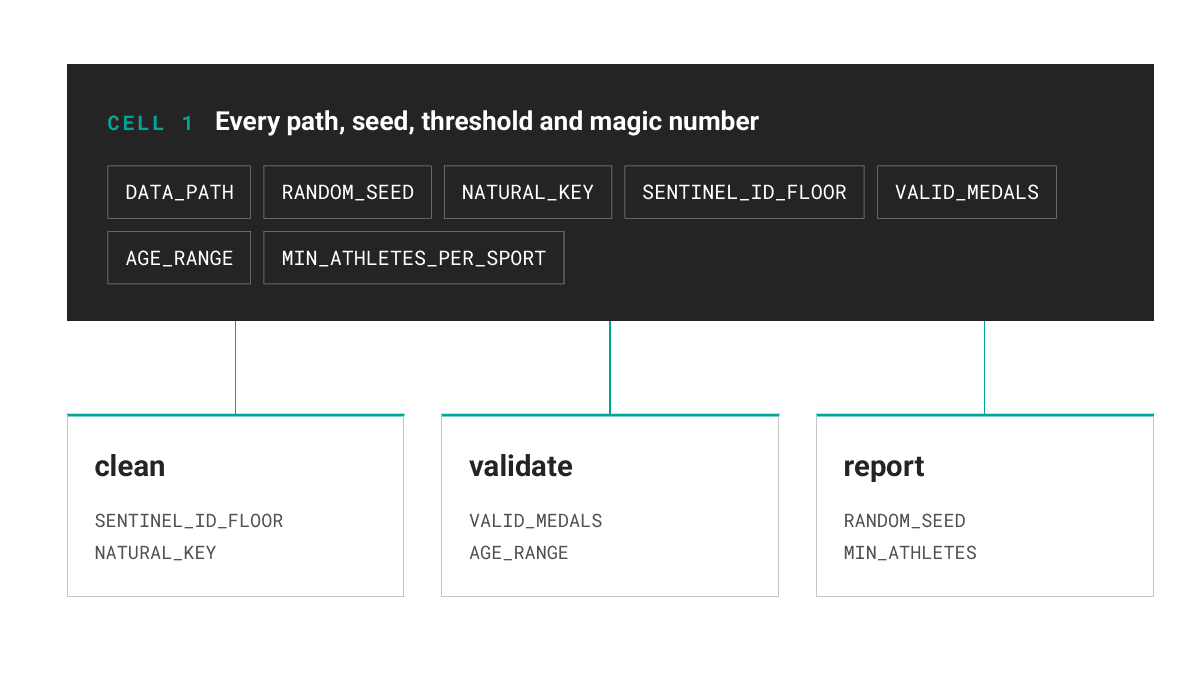
Furthermore, raw enterprise extracts frequently contain hidden anomalies. Standard descriptive statistics (df.describe()) or initial head inspection (df.head()) fail to uncover planted duplicate records or anomalous sentinel identifiers—such as test fixtures inserted during upstream database extraction. In empirical tests of the Olympic dataset, unvalidated ingestion missed three duplicate natural-key entries and two artificial sentinel IDs (IDs 999998 and 999999). These phantom records accounted for less than one percent of the file yet artificially skewed headline athletic success metrics by over 13 percent.
Architectural Solutions: Six Core Habits for Resilient Notebooks
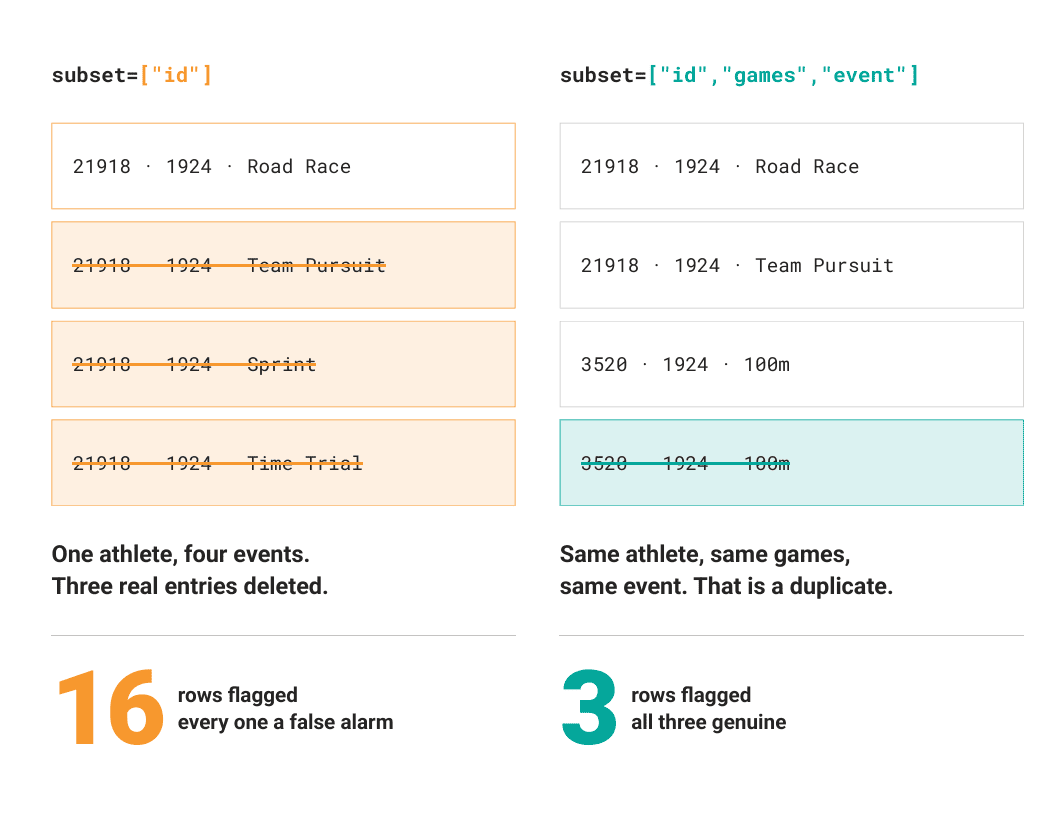
To eliminate these vulnerabilities, practitioners must integrate six foundational software engineering practices directly into their interactive notebook workflows.
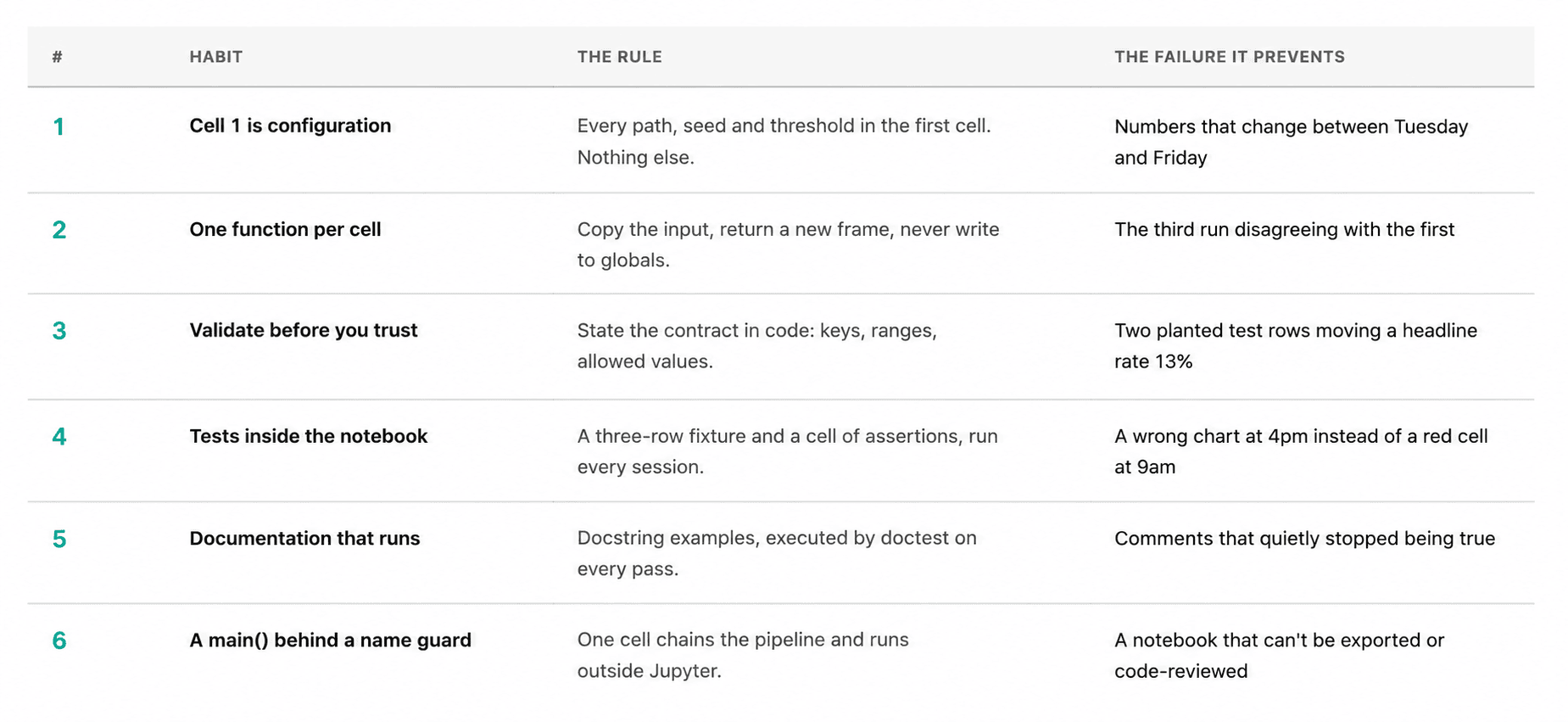
Habit 1: Centralizing Configurations in the Initial Cell
All file paths, random seeds, operating thresholds, and global magic numbers must reside exclusively in the first execution block. Nothing else belongs there.
from pathlib import Path
import pandas as pd

DATA_PATH = Path("olympics_athletes_events.csv")
RANDOM_SEED = 42

NATURAL_KEY = ["id", "games", "event"]
SENTINEL_ID_FLOOR = 900_000
VALID_SEXES = "M", "F"
VALID_MEDALS = "Gold", "Silver", "Bronze"
AGE_RANGE = (10, 75)
HEIGHT_RANGE_CM = (120, 230)
WEIGHT_RANGE_KG = (25, 220)
MIN_ATHLETES_PER_SPORT = 5
This centralization ensures that future reviewers can audit every underlying assumption within seconds without scrolling through dense blocks of code. Crucially, enforcing a deterministic global random seed (RANDOM_SEED = 42) guarantees that stochastic operations—such as train-test splits, bootstrapping, or k-means centroid initialization—produce identical outputs across multiple execution sessions.
Habit 2: Enforcing Single-Responsibility Cell Functions
To maintain state integrity, an execution cell must either define a single function or invoke one. It must never perform both actions simultaneously, nor should it mutate global variables instantiated by preceding cells.
def load_raw(path: Path) -> pd.DataFrame:
    """Read the Olympics CSV with no cleaning applied."""
    return pd.read_csv(path)

def clean(df: pd.DataFrame) -> pd.DataFrame:
    """Drop test rows and duplicate entries, then encode 'no medal' explicitly."""
    out = df[df["id"] < SENTINEL_ID_FLOOR].copy()
    out = out.drop_duplicates(subset=NATURAL_KEY, keep="first")
    out["medal"] = out["medal"].fillna("None")
    out["sex"] = out["sex"].astype("category")
    out["season"] = out["season"].astype("category")
    return out.reset_index(drop=True)

def add_features(df: pd.DataFrame) -> pd.DataFrame:
    """Add decade, is_medalist and bmi. Never mutates the input frame."""
    out = df.copy()
    out["decade"] = (out["year"] // 10) * 10
    out["is_medalist"] = out["medal"].ne("None")
    out["bmi"] = bmi(out["weight"], out["height"])
    return out
The strategic inclusion of .copy() at the onset of transformation functions prevents side effects. Because functions operate exclusively on isolated local frames, cell execution order becomes irrelevant. Re-running transformation blocks multiple times yields identical results, neutralizing the classic notebook bug where repeated execution alters underlying dataframes.
Habit 3: Automated Data Contract Validation
Before transforming data, notebooks should programmatically validate incoming schemas against established business logic.
def validate_raw(df: pd.DataFrame) -> list[str]:
    """Return a list of contract violations. An empty list means usable data."""
    problems = []
    expected = "id", "sex", "age", "height", "weight", "year", "sport", "event",
                "medal", "games", "team"
    missing = expected - set(df.columns)
    if missing:
        problems.append(f"missing columns: sorted(missing)")
        return problems

    dupes = df.duplicated(subset=NATURAL_KEY).sum()
    if dupes:
        problems.append(f"dupes duplicate rows on NATURAL_KEY")

    sentinels = df.loc[df["id"] >= SENTINEL_ID_FLOOR, "id"]
    if len(sentinels):
        found = sorted(int(i) for i in sentinels.unique())
        problems.append(f"len(sentinels) sentinel ids: found")

    return problems
Proper validation relies heavily on identifying the correct natural key. For instance, evaluating uniqueness strictly on an athlete identifier (id) generates false positives, as elite athletes frequently compete in multiple events during a single Olympic tournament. Evaluating natural composite keys (["id", "games", "event"]) isolates legitimate multi-event entries from erroneous data duplication.
Habit 4: Embedding Unit Tests Within Notebooks
Complex external testing frameworks like pytest are unnecessary to maintain internal notebook reliability. Developers can define compact fixture schemas and assertion suites directly within the document.
def _fixture() -> pd.DataFrame:
    return pd.DataFrame(
        "id": [1, 1, 2],
        "games": ["1924 Summer"] * 3,
        "event": ["Rings", "Rings", "Rings"],
        "sex": ["M", "M", "F"],
        "age": [24.0, 24.0, None],
        "height": [180.0, 180.0, 165.0],
        "weight": [81.0, 81.0, 55.0],
        "year": [1924, 1924, 1924],
        "season": ["Summer"] * 3,
        "sport": ["Gymnastics"] * 3,
        "medal": ["Gold", "Gold", None],
        "team": ["Denmark"] * 3,
    )

def run_tests() -> None:
    fx = _fixture()
    assert len(clean(fx)) == 2, "clean() must drop the duplicate entry"
    assert clean(fx)["medal"].tolist() == ["Gold", "None"], "missing medal becomes 'None'"
    print("all assertions passed")
Executing this validation suite during every interactive session ensures that code modifications fail early and visibly, well before downstream visualizations or reports are generated.
Habit 5: Executable Documentation via Doctests
Static comments degrade over time because interpretation drift remains unchecked by compilers. Conversely, executable docstring examples tested via Python’s native doctest module guarantee alignment between documentation and behavior.
def bmi(weight_kg: float, height_cm: float) -> float:
    """Body mass index in kg/m2.

    >>> round(bmi(81.0, 180.0), 1)
    25.0
    >>> round(bmi(55.0, 165.0), 1)
    20.2
    """
    return weight_kg / (height_cm / 100) ** 2
By invoking doctest.run_docstring_examples(bmi, globals(), name="bmi", verbose=True), analysts verify mathematical formulas dynamically during execution, ensuring that documentation serves as a living, verifiable specification.
Habit 6: Script Interoperability via Standard Entry Points
The final execution block must tie programmatic functions together within a standardized execution guard, proving that the notebook functions as an autonomous script.
if __name__ == "__main__":
    run_tests()
    doctest.run_docstring_examples(bmi, globals(), name="bmi", verbose=True)

    raw = load_raw(DATA_PATH)
    problems = validate_raw(raw)
    df = add_features(clean(raw))

    report = (df.groupby("sport", observed=True)
                .agg(entries=("id", "size"), medals=("is_medalist", "sum"))
                .query(f"entries >= MIN_ATHLETES_PER_SPORT"))
    print(report)
This structural pattern allows data teams to convert interactive notebooks directly into production-ready Python modules using utilities like jupyter nbconvert --to script analysis.ipynb. This capability bridges the historical gap between exploratory research notebooks and production software engineering pipelines.
Broader Impact and Implications for Enterprise Analytics
The integration of these structured development habits carries profound implications for data-driven enterprises. As organizations increasingly rely on automated machine learning pipelines, Large Language Model (LLM) agent integration, and cloud analytics workbenches, the cost of non-reproducible research compounds significantly.
Regulatory compliance frameworks, financial auditing standards, and internal quality assurance protocols increasingly demand transparent, verifiable data lineage. When data science teams transition from casual prototyping to disciplined, contract-validated notebook architectures, they drastically reduce model deployment friction, eliminate silent calculation errors, and establish institutional trust in quantitative decision-making. By investing minimal upfront effort into structural rigor, analytics organizations ensure their insights withstand the ultimate test of computational resilience.