
The emergence of the .claude folder within developer directories has become a common, if initially perplexing, sight for those integrating Anthropic’s Claude large language model into their projects. This hidden directory, automatically generated by various Claude-powered tools and frameworks, serves as a crucial local workspace, storing vital state information that enables consistent and intelligent interactions. For many developers, its sudden appearance prompts an immediate question: Is it safe to delete? The answer, while technically yes, comes with significant implications for the continuity and efficiency of AI-driven workflows.
The Rise of AI Local State Management
In the rapidly evolving landscape of artificial intelligence, large language models (LLMs) like Claude have revolutionized how developers build applications. However, a fundamental characteristic of these models, in their purest form, is their statelessness. Each API call is treated as an independent event, devoid of memory from prior interactions. This inherent limitation poses a significant challenge for creating dynamic, multi-turn conversations, agentic workflows, or applications requiring persistent context. To bridge this gap, local state management mechanisms have become indispensable.
The .claude folder exemplifies this necessity. Much like how .git manages version control or .vscode stores editor configurations, .claude provides a dedicated space for Claude-integrated tools to store project-specific data. This data includes configuration settings, cached responses, definitions for AI agents, and a chronological log of interactions, all designed to ensure that the AI system behaves consistently across different runs and sessions within a given project. Its quiet creation in the background, without explicit prompts or explanations, is a common trait of such foundational development directories, often leading to initial confusion among developers unfamiliar with its purpose. Understanding its internal mechanisms is not merely a matter of curiosity but a prerequisite for effective and robust AI application development.
Anatomy of the .claude Folder: A Detailed Breakdown
Upon closer inspection, the .claude folder reveals a structured internal architecture, typically comprising several key subdirectories and files, each serving a distinct purpose in maintaining the operational state of Claude-powered applications. While the exact contents may vary depending on the specific tool or framework leveraging Claude, a common pattern emerges:
-
config.json: This foundational file is central to how the Claude integration operates. It typically houses global and project-specific configuration parameters. This can include the specific Claude model version to be used (e.g., Claude 3 Opus, Sonnet, Haiku), temperature settings for controlling response creativity, maximum token limits, API key references (though often better managed through environment variables for security), and output formatting preferences. For instance, a developer might configure it to always request JSON output or to adhere to specific ethical guidelines defined for the project. Any deviation from these settings would mean the AI starts from a blank slate, requiring manual re-configuration for every task. -
memory/orcontext/: These folders are critical for maintaining continuity and enabling sophisticated AI interactions. They store various forms of "memory" that allow Claude to recall past interactions, user preferences, or relevant project data.- Short-term memory: This might include the conversational history of a current session, ensuring that Claude can refer back to previous turns in a dialogue without needing the entire prompt to be re-sent.
- Long-term memory: For more advanced agentic systems, this could involve embeddings of project documentation, user manuals, or previous successful resolutions, enabling the AI to retrieve and incorporate relevant information into its responses. This aligns with Retrieval Augmented Generation (RAG) principles, where external knowledge bases are dynamically queried to enhance model responses.
-
agents/: As AI tools evolve, the concept of "agents" – autonomous or semi-autonomous AI entities designed to perform multi-step tasks – becomes increasingly prevalent. Theagents/directory typically stores the definitions, configurations, and potentially the state of these agents. An agent definition might outline a sequence of operations (e.g., "analyze user query," "search internal knowledge base," "draft response," "seek user confirmation"), the specific tools it can invoke (e.g., a database query tool, an API call tool), and its decision-making logic. Storing these locally allows for complex, repeatable workflows without needing to redefine them for each execution. -
logs/: This directory is invaluable for debugging, auditing, and understanding the behavior of the Claude integration. It contains chronological records of various events, including:- User prompts and the corresponding Claude responses.
- Timestamps of interactions.
- Details of tool invocations by AI agents.
- Any errors or exceptions encountered during execution.
- Performance metrics, such as API latency or token usage.
These logs provide a transparent window into the AI’s thought process and execution path, crucial for troubleshooting unexpected behavior or optimizing performance.
-
cache/: Performance and cost efficiency are paramount in AI applications. Thecache/folder addresses these concerns by storing results of previous computations or API calls. If a specific query or a part of an agent’s workflow has been executed before, and its result is still valid, the system can retrieve it from the cache instead of making a redundant API call to Claude. This significantly reduces latency and minimizes API usage costs, especially for frequently accessed data or computationally intensive intermediate steps.
Operational Flow: A Chronological View
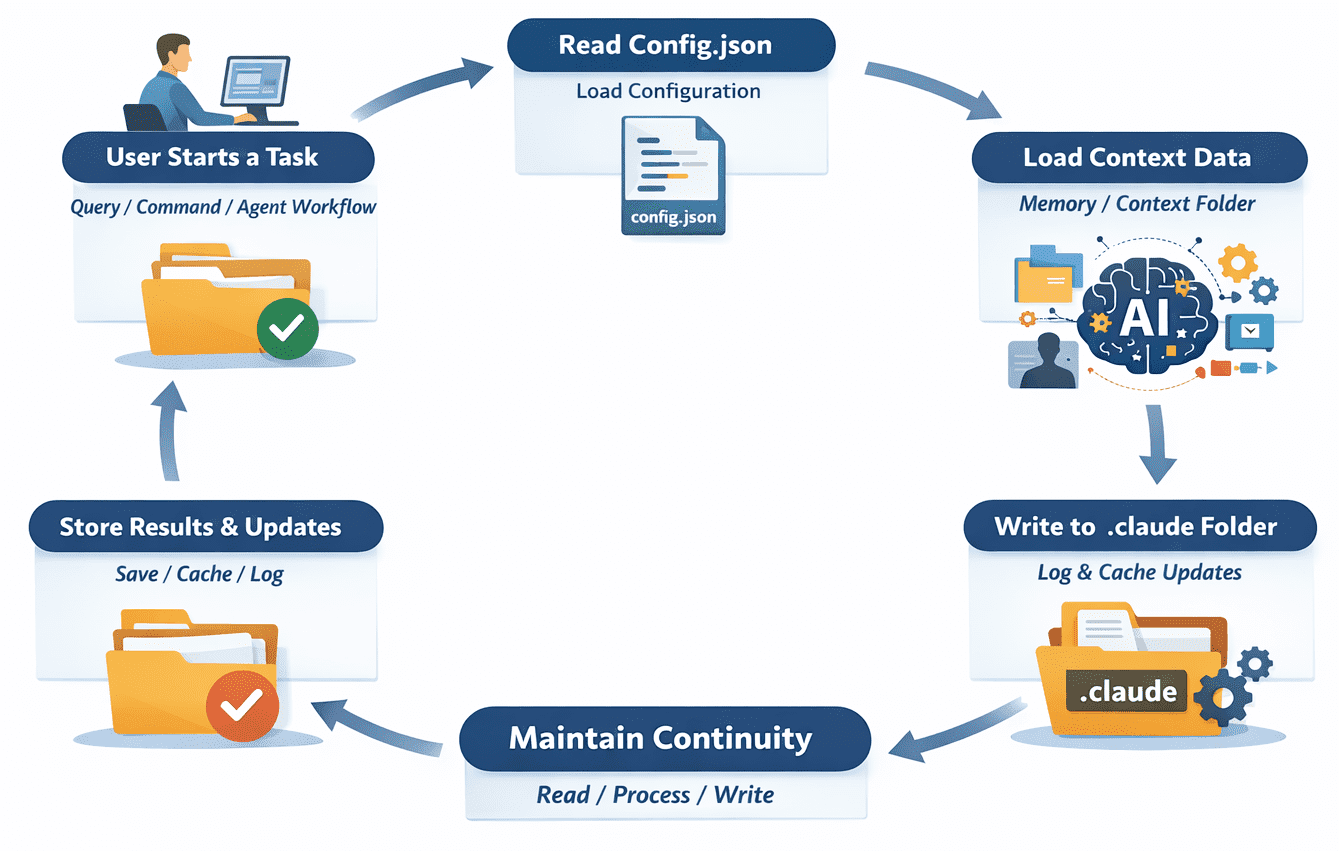
The .claude folder is not a static repository but an active participant in the lifecycle of a Claude-powered application. Its operational flow is a dynamic loop, ensuring that each interaction builds upon previous knowledge and configurations.
-
Initiation of a Task: A developer or user initiates a task, which could range from a simple natural language query to a complex, multi-step agent workflow. For example, running a command like
claude summarize "latest sales report.pdf"within a project directory. -
Configuration Retrieval: The Claude-powered tool first accesses
config.jsonwithin the.claudefolder. It reads parameters such as the preferred Claude model, specific constraints, or any custom output formats defined for the project. This ensures the AI operates within the established project guidelines. -
Context Loading: Next, the system checks the
memory/orcontext/folders. If the task is part of an ongoing conversation, or if there’s relevant historical data (e.g., previous summaries of similar reports, or specific user preferences), this context is loaded. For agent-based tasks, theagents/directory might be consulted to retrieve predefined workflow definitions, such as "read document," "extract key figures," "identify trends," and "generate executive summary." -
Task Execution: With configuration and context in place, the core task is executed. If it’s a simple query, Claude processes it and generates a response. If it’s an agent workflow, the system orchestrates multiple steps, potentially invoking external tools (e.g., a PDF parser, a database connector) and making decisions based on the current state and predefined logic.
-
State Persistence: As the task progresses and upon completion, the system actively writes back to the
.claudefolder.- Logs: Details of the execution, including prompts, responses, tool calls, and any errors, are appended to the files in the
logs/directory. - Memory/Context Updates: New information gleaned from the interaction, or updates to the conversational state, might be stored in
memory/orcontext/for future reference. - Cache Refresh: Intermediate results or frequently requested data may be stored or updated in the
cache/directory to expedite subsequent runs.
- Logs: Details of the execution, including prompts, responses, tool calls, and any errors, are appended to the files in the
This continuous read-process-write cycle is fundamental to enabling persistent and consistent AI behavior. Without it, every interaction would be an isolated event, severely limiting the sophistication and utility of AI applications. Developers often express initial confusion about the folder’s purpose but quickly come to appreciate its role in maintaining continuity and reducing redundant API calls.
The Developer’s Dilemma: To Delete or Not to Delete?
The question of whether to delete the .claude folder is common among developers. Technically, deleting it will not permanently "break" anything; the folder will simply be recreated the next time a Claude-powered tool is invoked in the project. However, the act of deletion carries significant consequences for the ongoing development process:
- Loss of Memory and Context: The most immediate impact is the complete erasure of all accumulated conversational history, learned preferences, and long-term context. Subsequent interactions will effectively "start from scratch," requiring the AI to be re-contextualized for every query, leading to less efficient and less intelligent responses.
- Resetting Custom Configurations: Any project-specific settings, model preferences, or tool definitions stored in
config.jsonoragents/will be lost. This necessitates re-configuration, adding friction to the development workflow. - Performance Degradation: The
cache/directory, designed to store intermediate results and API responses for faster retrieval, will be cleared. This means the system will have to re-compute or re-fetch data, potentially increasing execution times and API costs until the cache is rebuilt.
Despite these drawbacks, there are legitimate scenarios where deleting the .claude folder is beneficial. It serves as an effective "reset" mechanism. If a project’s AI integration is behaving erratically, producing inconsistent results, or encountering persistent errors, a corrupted or outdated state within the .claude folder might be the culprit. Clearing it can resolve such issues by forcing a fresh initialization. Furthermore, when starting a new project or migrating an existing one, a clean .claude folder ensures that no stale or irrelevant context from previous work contaminates the new setup. The critical takeaway is that deleting it is not merely cleaning up files; it is actively resetting the operational memory of your Claude integration.
Best Practices for Secure and Efficient Management
Effective management of the .claude folder is paramount for both security and developer productivity. Adopting best practices can prevent common pitfalls and ensure a smooth development experience.
-
.gitignoreIntegration: The first and most crucial step for any developer working in a version-controlled environment (e.g., Git) is to add.claude/to the project’s.gitignorefile. This prevents the folder and its contents from being accidentally committed to the repository. The data within.claudeis typically local state, specific to an individual developer’s environment, and rarely relevant for shared codebases. Committing it can lead to merge conflicts, bloat the repository, and, more critically, expose sensitive information. -
Security Considerations: The
.claudefolder can contain sensitive information.- API Keys: While best practice dictates storing API keys in environment variables,
config.jsonmight sometimes contain references or even direct API keys if not properly managed. - User Inputs/Outputs: The
logs/directory can store raw user prompts and Claude’s responses, which might include proprietary information, personal data, or confidential project details. - Proprietary Data: If the
memory/orcontext/folders are used to store embeddings or summaries of internal documents, this data becomes a local copy that must be protected.
Accidentally pushing this folder to a public GitHub repository or leaving it exposed on a development server can lead to significant data breaches. Developers should regularly audit the contents of their.claudefolders, especially in production or pre-production environments, to ensure no sensitive data is inadvertently stored or exposed.
- API Keys: While best practice dictates storing API keys in environment variables,
-
Periodic Cleaning: Over time, especially in active projects, the
logs/andcache/directories can grow considerably, accumulating large numbers of files. Periodically cleaning out unnecessary logs or stale cache entries can prevent disk space issues, reduce clutter, and ensure that the system is not operating on outdated information. Tools or scripts can be developed to automate this process, perhaps retaining logs only for a certain period or clearing the cache after major code changes. -
Selective Version Control (Rare Cases): While generally advised against, there are rare instances where specific, non-sensitive files within the
.claudefolder might benefit from version control. For example, if a team collaboratively develops complex agent definitions or structured workflow configurations that reside withinagents/, and these definitions are critical for project functionality, a case might be made for selectively committing those specific files. However, a cleaner approach is often to extract such shared configurations into a separate, purpose-built directory that is explicitly version-controlled and then referenced by the Claude integration.
Navigating Common Developer Mistakes
Many issues arising from the .claude folder stem not from its existence, but from misunderstandings or mismanagement by developers.
- Ignoring
.gitignore: The most frequent mistake is neglecting to add.claude/to.gitignore. This often results in unintentional commits of local state, leading to unnecessary conflicts in shared repositories and potential exposure of sensitive data. - Lack of Security Awareness: Developers sometimes overlook the potential for sensitive data (API keys, proprietary prompts, confidential responses) to be stored within the logs or configuration files, leading to security vulnerabilities if the folder is not adequately protected.
- Blind Deletion: While sometimes necessary for a reset, deleting the folder without understanding its implications can lead to frustration when AI interactions become inconsistent or custom configurations are lost, forcing repetitive setup tasks.
- Assuming Global State: Some developers mistakenly assume that changes made in one project’s
.claudefolder will affect Claude’s behavior globally or in other projects. Each.claudefolder is project-specific, ensuring isolation of state. - Neglecting Maintenance: Allowing log files and cached data to accumulate indefinitely can lead to disk space consumption and potentially degrade performance if the system has to sift through vast amounts of stale information.
Industry Context and Future Implications
The .claude folder is not an isolated phenomenon but rather reflects a broader trend in AI development. As LLMs become more integrated into software ecosystems, the need for robust local state management, context persistence, and agent orchestration will only grow. We can anticipate similar hidden directories for other major LLM providers or specialized AI frameworks, each serving the purpose of making powerful, stateless models adaptable to complex, stateful applications.
For developers, understanding these directories will become a core competency. It enables them to build more sophisticated, reliable, and performant AI applications, moving beyond simple API calls to constructing intelligent, context-aware systems. The .claude folder is a testament to the ongoing evolution of AI development, bridging the gap between raw model power and practical, real-world application. It transforms Claude from a mere API endpoint into an integrated, context-aware component within a larger software system.
Concluding Thoughts
The .claude folder, though initially a source of minor confusion, is a critical component in the modern AI development toolkit. It is the invisible engine that powers consistent, context-aware, and efficient interactions with Claude-powered tools. By storing configuration, memory, agent definitions, logs, and cached data, it enables developers to build sophisticated AI applications that remember, learn, and adapt within their project environments. Understanding its structure, operational flow, and best management practices transforms a mysterious hidden directory into a powerful ally, empowering developers to leverage the full potential of large language models. As AI continues to embed itself deeper into our digital infrastructure, the principles embodied by the .claude folder will only become more central to effective software engineering.