
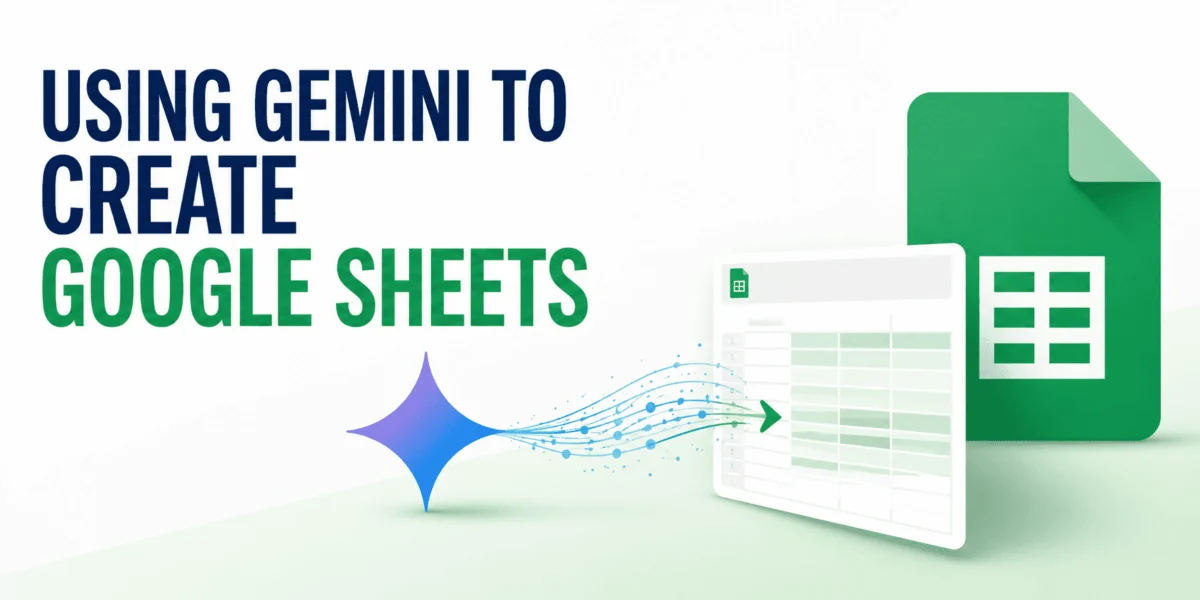
The landscape of digital productivity has been irrevocably altered by the advent of artificial intelligence, and Google’s latest strategic move, the deep integration of its powerful Gemini AI into Google Sheets, marks a significant milestone in this transformation. This enhancement empowers users to create, populate, analyze, and manage complex spreadsheets using intuitive natural language prompts, dramatically streamlining workflows and democratizing access to advanced data manipulation capabilities. Gone are the days of manual table construction, intricate formula memorization, and laborious data entry; Gemini ushers in an era where users can simply articulate their needs, and the AI constructs the digital framework. This innovation is poised to save countless hours for professionals across various industries, from finance and marketing to project management and academic research, enabling them to shift focus from tedious setup to strategic insights.
The Evolution of Productivity: A New Paradigm with AI
The integration of Gemini into Google Sheets is not an isolated development but rather a pivotal component of a broader industry-wide shift towards AI-powered productivity tools. For years, Google Sheets has evolved from a simple online spreadsheet into a robust, collaborative platform, offering real-time co-editing, extensive add-ons, and powerful data visualization capabilities. However, the core interaction remained largely manual, requiring users to possess a foundational understanding of spreadsheet logic, formulas, and structural design.
Google’s vision for Gemini extends across its entire Workspace ecosystem, aiming to imbue applications like Gmail, Docs, Slides, and now Sheets with intelligent assistance. This strategic push reflects a recognition that AI can fundamentally alter how individuals and organizations interact with their data and daily tasks. By embedding Gemini directly into Sheets, Google is effectively transforming a traditional computational tool into an intelligent assistant capable of anticipating needs, generating solutions, and simplifying complex operations. This move is particularly significant in a competitive landscape where rivals are also heavily investing in AI integration, signaling a new frontier in the battle for enterprise and individual user loyalty. The promise is clear: to make advanced data analysis and spreadsheet management accessible to a wider audience, irrespective of their technical proficiency.
A Chronology of AI Integration: Gemini’s Journey to Sheets
The path to Gemini’s deep integration within Google Sheets has been a deliberate and phased rollout, reflecting Google’s broader strategy for AI deployment. Gemini itself, initially unveiled as a new generation of Google’s AI models, was designed from the ground up to be multimodal, capable of understanding and operating across text, code, audio, image, and video. Its public rollout began with considerable anticipation, with Google positioning it as a foundational model for diverse applications.
The specific integration into Google Workspace applications, including Sheets, largely gained momentum following the rebranding of "Duet AI" to "Gemini for Workspace." Duet AI, first introduced in 2023, laid the groundwork by offering AI assistance across various Google apps, providing features like drafting emails, summarizing documents, and generating images. The subsequent transition to the Gemini brand solidified Google’s commitment to leveraging its most advanced AI model for enterprise productivity. This integration typically began with early access programs for Google Workspace Enterprise customers, gradually expanding to other business, education, and non-profit tiers. The rollout is ongoing, with Google continually enhancing Gemini’s capabilities and availability across different subscription levels, ensuring that a broad spectrum of users can benefit from its intelligence in their daily spreadsheet tasks. This staggered approach allows for continuous feedback, refinement, and optimization, ensuring a stable and effective user experience.
Unlocking Spreadsheet Potential: Three Core Methodologies with Gemini
The integration of Gemini into Google Sheets manifests through several powerful methodologies, each catering to different user needs and levels of technical expertise. These methods collectively underscore Gemini’s versatility in transforming how spreadsheets are created, managed, and analyzed.
Method 1: Built-in Workspace Integration (The "Ask Gemini" Side Panel)
For users operating within the Google Workspace ecosystem with a Gemini add-on (such as Gemini Business or Enterprise), the AI’s power is seamlessly embedded directly into the spreadsheet interface. This direct integration is perhaps the most revolutionary aspect, allowing for real-time, context-aware assistance without ever leaving the application.
-
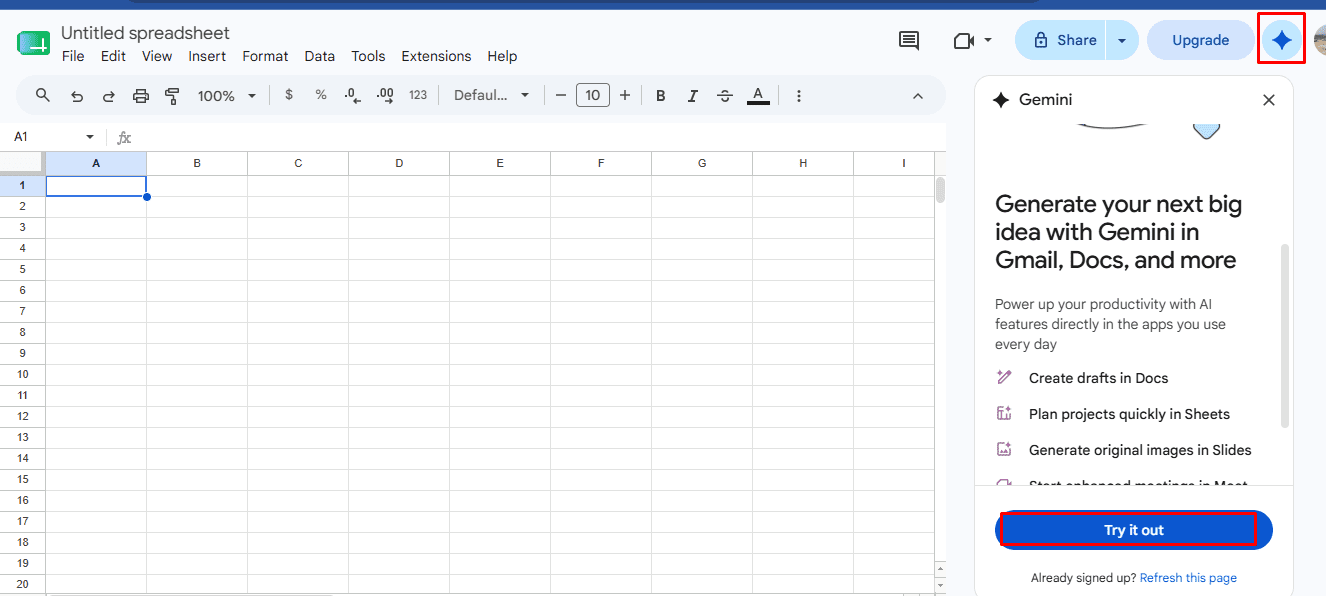
Accessing Gemini in Google Sheets: The primary entry point is typically an "Ask Gemini" button or a similar prompt within the Google Sheets toolbar, opening a dedicated side panel. This panel serves as the conversational interface, where users can input their natural language requests. The visual cues within the application, such as the distinct Gemini icon, signal its availability and readiness to assist. This immediate accessibility ensures that help is always just a click away, making it a truly integrated experience.
-
Prompting Gemini to Create Sheets: Instead of manually typing column headers or meticulously designing table layouts, users can describe their requirements in plain English. For instance, a user might prompt: "Create a project tracking sheet with columns for Task Name, Assignee, Start Date, Due Date, Status (with dropdown options like ‘Not Started’, ‘In Progress’, ‘Completed’), Priority, and Notes. Populate with 5 sample tasks." Or, "Design a sales report table for Q3, including Product ID, Product Name, Units Sold, Revenue per Unit, Total Revenue, and Region. Add dummy data for 10 products across 3 regions." Gemini then interprets these requests, generating a structured table with appropriate column headers, data types, and even pre-filled sample data, significantly accelerating the initial setup phase. This capability is invaluable for new projects, quick analyses, or prototyping spreadsheet designs.
-
Reviewing and Inserting the Output: After submitting a prompt, Gemini processes the request and presents a preview of the generated table within the side panel. This preview allows users to review the structure, column names, and any sample data to ensure it aligns with their vision. If necessary, users can refine their prompt with follow-up instructions (e.g., "Add a ‘Project Manager’ column," or "Change ‘Status’ options to include ‘On Hold’"). Once satisfied, the output can be inserted directly into the current sheet or as a new sheet entirely. This iterative process ensures that the AI’s output is precisely tailored to the user’s needs, promoting accuracy and efficiency.
-
Asking for Formulas and Analysis: Beyond structure creation, Gemini excels at generating complex formulas and offering analytical insights. Users no longer need to recall intricate syntax or consult documentation. Simple requests like "Calculate the total revenue for each product" or "Show the average units sold per region" will prompt Gemini to generate the correct formulas (e.g.,
SUMIFS,AVERAGEIF), provide a clear explanation of how the formula works, and even suggest potential improvements or alternative analytical approaches. For example, a request to "Analyze sales trends" might lead Gemini to suggest creating a pivot table or generating a chart. The "Pro Tip" of using the in-cell@ menuor "Help me organize" further streamlines this process, allowing for context-specific assistance directly within the cell or selected range, offering quick access to formatting, formula suggestions, and data organization tools.
Method 2: Creating Sheets via the Gemini Web App (Standalone Data Generation)
For users who may not have a Google Workspace account with a Gemini add-on, or for those who prefer to generate structured data outside of Sheets and then import it, the Gemini web application offers a powerful alternative. This method leverages Gemini’s ability to produce well-organized data tables directly from a conversational interface.
-
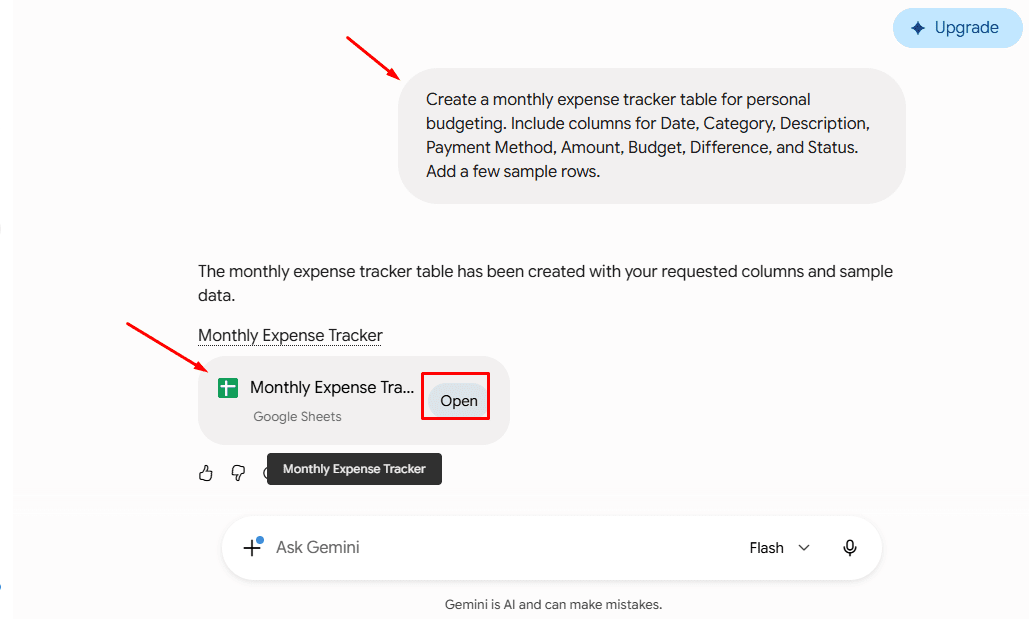
Prompting Gemini to Generate Structured Data: Users can access the Gemini web app and provide prompts to generate structured data. For instance, the example "Create a monthly expense tracker table for personal budgeting. Include columns for Date, Category, Description, Payment Method, Amount, Budget, Difference, and Status. Add a few sample rows," demonstrates how specific and detailed prompts can yield robust outputs. Other examples might include: "Generate a content calendar for a blog, with columns for Topic, Target Keyword, Publish Date, Author, Status, and SEO Score," or "Produce an inventory list for a small retail store, including Item Name, SKU, Quantity In Stock, Unit Price, Supplier, and Reorder Level." Gemini processes these requests and presents the data in a neatly formatted table within its response.
-
Exporting to Google Sheets: Once Gemini generates the desired table in its web interface, a convenient "Export to Sheets" or similar button allows for a one-click transfer. This action automatically creates a new Google Sheet document populated with the generated data, preserving the structure and content precisely as presented in Gemini’s response. This eliminates the need for manual copying and pasting, ensuring data integrity and saving time.
-
Opening in the Spreadsheet: The newly created Google Sheet is immediately accessible, ready for further formatting, analysis, or collaboration. Users can then apply conditional formatting, add charts, integrate additional data sources, or share the sheet with collaborators, leveraging the full power of Google Sheets on the AI-generated foundation. This workflow is particularly useful for quickly prototyping data structures or generating large datasets for testing and development purposes.
Method 3: Generating Apps Script with Gemini (For Advanced Automation)
For users with more specialized needs, requiring highly customized spreadsheet behavior, automated processes, or complex logic that goes beyond standard formulas, Gemini can act as a powerful code generator for Google Apps Script. Google Apps Script, a JavaScript-based platform, allows for extensive automation and customization within Google Workspace.
-
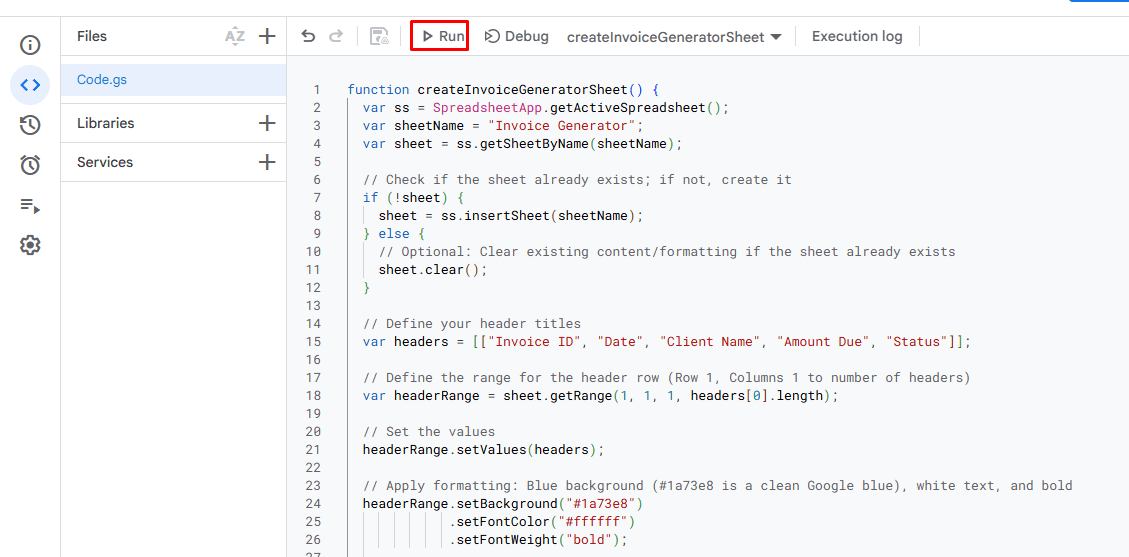
Requesting the Script: Advanced users can prompt Gemini to write custom Google Apps Scripts. For example, the prompt "Write a Google Apps Script that creates a new sheet called ‘Invoice Generator’, sets the header row to blue with white text, and bolds the font" demonstrates a request for specific formatting and sheet creation. More complex requests could include: "Generate a script to automatically archive rows from ‘Active Projects’ to ‘Completed Projects’ when the status column changes to ‘Completed’," or "Create a script that sends an email notification to team members when a task’s due date is within 3 days and its status is not ‘Completed’." Gemini understands these functional requirements and produces the corresponding Apps Script code.

-
Pasting It into Sheets: The generated script can then be copied from Gemini’s response and pasted directly into the Apps Script editor within Google Sheets (accessible via Extensions > Apps Script). This editor provides a development environment where users can manage, write, and execute JavaScript code that interacts with their Google Sheets data.
-
Viewing the Result: Once pasted and saved, the script can be executed, either manually or triggered by specific events. The result is immediate: a new sheet is created with the specified name, the header row is formatted as requested (blue background, white, bold text), or the automation task is performed. This method empowers users to build bespoke solutions, automate repetitive tasks, and extend the functionality of Google Sheets far beyond its native capabilities, all with the assistance of AI-generated code. Users can then iteratively refine the code with follow-up prompts to Gemini, enhancing its functionality or adjusting its parameters.
Supporting Data and Perceived Efficacy
While specific granular metrics from Google are continuously evolving, early adopter feedback and internal analyses strongly suggest that Gemini’s integration into Sheets yields substantial productivity gains. Anecdotal evidence from businesses leveraging Gemini for Workspace indicates a potential reduction of 50-70% in the time required for initial spreadsheet setup and data structuring. This efficiency stems from the elimination of manual input for common tasks and the acceleration of formula generation. Furthermore, the AI’s ability to suggest and explain formulas can lead to improved data accuracy, as it reduces the likelihood of human error in complex calculations. For non-technical users, Gemini acts as a powerful enabler, lowering the barrier to entry for sophisticated data analysis and reporting, effectively democratizing access to tools previously reserved for those with specific technical skills. The time saved can then be redirected towards higher-value activities such as deeper analysis, strategic planning, and decision-making, transforming the role of data handlers from mere inputters to strategic thinkers.
Official Responses and Industry Reactions
Google executives have consistently highlighted Gemini’s role in their broader vision for "AI-powered productivity." Sundar Pichai, CEO of Google and Alphabet, has often articulated the company’s commitment to building "helpful and responsible AI" that empowers individuals and businesses. The integration into Workspace, and specifically Sheets, aligns with this mission by aiming to "democratize data analysis" and make powerful tools accessible to everyone. Thomas Kurian, CEO of Google Cloud, has emphasized the enterprise-grade security and privacy built into Gemini for Workspace, assuring customers that their data is protected and not used to train public models.

Industry analysts have largely welcomed Google’s aggressive push with Gemini into its productivity suite. Many see it as a critical move in the competitive AI arms race, particularly against Microsoft’s Copilot for Microsoft 365. Analysts from firms like Gartner and Forrester have noted that such integrations are not just about adding features but about fundamentally redefining how users interact with software. They predict that AI assistants will become indispensable, transforming job roles and requiring new skills in "prompt engineering" and critical evaluation of AI outputs. Early feedback from companies piloting Gemini for Workspace has been overwhelmingly positive, with users reporting increased efficiency, reduced cognitive load for complex tasks, and the ability to undertake analyses that were previously too time-consuming or technically challenging.
Broader Impact and Future Implications
The integration of Gemini into Google Sheets carries profound implications across several dimensions, promising a transformative shift in how individuals and organizations manage data.
- Transformative Productivity Shift: For data analysts, project managers, financial planners, and small business owners, Gemini fundamentally alters the workflow. Less time will be spent on manual data entry, formula debugging, and structural design, allowing for more time dedicated to strategic analysis, interpretation of results, and actionable insights. This shift could lead to more dynamic and responsive business operations.
- Evolution of Skillsets: The emphasis will gradually move from rote memorization of formulas and coding syntax to the art of effective prompt engineering. Users will need to learn how to articulate their needs clearly and iteratively refine AI outputs. Critical thinking, data interpretation, and an understanding of the underlying data principles will become even more paramount, as users will be responsible for validating the AI’s suggestions.
- Democratization of Data Analysis: By simplifying complex tasks through natural language, Gemini makes advanced spreadsheet capabilities accessible to a much broader audience. Individuals without extensive technical backgrounds can now perform sophisticated data manipulations, generate insightful reports, and even automate tasks, lowering the barrier to entry for data-driven decision-making across all levels of an organization.
- Data Governance and Privacy: While Google emphasizes robust security and privacy protocols for Workspace data, the expanded use of AI inevitably brings data governance considerations to the forefront. Organizations will need to ensure clear policies regarding AI use, data handling, and the verification of AI-generated content, especially for sensitive information. Google’s assurances that Workspace data is not used to train public Gemini models are crucial for enterprise adoption.
- Intensified Competitive Landscape: The deep integration of Gemini strengthens Google’s position in the highly competitive productivity software market. This move directly challenges rivals like Microsoft, which is similarly integrating AI into its Office suite. The ongoing innovation race will likely lead to even more sophisticated AI capabilities in productivity tools, benefiting end-users with continuously evolving and more intelligent assistants.
- Future Outlook: The current capabilities are likely just the beginning. Future enhancements could include more proactive AI suggestions based on user behavior and data patterns, deeper integration with external data sources, advanced predictive analytics, and seamless interoperability with other Workspace applications for end-to-end AI-powered workflows. Imagine Gemini not just creating a sales report but also suggesting marketing strategies based on the analyzed data, or automatically updating a project dashboard based on task completions in other apps.
Pro-Tips for Maximizing Gemini’s Potential in Google Sheets
To harness the full power of Gemini in Google Sheets, users should adopt specific strategies for interaction:
- Be Specific and Detailed in Prompts: The clearer and more detailed your prompts, the better Gemini’s output will be. Instead of "Make a budget," try "Create a personal monthly budget tracker with columns for income sources, fixed expenses, variable expenses, savings goals, and a column to calculate the remaining balance, with 3 months of sample data."
- Leverage Follow-Up Prompts: Gemini is designed for conversational interaction. Don’t expect perfection in the first attempt. Use follow-up prompts to refine, adjust, or expand upon previous outputs (e.g., "Now add a column for tax deductions," or "Change the ‘Status’ column to a dropdown list with ‘Pending’, ‘Approved’, ‘Rejected’ options").
- Provide Context: When asking for analysis or formulas, ensure Gemini has enough context. If you’re working with a specific range, select it before prompting, or refer to cell ranges directly (e.g., "Using the data in columns A to C, calculate the average sales per product").
- Verify AI-Generated Content: Always review formulas, data, and scripts generated by Gemini. While highly accurate, it’s crucial to understand what the AI has produced, especially for critical business decisions or sensitive data. Cross-reference with your knowledge or existing data.
- Experiment and Learn: The best way to understand Gemini’s capabilities is to experiment. Try different types of prompts, ask for diverse analyses, and observe how it responds. This iterative learning process will help you craft more effective prompts over time.
- Utilize In-App Shortcuts: For quick actions, remember to use the
@ menuor "Help me organize" features directly within Sheets, which can provide context-aware suggestions for formulas, formatting, and data organization without needing to open the full Gemini side panel. - Understand Data Privacy: For enterprise users, be aware of Google’s data privacy commitments for Workspace, ensuring that your organization’s data handled by Gemini remains within your control and is not used for external model training.
Conclusion
Gemini’s integration into Google Sheets represents a significant leap forward in productivity software, transforming what was once a manual, formula-driven tool into an intelligent, conversational assistant. By empowering users to create, manage, and analyze spreadsheets through natural language, Gemini dramatically reduces the time and technical expertise required for complex data tasks. Whether it’s the rapid generation of an expense tracker, the automatic creation of advanced formulas, or the scripting of custom automation, Gemini facilitates a more intuitive and efficient interaction with data. This innovation not only saves precious time but also broadens access to sophisticated data management capabilities, enabling a wider array of professionals to derive meaningful insights and make informed decisions faster than ever before. As AI continues to evolve, its symbiotic relationship with productivity tools like Google Sheets will undoubtedly redefine the future of work, making advanced data capabilities accessible, intuitive, and truly transformative.