
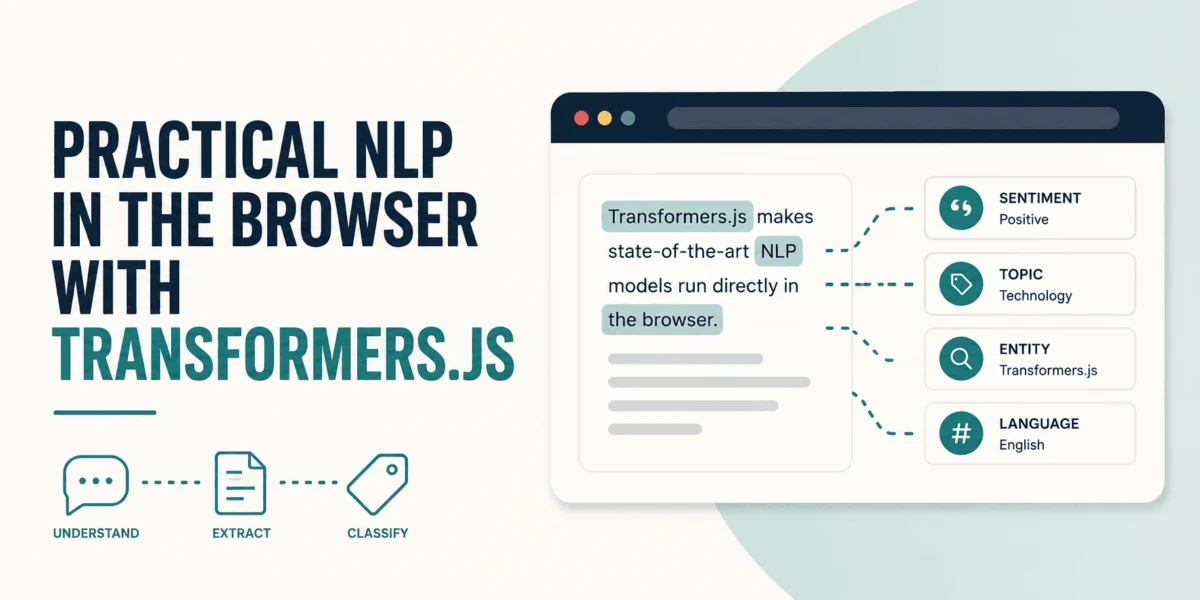
The landscape of Natural Language Processing (NLP) deployment has undergone a significant transformation, with a groundbreaking shift now enabling state-of-the-art models to operate directly within web browsers, bypassing traditional server-side infrastructure. This pivotal development is spearheaded by Transformers.js, a JavaScript library from Hugging Face, which allows sophisticated NLP tasks to be executed on the user’s device, fundamentally altering the economics, privacy implications, and responsiveness of AI-powered web applications.
The Paradigm Shift: From Cloud Dependence to Edge Computing
For many years, the operational reality of running advanced transformer models was tethered to robust server infrastructure. This typically involved maintaining Python-based backend servers, allocating significant computational resources, often including costly GPU time, and routing every inference request through an API. Users would input data, which would then traverse the internet to a remote server, undergo processing, and return as a prediction. This architecture was a necessity, dictated by the colossal size and computational demands of early transformer models, which simply could not run efficiently on client-side hardware.
However, the rapid advancements in web technologies and model optimization have rendered this server-centric approach no longer the exclusive, or even always the optimal, solution. The advent of WebAssembly (WASM) and, more recently, WebGPU has unlocked the browser’s potential as a powerful execution environment for complex computational tasks, including machine learning inference. Transformers.js capitalizes on these advancements, providing a near one-to-one functional equivalence to Hugging Face’s widely used Python transformers library, but entirely within the JavaScript ecosystem. This means developers can leverage the same pretrained models, task names, and intuitive pipeline() API, but now with the added benefits of local execution.
Under the Hood: ONNX Runtime and Web Technologies
The technical bridge facilitating this browser-based revolution is ONNX Runtime. Models originally trained in popular frameworks like PyTorch, TensorFlow, or JAX are converted into the Open Neural Network Exchange (ONNX) format using tools such as Hugging Face Optimum. ONNX Runtime then serves as the execution engine, running these models efficiently in the browser. By default, it utilizes WebAssembly (WASM), ensuring broad compatibility across virtually all modern web browsers by executing on the CPU.
For applications demanding higher performance, particularly where available, Transformers.js also offers experimental support for WebGPU. By setting device: 'webgpu', computation can be routed through the browser’s native WebGPU API, providing meaningful speed improvements by leveraging the user’s graphical processing unit. This integration of cutting-edge web standards underscores a broader industry trend towards pushing computational capabilities to the edge, closer to the user.
Furthermore, Transformers.js addresses the practical challenge of model size through quantization. While full-precision (fp32) models offer maximum accuracy, they come with substantial download sizes. To mitigate this for browser environments, dtype options like q8 (8-bit quantization) and q4 (4-bit quantization) significantly reduce file sizes, at a minimal, often negligible, cost to accuracy (typically 1-3%). This thoughtful optimization ensures models are practical for web deployment, even on mobile devices or slower connections. For instance, q8 serves as a balanced default for general browser use, offering a good trade-off between size and accuracy, while q4 is ideal for mobile or bandwidth-constrained scenarios. Full precision fp32 remains suitable for server-side Node.js environments where download size is less of a concern, and fp16 (half-precision) is recommended for WebGPU-enabled contexts to maximize speed on compatible hardware.
The Simplified pipeline() API: A Gateway to NLP
At the core of Transformers.js’s user-friendliness is the pipeline() function, which encapsulates the complexity of loading and running NLP models into a remarkably simple interface. This function bundles three critical components: a pretrained model, its corresponding tokenizer, and any necessary post-processing logic, into a single, callable object. Developers are abstracted from the intricate details of model weights or tokenizer configurations; they simply call the pipeline with text input and receive structured output.
The pipeline() signature is elegantly concise: const pipe = await pipeline(task, model?, options?); followed by const result = await pipe(input, inferenceOptions?);. The task parameter is a string identifier that dictates the type of model to load and how inputs/outputs are handled (e.g., ‘sentiment-analysis’, ‘zero-shot-classification’). An optional model ID allows for specifying a particular model from the Hugging Face Hub, otherwise, a default is loaded. The options object provides control over execution parameters like device (WASM/WebGPU) and dtype (quantization level).
Crucially, both the pipeline initialization and inference steps are asynchronous, returning Promises. The initial pipeline() call, which involves downloading and loading the model into memory, represents the primary loading time, especially on the first run. Subsequent inference calls with the loaded pipeline are typically very fast. To enhance user experience during the initial download, a progress_callback option allows developers to display status updates, informing users that models are being loaded rather than leaving them staring at a static screen. It’s important to note, as specified in the official documentation, that Transformers.js is an inference-only library; it does not support model fine-tuning or training. Custom models must be trained externally (e.g., in Python or cloud environments) and then exported to ONNX format for browser deployment.
Practical Applications: Three Core NLP Tasks
The article details three fundamental NLP tasks that highlight the power and versatility of Transformers.js: text classification, zero-shot classification, and question answering.
1. Text Classification: Categorizing Content with Confidence
Text classification is a foundational NLP task involving the assignment of a predefined label and a confidence score to a given input text. While sentiment analysis (classifying text as positive or negative) is perhaps the most ubiquitous application, the same pipeline architecture can handle any fixed set of categories on which the model was trained.
The output for text classification is an array of objects, each containing a label (the predicted class as a string) and a score (a float between 0 and 1 indicating the model’s confidence). A score nearing 1.0 signifies high confidence, while scores around 0.5 suggest uncertainty and require careful handling in application logic. The array format accommodates batch processing, allowing multiple texts to be classified efficiently in a single call. This capability is invaluable for automating content moderation, customer feedback analysis, or routing simple inquiries.
The accompanying HTML example for a sentiment classifier showcases how a few lines of JavaScript can integrate a pre-trained distilbert-base-uncased-finetuned-sst-2-english model. The loadModel function asynchronously fetches and caches the model, updating a status message to keep the user informed. Once loaded, subsequent classifications are virtually instantaneous, typically completing within 200 milliseconds on a modern laptop, providing real-time feedback on text sentiment. This local execution drastically reduces latency and eliminates the need for external API calls, making the application faster and more private.
2. Zero-Shot Classification: Adapting to Dynamic Categories
Zero-shot classification represents a significant leap beyond traditional text classification by enabling the categorization of text into labels defined at runtime, without the need for any prior training data specific to those labels. Users provide the input text and a list of candidate labels in plain English, and the model intelligently determines which label best fits based on its deep understanding of language semantics.
This capability is particularly transformative for scenarios where training data is scarce, or where categories are frequently updated or highly dynamic—a common reality in many real-world projects. The underlying mechanism typically involves Natural Language Inference (NLI). The model reformulates each candidate label into an NLI hypothesis (e.g., for "billing issue," it creates "This text is about a billing issue") and then calculates the probability that the input text entails this hypothesis. The label corresponding to the highest entailment score is chosen as the winner. This NLI-based approach is why descriptive English phrases work so effectively as labels; the model comprehends their meaning rather than merely recognizing their surface form.
The output for zero-shot classification includes the original sequence, an array of labels sorted by score (from highest to lowest), and a corresponding array of scores. When multi_label is false (the default), scores typically sum to approximately 1, indicating a competition among labels. Setting multi_label: true allows each label to be scored independently, making it suitable for texts that might plausibly belong to several categories simultaneously.
The example provided, a "Support Ticket Router," powerfully illustrates this. A simple DEPARTMENTS array containing human-readable labels like ‘shipping and delivery’ or ‘technical support’ is all the configuration needed. The model, Xenova/bart-large-mnli, processes a support ticket and routes it to the most appropriate department. The UI dynamically generates a horizontal bar chart visualizing the confidence scores for each department, offering transparency and aiding human agents in making informed routing decisions. This flexibility to change routing categories on the fly without retraining is a monumental advantage for businesses.
3. Question Answering: Extracting Precise Information from Documents
Question answering in Transformers.js is designed for extractive QA. This means users provide a passage of text (context) and a question in natural language. The model then identifies and extracts the exact span of text within the provided context that best answers the question. It does not generate novel text or reason beyond the explicit information present in the context. The answer will always be a substring of the input document.
This extractive nature makes it an ideal tool for document interrogation, allowing users to quickly pinpoint specific information within longer texts such as policy documents, manuals, or customer support tickets. The model effectively acts as a highly intelligent search and highlight function.
The output of the question-answering pipeline includes the answer (the extracted substring), a score representing the model’s confidence in that answer, and start and end character indices. These indices are particularly useful for enhancing user experience, allowing developers to highlight the answer directly within the original context, providing immediate visual confirmation and traceability.
A key consideration for question answering is handling instances where no clear answer exists in the context. In such cases, the score will typically be low, and the answer might be a short, seemingly irrelevant span. Standard practice involves setting a confidence threshold (e.g., 0.3 or 0.4) below which answers are treated as "not found," preventing the display of low-quality or incorrect extractions.
The "Document Q&A" example demonstrates how the Xenova/distilbert-base-uncased-distilled-squad model can extract answers from a sample return policy. The code utilizes the start and end indices to wrap the extracted answer in a <mark> tag, visually highlighting it within the document. A collapsible <details> element further improves UI cleanliness by allowing users to toggle the highlighted context view. This capability empowers users to quickly digest information from dense documents, reducing the need for manual scanning.
Real-World Convergence: The Support Ticket Analyzer
The true power of Transformers.js becomes evident when these individual NLP capabilities are combined into a cohesive application. The "Support Ticket Analyzer" example illustrates this by integrating sentiment analysis, zero-shot classification, and question answering to provide a comprehensive analytical surface for incoming customer support tickets.
This sophisticated tool, encapsulated within a single, self-contained HTML file of fewer than 200 lines, provides invaluable insights:
- Sentiment: Quickly gauges the customer’s emotional state, flagging high-confidence negative sentiments as "HIGH URGENCY" for immediate prioritization. This automated urgency detection requires no additional model, leveraging the sentiment score directly.
- Department Routing: Uses zero-shot classification to route the ticket to the most appropriate department. Instead of just showing the top winner, the application displays the top three candidate departments with their confidence scores, often visualized as bar charts. This empowers human agents with sufficient context to make informed overrides if the top two scores are very close.
- Key Information Extraction: Employs question answering to extract critical structured data such as order numbers, the main issue, and the customer’s specific request. By defining a set of
QA_QUERIES, the model automatically pulls out these details without relying on brittle regex patterns or complex parsing rules. A confidence threshold ensures that only high-quality extractions are surfaced, with low-confidence answers marked as "not found."
The technical implementation of the analyzer showcases efficient model loading through Promise.all, allowing all three pipelines to load in parallel and reducing the overall initialization time. Similarly, all three inference tasks run concurrently when a ticket is submitted, providing a rapid, holistic analysis. This application exemplifies how client-side NLP can deliver immediate, actionable intelligence, significantly improving operational efficiency and customer satisfaction.
Performance, Limitations, and Strategic Considerations
While Transformers.js heralds a new era for browser-based NLP, it’s essential to understand its performance characteristics and limitations to make informed deployment decisions. The primary trade-off is the initial model download size, which, even with quantization, can range from tens to hundreds of megabytes. This initial download can impact the first-time user experience, especially on slower networks. However, once downloaded, models are cached locally, leading to instant subsequent loads and offline functionality.
Inference speed is generally excellent on modern CPUs (via WASM) and significantly faster on WebGPU-enabled hardware. For instance, a quantized sentiment analysis model can infer in under 200ms on a typical laptop. However, complex tasks or larger models might still experience noticeable latency compared to dedicated server-side GPUs.
Key considerations for deployment include:
- Initial Load Time: Mitigate with
progress_callbackand aggressive caching strategies. - Model Size: Select appropriate
dtype(q8, q4) based on target device and network conditions. - Computational Intensity: While suitable for many tasks, extremely large models or very high-throughput requirements might still necessitate server-side processing.
- Browser Compatibility: WASM ensures broad compatibility, while WebGPU support is still evolving but gaining traction.
- Inference-Only: Remember that Transformers.js is for inference; training and fine-tuning must occur elsewhere.
A Future of Ubiquitous, Private AI
Transformers.js represents a significant milestone in making production-quality NLP accessible and ubiquitous. By enabling sophisticated AI models to run directly in the browser, it eliminates the need for server infrastructure, reduces operational costs, and crucially, enhances user privacy by ensuring sensitive data never leaves the user’s device. The simplicity of its pipeline() API, combined with powerful underlying technologies like ONNX Runtime, WebAssembly, and WebGPU, democratizes access to advanced NLP for web developers.
From simple text classification to dynamic zero-shot routing and precise question answering, the range of applications is vast. The support ticket analyzer serves as a compelling demonstration of how these capabilities can be seamlessly integrated into practical, real-world tools. As web technologies continue to evolve, the ecosystem around client-side AI is poised for further growth, promising a future where intelligent, privacy-preserving applications are the norm. Developers are encouraged to explore the official Transformers.js documentation and examples repository, which cover an even wider array of tasks, all adhering to the same intuitive pipeline() pattern, marking a new frontier for interactive, AI-powered web experiences.
Shittu Olumide is a software engineer and technical writer passionate about leveraging cutting-edge technologies to craft compelling narratives, with a keen eye for detail and a knack for simplifying complex concepts. You can also find Shittu on Twitter.