

In the increasingly data-driven global economy, the ability to extract meaningful insights from vast and varied information sources has become a cornerstone of competitive advantage. However, the journey from raw data to actionable intelligence is frequently impeded by a pervasive and often underestimated challenge: data quality. Far from being a mere technicality, ensuring data hygiene is a fundamental and time-consuming task that forms the bedrock of reliable analytics, machine learning, and strategic decision-making. Reports from industry surveys consistently indicate that data professionals, including data scientists and analysts, spend a significant portion of their time—often cited as upwards of 60% to 80%—on data preparation, cleansing, and transformation rather than on advanced analysis or model building. This substantial investment underscores the complex reality that data, in its native form, is rarely pristine, frequently arriving with inconsistencies, errors, and structural imperfections that can critically undermine any subsequent analytical endeavor.
The ramifications of poor data quality extend beyond mere inefficiency; they translate into tangible costs for businesses worldwide. Gartner, for instance, has estimated that poor data quality costs organizations an average of $15 million per year, highlighting the financial burden of flawed decision-making, operational inefficiencies, and missed opportunities stemming from unreliable data. From erroneous customer profiling and ineffective marketing campaigns to misaligned supply chain management and compliance risks, the downstream effects of uncleaned data are profound and multifaceted. Addressing these issues proactively is not just a best practice but a strategic imperative. This comprehensive guide delves into a practical workflow for systematically cleaning a common yet challenging data format – the messy customer CSV file – leveraging the powerful capabilities of Python and its highly popular data manipulation library, pandas. This approach, widely adopted across industries, illustrates how methodical data cleansing transforms raw, unreliable inputs into a validated, analysis-ready asset.
The Initial Data Reconnaissance: Loading and Inspecting the Raw Material
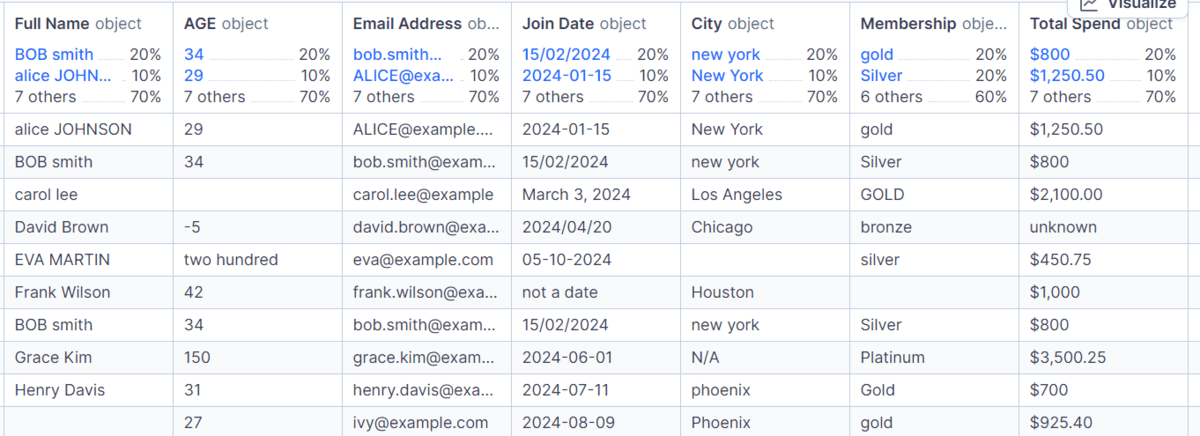
Before any corrective action can be taken, a crucial preliminary step involves loading the dataset and conducting a thorough initial inspection. This phase serves as a diagnostic, revealing the scope and nature of the data quality issues at hand. For this case study, a "messy_customers.csv" file is loaded into a pandas DataFrame, a two-dimensional, size-mutable, and potentially heterogeneous tabular data structure. The keep_default_na=False parameter is particularly relevant here, preventing pandas from automatically interpreting certain strings (like ‘NA’ or ‘NULL’) as missing values at this initial stage, thus preserving the raw state for explicit handling later.
Upon loading, immediate insights are gleaned through basic DataFrame methods. Checking df.shape reveals the dimensions of the dataset—e.g., 10 rows and 8 columns in our example—providing a quick understanding of its size. A review of df.columns.tolist() exposes the column headers, often revealing leading/trailing spaces, inconsistent casing, or special characters that hinder programmatic access. Examining df.dtypes is equally critical, as it frequently shows that many columns, even those intended for numerical or date values, are initially interpreted as object types, indicating pandas is treating them as generic strings. This misinterpretation is a common precursor to data processing errors. Finally, df.duplicated().sum() offers an early warning about redundant records, which, if left unaddressed, can skew statistical calculations and inflate counts. This initial audit provides a foundational understanding of the data’s current state, acting as a roadmap for the subsequent cleaning operations.

Establishing Order: Standardizing Column Names for Clarity and Automation
One of the most immediate and impactful steps in data cleaning involves standardizing column names. Inconsistent naming conventions, such as varying capitalization, embedded spaces, or special characters, can significantly impede data manipulation, script readability, and collaborative efforts. For instance, a column named " Email Address " with leading and trailing spaces is cumbersome to reference in code and prone to typographical errors.
The systematic approach to cleaning column names typically involves a sequence of operations:
- Stripping Whitespace: Removing any leading or trailing spaces from column names (
.str.strip()). - Lowercasing: Converting all characters to lowercase (
.str.lower()) to ensure consistency regardless of original casing. - Replacing Spaces with Underscores: Substituting internal spaces with underscores (
.str.replace(r"s+", "_", regex=True)) to create ‘snake_case’ names, a widely preferred convention in Python for variable and column naming due to its compatibility with attribute-style access and enhanced readability.
This transformation ensures that column names like ‘ Customer ID ‘ become ‘customer_id’, ‘Email Address’ becomes ’email_address’, and ‘AGE’ becomes ‘age’. Such standardization dramatically improves the maintainability of code, reduces the likelihood of errors, and facilitates seamless integration with other data processing tools and scripts. Industry experts often highlight that clean, consistent naming conventions are not just about aesthetics but are a critical component of robust data governance frameworks, enabling more efficient querying and analysis across large datasets.
Addressing Data Voids: Comprehensive Handling of Missing Values and Placeholders
Real-world datasets are replete with missing information, which can manifest in various forms beyond simply empty cells. Common placeholders such as "N/A", "n/a", "NA", "unknown", or "not a date" are frequently used by data entry personnel or source systems to denote absent values. If not uniformly identified and treated, these varied representations can lead to inaccurate analysis, as pandas might interpret them as valid strings rather than true missing data.
The cleaning workflow addresses this by:
- Standardizing Blank Strings: Converting cells containing only whitespace into proper
pd.NA(pandas’ dedicated missing value type, which supports integer and boolean dtypes unlikenumpy.nan). This is achieved using a regular expressionr"^s*$". - Mapping Placeholders: Explicitly replacing a predefined list of common placeholder strings with
pd.NA.
After these replacements, df.isna().sum() provides an accurate count of missing values per column. This step is foundational because consistent handling of missing data is paramount for statistical integrity. Different strategies for dealing with pd.NA (e.g., imputation, deletion) can then be applied uniformly, preventing fragmented approaches that could introduce bias or errors into the analysis. For instance, if ‘unknown’ is treated as a category in one part of the analysis and as a missing value in another, the results would be inherently contradictory.
Ensuring Data Integrity: Eliminating Redundant Records
Duplicate rows represent a significant threat to data integrity and analytical accuracy. The presence of identical records can artificially inflate counts, skew averages, and lead to erroneous conclusions, particularly in customer relationship management (CRM) where each customer should ideally have a unique entry. Detecting and removing these redundancies is a straightforward yet critical step.
By applying df.drop_duplicates().copy(), exact duplicate rows are identified and removed. The .copy() method is crucial here to ensure that the resulting DataFrame is a distinct object, preventing potential SettingWithCopyWarning issues in subsequent operations. In our example, a dataset with 10 rows before this step yields 9 rows afterward, indicating the successful removal of one exact duplicate. This process ensures that each record contributes uniquely to the dataset, establishing a reliable foundation for any statistical or predictive modeling. The impact of ignoring duplicates can be severe, from overcounting customers in a marketing campaign to miscalculating total sales figures, leading to misallocation of resources and misguided business strategies.
Harmonizing Text Fields and Categorical Data for Consistency
Text-based columns, such as ‘customer_id’, ‘full_name’, ’email_address’, ‘city’, and ‘membership’, are notoriously susceptible to inconsistencies due to human entry variations or diverse data sources. Cleaning these columns involves a multi-pronged approach to ensure uniformity and facilitate accurate categorization and matching.
The process includes:

- Type Conversion and Stripping: Converting columns to the dedicated ‘string’ dtype (which handles
pd.NAgracefully) and removing extraneous whitespace using.str.strip(). - Full Name Formatting: Standardizing names by replacing multiple internal spaces with a single space (
r"s+", " ") and converting to title case (.str.title()) for professional presentation. - City Formatting: Applying title case to city names for consistency.
- Email and Membership Formatting: Converting email addresses and membership types to lowercase (
.str.lower()) to ensure that, for instance, "Gold", "GOLD", and "gold" are all treated as the same category.
Beyond basic text cleaning, standardizing categorical columns like ‘membership’ is vital. Datasets often contain variations or invalid entries for categories that should adhere to a predefined set. By establishing an allowed_memberships set (e.g., "bronze", "silver", "gold"), any entry in the ‘membership’ column that falls outside this set is identified and replaced with pd.NA. This prevents erroneous categories like "platinum" or misspellings from polluting the data, ensuring that analyses based on membership tiers are accurate and reflective of the intended categories. The value_counts(dropna=False) method then provides a clear summary of the distribution, including any newly introduced pd.NA values, allowing for further strategic handling.
Transforming Data Types: Ensuring Numerical and Temporal Accuracy
The utility of data is often constrained by its type. Columns intended for numerical calculations or temporal analysis frequently arrive as generic ‘object’ (string) types, making direct mathematical or date-based operations impossible.
Age Conversion:
The ‘age’ column, for instance, must be converted to a numeric type. pd.to_numeric(df["age"], errors="coerce") attempts this conversion, replacing any values that cannot be parsed as numbers with pd.NA. Furthermore, logical constraints are applied: ages outside a reasonable range (e.g., 0 to 120) are also considered invalid and converted to pd.NA. Finally, the column is cast to Int64, pandas’ nullable integer type, to accommodate missing values without forcing them into a float representation. This ensures that age can be used for statistical measures, segmentation, and demographic analysis.
Date Conversion:
The ‘join_date’ column presents a common challenge: mixed date formats. Dates might appear as "DD/MM/YYYY", "MM-DD-YYYY", or other variations. pd.to_datetime(df["join_date"], format="mixed", dayfirst=True, errors="coerce") is a powerful solution. format="mixed" intelligently infers the date format for each entry, dayfirst=True guides parsing when ambiguity exists (e.g., "01/02/2023" as January 2nd vs. February 1st), and errors="coerce" converts unparseable dates to pd.NaT (Not a Time), pandas’ missing value for datetime objects. This transformation is critical for time-series analysis, calculating customer tenure, or understanding seasonal trends.
Currency Conversion (Total Spend):
The ‘total_spend’ column typically contains currency symbols (e.g., ‘$’, ‘€’), commas, or text, preventing it from being treated as a number. The cleaning process involves:

- Converting to string type to use string methods.
- Removing all characters except numbers, decimal points, and minus signs using a regular expression (
r"[^0-9.-]", replacing them with an empty string). - Converting the resulting clean string to a numeric type using
pd.to_numeric(errors="coerce").
This enables accurate financial calculations, aggregation, and comparison of spending patterns.
The correct assignment of data types is not merely a technical detail; it is a prerequisite for any meaningful quantitative analysis. Incorrect types can lead to silent errors, preventing calculations, misinterpreting data, or causing crashes in downstream applications.
Enhancing Data Reliability: Validating Email Addresses
Email addresses are crucial identifiers and communication channels in customer datasets. Their validity directly impacts the effectiveness of marketing campaigns, customer support, and user authentication systems. A simple yet effective validation step involves checking if email addresses conform to a basic structural pattern.
A regular expression, email_pattern = r"^[^s@]+@[^s@]+.[^s@]+$", is used to define the expected format (e.g., [email protected]). This pattern checks for the presence of a string before an ‘@’ symbol, followed by another string, then a ‘.’ and a final string. Emails that do not match this pattern are considered invalid and replaced with pd.NA. While this is a basic validation (more complex regex could be used for stricter checks), it effectively filters out obviously malformed entries. The implications of invalid email addresses are significant: bounced emails lead to wasted resources, inaccurate communication metrics, and a diminished customer experience. Ensuring email validity contributes directly to operational efficiency and customer engagement.
Strategic Imputation and Retention: Final Handling of Missing Values
After various cleaning steps, some missing values will inevitably remain. The strategy for handling these final pd.NAs depends on the column’s criticality and the context of the analysis. A blanket approach (e.g., deleting all rows with any missing value) can lead to significant data loss, while indiscriminate imputation can introduce bias.
For this customer dataset:
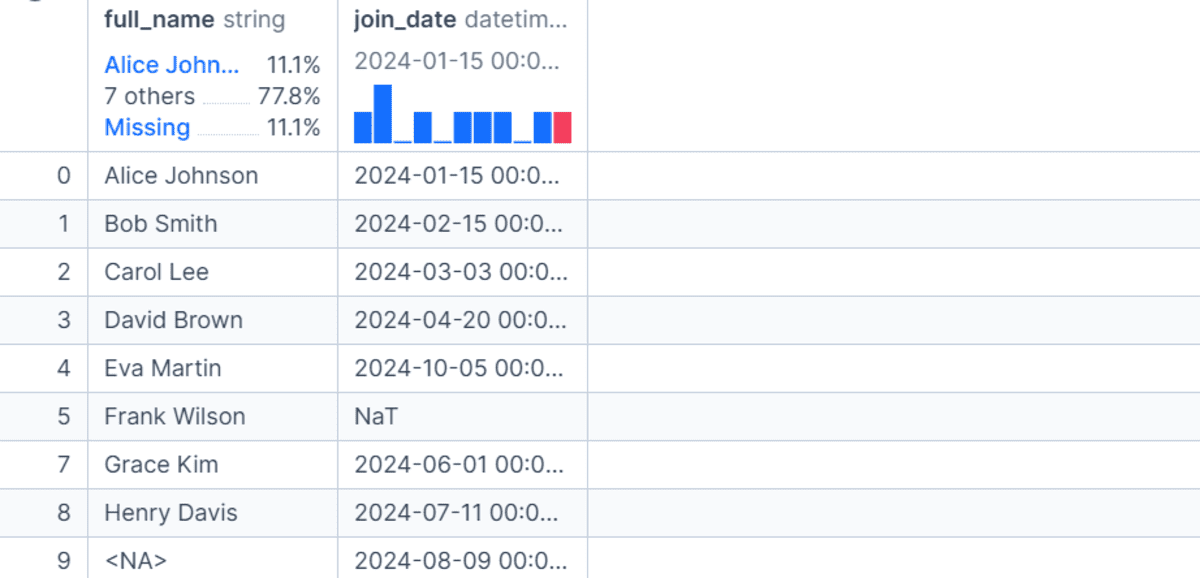
- Critical Identifier Deletion: Rows where
customer_idis missing are dropped (df.dropna(subset=["customer_id"])). A customer ID is often the primary key, and a record without it loses its unique identification, making it largely unusable. - Default Value Imputation: For non-critical text fields, sensible default values are used. Missing
full_nameandcityvalues are filled with "Unknown", and missingmembershipvalues with "unassigned". These values indicate missingness but preserve the row, allowing for analysis of "unknown" or "unassigned" categories. - Statistical Imputation: For numerical fields like ‘age’, the median age (
int(df["age"].median())) is used to fill missing values. The median is robust to outliers and represents a central tendency, providing a reasonable estimate without distorting the overall distribution as much as the mean might. - Zero Imputation: For ‘total_spend’, missing values are filled with
0.0. This is a common practice when a missing spend implies no recorded spending, which is a meaningful zero value in a financial context.
This selective approach ensures that critical data integrity is maintained while maximizing the utility of the remaining data. It acknowledges that sometimes, keeping pd.NA for certain columns (like ’email_address’ or ‘join_date’ if no reasonable imputation is possible) is the most honest and least misleading approach, preventing the fabrication of data where none exists.
Quality Assurance: Post-Cleaning Validation Checks
A crucial, often overlooked, phase in the data cleaning workflow is post-cleaning validation. This involves a series of programmatic checks to confirm that the cleaned dataset adheres to predefined rules and expectations. This "trust but verify" principle provides a vital layer of quality assurance, catching any subtle errors or inconsistencies that might have survived the cleaning process.
Using assert statements, specific conditions are programmatically verified:
assert df["customer_id"].notna().all(): Ensures no customer IDs are missing.assert df["customer_id"].is_unique: Verifies that each customer ID is unique.assert df["age"].between(0, 120).all(): Confirms all ages fall within a reasonable, defined range.assert df["total_spend"].ge(0).all(): Checks that total spend values are non-negative.assert df["membership"].isin(final_memberships).all(): Ensures all membership values belong to the approved set, including "unassigned".
If all these assertions pass, it signals a high level of confidence in the cleaned dataset’s quality. These checks act as a data quality gate, preventing flawed data from progressing to critical analysis or machine learning model training. Industry best practices advocate for such automated validation as an integral part of any data pipeline, transforming data cleaning from an art into a more robust, auditable science.
Preserving the Cleaned Asset: Saving for Future Use
The final step in the data cleaning workflow is to save the meticulously cleaned dataset. This practice is not merely administrative; it is fundamental to data governance, reproducibility, and the creation of an auditable trail. Saving the cleaned data as a new file, such as "clean_customers.csv", ensures that the original messy CSV remains untouched. This allows for backtracking if alternative cleaning strategies are needed or if unforeseen issues arise downstream.
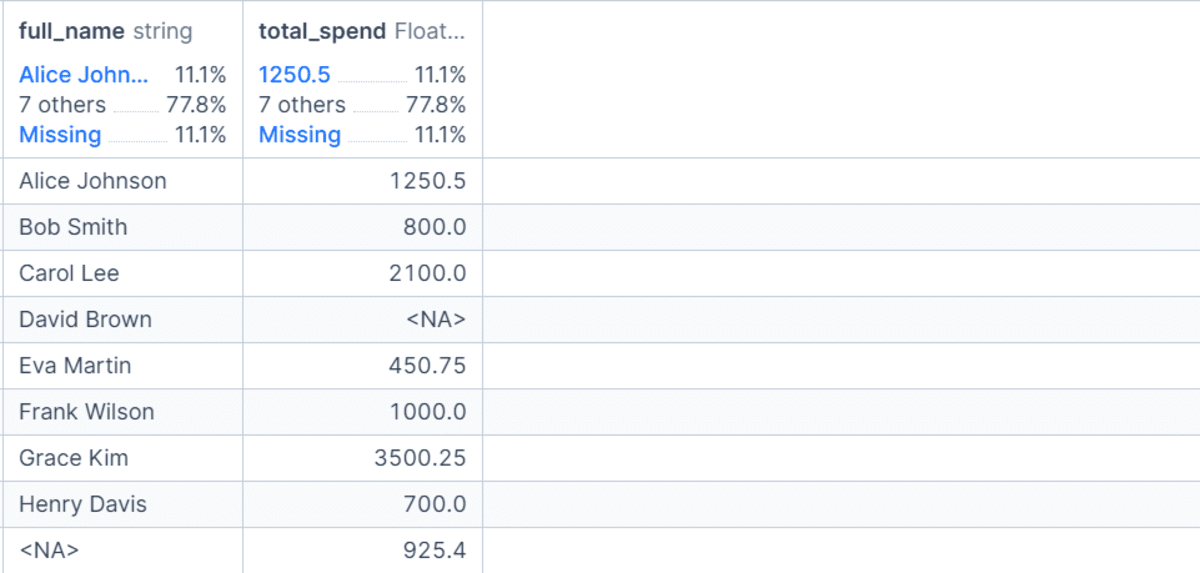
When saving to CSV, important parameters are used:
index=False: Prevents pandas from writing the DataFrame index as a column in the CSV, which is usually redundant and unwanted.date_format="%Y-%m-%d": Ensures that datetime columns are written in a consistent and universally parseable format (YYYY-MM-DD), avoiding ambiguity and facilitating easier loading into other systems or tools.
This practice of preserving the raw data while generating a cleaned version is a cornerstone of responsible data management. It underscores the importance of a clear separation between source data and processed data, enhancing transparency and reliability throughout the data lifecycle.
Conclusion: Elevating Data Cleaning from Task to Strategic Imperative
The journey through cleaning a messy customer CSV file with Python and pandas vividly illustrates that data cleaning is far more than a rudimentary task; it is a critical discipline demanding meticulous attention to detail, a deep understanding of data types, and a strategic approach to handling inconsistencies. From the initial inspection of raw data to the final validation checks and secure saving, each step is designed to transform unreliable inputs into a trusted foundation for informed decision-making.
The pervasive challenges of messy data—ranging from inconsistent column names and varied missing value representations to incorrect data types and duplicate records—are universal across industries. Effectively navigating these complexities, as demonstrated by this practical workflow, empowers data professionals to build robust analytical models, derive accurate business intelligence, and ensure compliance with data governance regulations. The ability to systematically inspect, clean, validate, and manage data is an indispensable skill in the era of big data and artificial intelligence. By embracing comprehensive data hygiene practices, organizations can unlock the full potential of their data assets, fostering greater accuracy, efficiency, and ultimately, a stronger competitive edge in the global marketplace.