
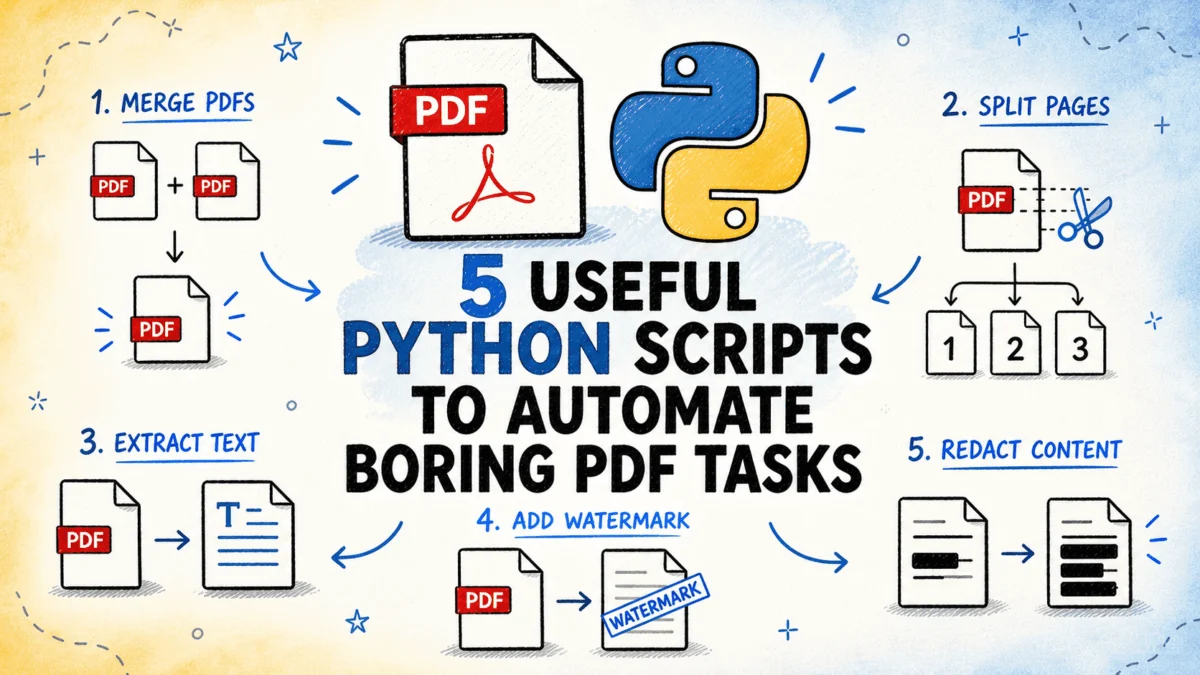
In an increasingly digital world, Portable Document Format (PDF) files remain an indispensable medium for information exchange across virtually every sector, from corporate enterprises and government agencies to educational institutions and individual users. With an estimated 2.5 trillion PDFs viewed globally each year, according to industry statistics, the sheer volume of these documents necessitates sophisticated and efficient management solutions. However, the routine manipulation of PDFs—such as merging reports, splitting large files, extracting critical data, adding watermarks for branding or security, redacting sensitive information, or cataloging extensive collections—often devolves into manual, time-consuming, and error-prone processes. Addressing these pervasive challenges, a suite of five meticulously crafted Python scripts has emerged, offering robust, command-line-driven automation for these common PDF workflows. These scripts are designed for batch processing, offering significant improvements in speed, accuracy, and operational efficiency, and are readily available for implementation, with all source code accessible on GitHub.
The Ubiquity of PDFs and the Automation Imperative
PDFs are foundational to modern digital workflows due to their cross-platform compatibility and ability to preserve document formatting. They are the standard for contracts, invoices, academic papers, legal filings, and financial statements. Despite their advantages, the fixed nature of PDFs presents significant hurdles when dynamic interaction or large-scale processing is required. Manual handling of these documents, especially in high volumes, can lead to substantial operational bottlenecks, increased labor costs, and elevated risks of human error. For instance, a legal department might spend countless hours manually redacting sensitive client information across hundreds of documents, or a finance team might struggle to consolidate monthly reports from various departments. This context underscores the critical need for automation, transforming what were once tedious, repetitive tasks into streamlined, programmatic operations. Python, with its extensive libraries and readability, has naturally become a leading language for developing such automation tools, bridging the gap between static documents and dynamic data processing needs.
A Deeper Dive into the Automation Arsenal
The five Python scripts leverage powerful open-source libraries to perform their functions, offering a comprehensive toolkit for managing PDF documents programmatically. Each script targets a specific set of pain points, providing a precise and scalable solution.
Efficiency in Document Assembly: Merging and Splitting PDFs
The Challenge: One of the most common requirements in document management is the ability to consolidate multiple PDF files into a single, cohesive document or, conversely, to dissect a large PDF into smaller, manageable segments. Manually performing these actions, especially when dealing with dozens or hundreds of files, or when specific page ranges need to be extracted, is exceedingly tedious. It consumes valuable employee time and introduces a high probability of misordering pages or overlooking critical sections. Imagine a scenario in a university admissions office where hundreds of application documents, each comprising multiple PDF attachments, need to be compiled into a single file per applicant, or a publishing house needing to split a large manuscript into chapters.
The Solution: This Python script provides a dual-mode functionality: it can merge an entire folder of PDF files into a single output document, allowing for configurable order based on filename or a custom text file definition. Alternatively, it can split a single PDF into multiple files based on fixed page ranges (e.g., every 10 pages), specific page counts, or a custom list of individual page numbers. The core functionality relies on the robust pypdf library, known for its efficiency in handling page-level operations. In merge mode, the script intelligently reads all PDFs from a designated input folder, sorts them according to the specified criteria, and sequentially writes their content into a new output PDF, crucially preserving metadata from the initial input file to maintain document integrity. For splitting, it processes the input PDF page by page, creating new numbered output files for each defined segment, ensuring that large documents can be easily compartmentalized for focused review or distribution.
Unlocking Data: Extracting Text and Tables from PDFs
The Challenge: PDFs are often repositories of critical data, whether it’s narrative text from research reports or structured tabular information from financial statements, invoices, or sensor readings. The conventional method of extracting this data—copy-pasting from a PDF viewer—is inherently inefficient, prone to formatting errors, and utterly impractical for anything beyond a few pages. This barrier to data extraction significantly impedes subsequent data analysis, database population, or business intelligence initiatives, effectively locking valuable information within an inaccessible format. Consider the difficulty faced by data analysts trying to aggregate quarterly sales figures spread across hundreds of individual PDF invoices.
The Solution: This script is designed to liberate text and tabular data from one or more PDF files, outputting the results into structured formats ready for further processing. Text can be exported to plain text or Markdown files, accommodating different presentation needs. Crucially, tables are extracted and written to CSV or Excel files, with each detected table typically receiving its own sheet in an Excel workbook. The script intelligently employs pypdf for basic text extraction and pdfplumber for more advanced, layout-aware extraction and sophisticated table detection. pdfplumber excels at understanding the visual structure of a PDF, allowing it to accurately identify table boundaries and cells even in complex layouts. The extraction process involves iterating page by page, identifying text blocks and table regions. Extracted tables undergo normalization—empty rows are removed, and headers are intelligently detected—before being written to their respective output files. A summary report is generated, detailing the number of pages and tables found in each file, and highlighting any pages where extraction yielded no output, providing a clear audit trail. This capability is transformative for data-intensive industries, enabling rapid data ingestion and analysis.
Ensuring Professionalism and Compliance: Stamping, Watermarking, and Page Numbering
The Challenge: Before internal distribution or external sharing, documents often require standardized markings such as watermarks, stamps (e.g., "Confidential," "Draft"), or page numbers. While these seem like straightforward additions, performing them manually through a graphical user interface (GUI) for a large batch of documents is exceedingly time-consuming and inconsistent. A legal firm sending out draft contracts might need to stamp each page with "DRAFT – FOR REVIEW ONLY," or a government agency might need to add unique identifiers and page numbers to thousands of public records. The repetitive nature of these tasks makes them prime candidates for automation to ensure consistency and efficiency.
The Solution: This script automates the application of text or image stamps to every page of single or multiple PDF files. It supports various marking types, including diagonal watermarks for security, custom header/footer text for branding or contextual information, sequential page numbers for navigation, and image overlays (e.g., company logos). The script offers extensive configuration options for positioning, font size, opacity, and color, allowing for highly customized outputs. The underlying mechanism involves pypdf for page manipulation and reportlab, a powerful Python library for generating PDF documents, to create the stamp layer. For each input PDF, the script dynamically generates a single-page stamp PDF in memory using reportlab, rendering the specified text or image at the desired coordinates, angle, font, and opacity. This dynamically created stamp page is then merged onto every page of the source PDF using pypdf‘s capabilities. The process generates a new output file, preserving the original document intact. The special handling for page numbers ensures that each page receives a unique, context-appropriate stamp, further enhancing document professionalism and navigability.
Safeguarding Sensitive Information: Redacting Content Securely
The Challenge: In an era of heightened data privacy concerns and stringent regulatory frameworks like GDPR, HIPAA, and CCPA, securely redacting sensitive content from documents before external sharing is paramount. This content can include personally identifiable information (PII) such as names, addresses, phone numbers, email addresses, as well as financial figures, reference numbers, or proprietary business data. Manually drawing black boxes over text in a PDF editor is a common but often insecure practice; many tools merely obscure the text visually without actually removing the underlying content, leaving it vulnerable to sophisticated extraction methods. This poses significant compliance risks and potential reputational damage.
The Solution: This powerful script offers a robust solution for permanently redacting sensitive content from PDF pages. It scans documents for text matching predefined patterns, which can include regular expressions, exact strings, or categorized identifiers like email addresses and phone numbers. Upon detection, the script replaces the matching content with solid black rectangles, but critically, it permanently removes the underlying text from the document’s content stream, not just visually obscuring it. This secure redaction is achieved using pymupdf (also known as fitz), a high-performance library that provides advanced text search capabilities with precise bounding box coordinates and the ability to apply redaction annotations that fundamentally alter the document’s content. For each page, the script identifies all matches for configured patterns, marks their bounding rectangles as redaction annotations, and then applies these annotations. The result is a new PDF where the sensitive text is irrevocably removed. A comprehensive report is generated, detailing every redaction made, including the page number, the matched text (before redaction), and the specific pattern that triggered the action, providing an essential audit trail for compliance purposes. This script is indispensable for legal, healthcare, and financial sectors dealing with confidential information.
Gaining Control: Metadata Extraction and PDF Inventory
The Challenge: Managing large collections of PDF files—whether archives, departmental documents, or research datasets—becomes unwieldy without a clear understanding of each file’s basic attributes. Important facts like page count, file size, creation/modification dates, author, producer, encryption status, or whether a document contains searchable text or is merely a scanned image are often obscure. Manually checking each file through a PDF viewer is not feasible for collections numbering in the hundreds or thousands, leading to poor document governance, difficulty in content discovery, and potential compliance issues.
The Solution: This script serves as a powerful inventory tool, scanning a designated folder of PDF files and systematically extracting crucial metadata from each. The collected data includes page count, file size, creation and modification dates, author, producer, encryption status, and a determination of whether the document contains searchable text or consists primarily of scanned images. All extracted information is then compiled into a single, structured CSV or Excel inventory file, making it easy to sort, filter, and analyze. The script leverages pypdf to access standard document metadata from the PDF’s information dictionary and pdfplumber to sample pages and ascertain the presence of extractable text content. For encrypted files that cannot be opened, the script flags them appropriately rather than silently skipping them, ensuring a complete and transparent inventory. The output inventory provides one row per file with all extracted fields, complemented by a summary row at the bottom presenting totals and averages, offering immediate insights into the entire document collection. This capability is invaluable for digital archiving, e-discovery, and general document management across organizations.
The Python Ecosystem Advantage and Broader Implications
The power of these scripts lies not only in their individual functionalities but also in their foundation within the Python ecosystem. Python’s versatility, extensive library support, and clear syntax make it an ideal language for developing robust automation solutions. Libraries like pypdf, pdfplumber, reportlab, and pymupdf are mature, well-documented, and actively maintained, providing a reliable backbone for these tools.
The implications of adopting such automated PDF management solutions are far-reaching:
- Operational Efficiency and Cost Savings: By automating repetitive tasks, organizations can significantly reduce the manual labor involved in document processing. This translates directly into reduced operational costs and allows human resources to be reallocated to higher-value activities. Industry analysts often cite potential time savings of 60-80% for routine document handling tasks through automation.
- Enhanced Accuracy and Consistency: Automation eliminates the human error inherent in manual processes. Whether merging documents in a specific order, redacting sensitive data, or applying watermarks, scripts ensure consistency across all documents, adhering precisely to predefined rules.
- Improved Data Security and Compliance: Tools like the redaction script are critical for meeting stringent data privacy regulations. By ensuring permanent removal of sensitive data, organizations can mitigate risks associated with data breaches and non-compliance fines. The metadata inventory script further aids in identifying potentially vulnerable files (e.g., unencrypted documents).
- Scalability and Throughput: These scripts are designed for batch processing, meaning they can handle thousands of documents with the same efficiency as a single file. This scalability is crucial for organizations dealing with high volumes of digital documentation.
- Empowerment and Accessibility: While developed by data scientists, these command-line scripts can be easily configured and run by IT administrators, data analysts, or even non-technical users with minimal training, empowering teams to manage their document workflows more effectively without relying solely on specialized software.
- Auditability and Transparency: The generation of summary reports and audit trails for tasks like redaction and extraction provides crucial transparency, which is vital for compliance, quality assurance, and debugging.
Implementation and Best Practices
Implementing these scripts is straightforward, typically involving the installation of the listed Python dependencies and minor adjustments to configuration settings for file paths and specific parameters. It is highly recommended to begin with a small batch of test files to verify the output and ensure that the scripts behave as expected before scaling up to larger, production-level folders. This iterative approach allows for fine-tuning and validation, guaranteeing desired results. The open-source nature of these scripts also fosters a community of users and developers, encouraging further enhancements and adaptations to meet diverse organizational needs.
These five Python scripts represent a significant step forward in intelligent document processing, offering robust, efficient, and secure methods to manage PDF files. By transforming tedious manual tasks into automated workflows, they empower businesses and individuals to streamline operations, enhance data security, and achieve higher levels of productivity in their digital environments.
Bala Priya C is a developer and technical writer from India. She likes working at the intersection of math, programming, data science, and content creation. Her areas of interest and expertise include DevOps, data science, and natural language processing. She enjoys reading, writing, coding, and coffee! Currently, she’s working on learning and sharing her knowledge with the developer community by authoring tutorials, how-to guides, opinion pieces, and more. Bala also creates engaging resource overviews and coding tutorials.