
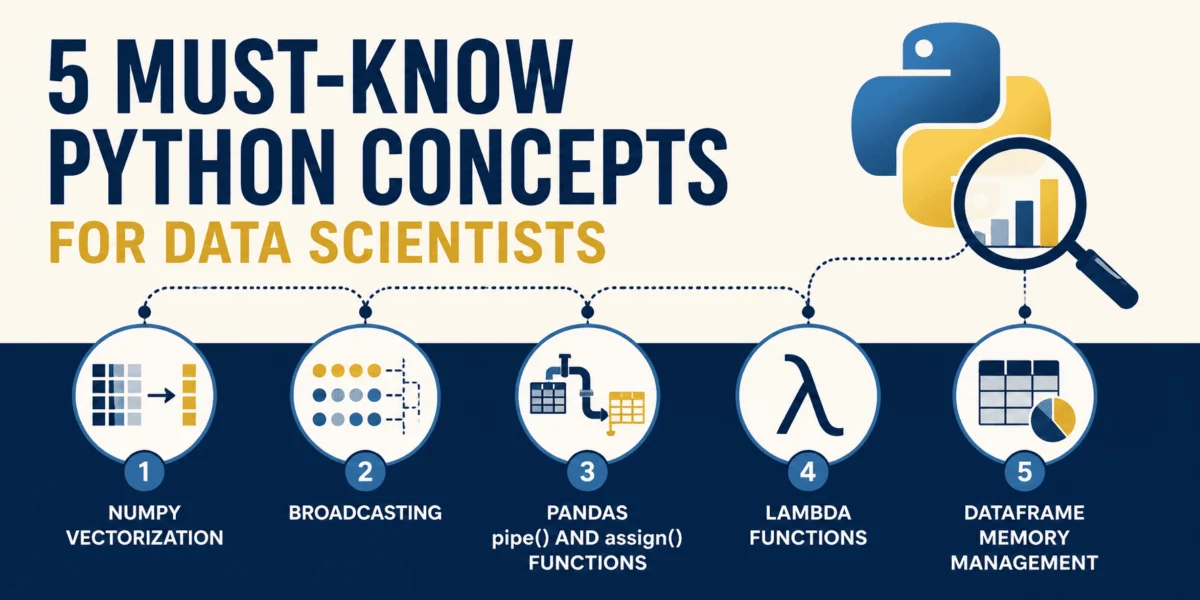
Python’s pervasive influence across the data science landscape is not merely a trend but a testament to its highly expressive syntax, remarkable readability, and an unparalleled ecosystem of libraries. While its high-level abstraction simplifies development by managing low-level memory, this very design choice often translates to slower execution speeds for raw iterative processes due to dynamic typing and interpretation. For data scientists aiming to transcend basic scripting and build robust, scalable data systems, a fundamental shift from conventional procedural coding to specialized, vectorized, and memory-conscious approaches is imperative. This article delves into five critical Python concepts, equipping professionals with the knowledge to transform inefficient, convoluted code into lightning-fast, production-grade, and elegantly functional data pipelines.
The Foundation of Speed: NumPy Vectorization
The efficiency of data processing hinges significantly on how operations are performed across large datasets. Standard Python loops, while intuitive, introduce substantial overhead during each iteration. As an interpreted language, Python incurs costs for type checking, dynamic method lookup, and reference counting with every single element processed within a loop. When dealing with millions or even billions of data points, these micro-overhead costs accumulate rapidly, manifesting as significant bottlenecks that can extend processing times from milliseconds to several seconds or even minutes. This inherent characteristic makes raw Python loops unsuitable for performance-critical data science tasks.
The industry-standard solution to this challenge is NumPy vectorization. Instead of iterating through elements one by one using Python bytecode, NumPy offloads these loops to highly optimized, pre-compiled C-extensions. These operations are designed to act on entire arrays or array slices simultaneously, executing contiguous blocks of data at the machine level. A key enabler of this performance is the utilization of Single Instruction, Multiple Data (SIMD) instructions, which allow a single CPU instruction to operate on multiple data points concurrently. This parallel processing capability is a cornerstone of high-performance computing in scientific and data-intensive domains.
Consider a common scenario: scaling a large collection of sensor readings. If we have ten million float values, a traditional Python for loop would sequentially process each value. For instance, scaling each reading by 1.5 and adding a calibration constant of 10.0 might take approximately 0.35 seconds on a modern system for ten million elements. This seemingly small duration quickly becomes problematic in real-time analytics or when chained with numerous other transformations.
import time

n_elements = 10_000_000
data_list = [float(x) for x in range(n_elements)]

start_time = time.time()
scaled_list = []
for val in data_list:
    scaled_list.append(val * 1.5 + 10.0)
loop_duration = time.time() - start_time
print(f"Loop implementation took: loop_duration:.6f seconds")
In stark contrast, the vectorized approach using NumPy dramatically reduces execution time. By loading the data into a contiguous NumPy array, the entire calculation is performed efficiently in C-level loops.
import numpy as np
import time

n_elements = 10_000_000
data_array = np.arange(n_elements, dtype=float)

start_time = time.time()
scaled_array = data_array * 1.5 + 10.0
numpy_duration = time.time() - start_time
print(f"NumPy implementation took: numpy_duration:.6f seconds")
print(f"Speedup: loop_duration / numpy_duration:.1fx faster!")
The difference is profound: the NumPy implementation could complete the same operation in as little as 0.013 seconds, representing a speedup of over 26 times. This massive performance gain, achieved with cleaner and more concise code, underscores why vectorization is not merely an optimization but a fundamental paradigm for efficient data manipulation in Python. The elimination of explicit Python loops, moving computation entirely into high-speed C-space, directly translates to reduced processing times and enhanced scalability for demanding data workloads. Industry leaders and academic researchers consistently advocate for vectorization as a critical first step in optimizing Python-based data workflows, noting its direct impact on computational resource utilization and project timelines.
Efficient Data Alignment: Broadcasting in NumPy
In the realm of linear algebra, a strict requirement often dictates that matrix operations necessitate operands of identical shapes. However, real-world data science frequently presents scenarios where operations must be performed on arrays of differing dimensions. Examples include subtracting feature column averages from a raw dataset or normalizing individual row values. Manually aligning these disparate shapes, perhaps by duplicating data, can lead to increased memory consumption and convoluted code.
NumPy elegantly resolves this challenge through broadcasting, a powerful set of mathematical rules that permit element-wise operations on arrays of different shapes. Rather than physically copying or duplicating data to achieve matching dimensions, broadcasting virtually expands the smaller array along its missing or single-element dimensions. This crucial mechanism operates without incurring additional memory overhead, as no actual data copying occurs. The core principle allows operations to proceed as if the smaller array had been stretched to match the larger array’s shape, facilitating complex calculations with minimal effort and maximum efficiency.
The general rules for broadcasting are straightforward:
- If the arrays differ in their number of dimensions, the shape of the smaller array is padded with ones on its left side.
- If the shapes of the two arrays do not match in any dimension, and neither dimension is 1, an error is raised.
- Dimensions with size 1 are stretched to match the other array’s dimension.
Consider a practical application: "de-meaning" a feature matrix by subtracting the mean of each column. A 3×4 feature matrix (representing 3 samples and 4 features) requires the subtraction of a 4-element column mean vector. A manual, procedural approach would involve nested loops, iterating through each element, or explicitly "tiling" the column means to match the feature matrix’s shape. Both methods are cumbersome, prone to errors, and inefficient.
import numpy as np

features = np.array([
    [10.0, 20.0, 30.0, 4.0],
    [12.0, 24.0, 36.0, 8.0],
    [14.0, 28.0, 42.0, 12.0]
])

col_means = np.mean(features, axis=0) # Shape: (4,)

# Manual de-meaning (illustrative of inefficiency)
demeaned_clunky = np.zeros_like(features)
for idx in range(features.shape[0]):
    for col_idx in range(features.shape[1]):
        demeaned_clunky[idx, col_idx] = features[idx, col_idx] - col_means[col_idx]

# Tiling approach (memory-intensive)
tiled_means = np.tile(col_means, (features.shape[0], 1))
demeaned_tiled = features - tiled_means
The Pythonic solution, leveraging broadcasting, simplifies this significantly. When subtracting the (4,) shaped col_means from the (3, 4) shaped features matrix, NumPy automatically treats col_means as if it were (1, 4). It then expands this dimension along the first axis (rows) to match the (3, 4) shape for the element-wise subtraction.
import numpy as np

features = np.array([
    [10.0, 20.0, 30.0, 4.0],
    [12.0, 24.0, 36.0, 8.0],
    [14.0, 28.0, 42.0, 12.0]
])

col_means = np.mean(features, axis=0)
demeaned_broadcasting = features - col_means # Automatic broadcasting

# Another example: Dividing each row by its row sum
row_sums = np.sum(features, axis=1) # Shape (3,)
# To divide (3, 4) by (3,), we expand row_sums to (3, 1) using np.newaxis
normalized_features = features / row_sums[:, np.newaxis]

print("Demeaned:n", demeaned_broadcasting)
print("nNormalized Rows:n", normalized_features)
The elegance of broadcasting lies in its ability to perform these operations at C-speed without generating an intermediate tiled matrix, thereby preserving memory bandwidth and accelerating computations. This not only results in cleaner, more readable code but also enhances computational efficiency, making it an indispensable tool for operations ranging from data normalization in machine learning to complex statistical analyses. Data engineers and machine learning practitioners universally embrace broadcasting as a cornerstone for writing performant and concise numerical code, drastically reducing the complexity and potential for errors associated with manual dimension management.
Crafting Maintainable Data Pipelines with Pandas .pipe() and .assign()
Data preparation, often the most time-consuming phase in a data science project, can easily devolve into a tangle of sequential, procedural code within Pandas. This typically involves creating numerous intermediate DataFrames (e.g., df_temp1, df_temp2), performing in-place modifications that can lead to unintended side effects, or chaining bracketed operations that become difficult to read and debug. A common pitfall is the dreaded SettingWithCopyWarning, which signals potential issues with modifications not being applied to the original DataFrame, leading to silent data corruption or unexpected behavior. Such practices hinder code readability, complicate testing, and ultimately reduce the maintainability of data pipelines.
Modern Pandas, influenced by principles of functional programming, actively encourages a departure from procedural mutations towards a more declarative and pipeline-oriented approach. By judiciously utilizing the .assign() method for creating or modifying columns and the .pipe() method for applying custom, reusable multi-column or DataFrame-level operations, data scientists can construct elegant, chainable data pipelines. This methodology promotes immutability, ensuring that the original DataFrame remains untouched and each step in the pipeline produces a new, transformed DataFrame. This clarity significantly enhances code comprehension and reduces debugging time.
Consider a raw customer sales dataset that requires a series of cleaning and transformation steps: filtering outliers, standardizing string formats, imputing missing values, and calculating derived metrics. A traditional, "clunky" approach would involve a sequence of operations, each potentially modifying the DataFrame in place or creating temporary copies.
import pandas as pd
import numpy as np

raw_data =
    'Customer_ID': [101, 102, 103, 104, 105],
    'Age': [25, -5, 47, 120, 31],
    'Country': ['usa', 'CANADA', 'usa', 'Germany', 'canada'],
    'Raw_Spend': [120.50, 450.00, 80.00, np.nan, 300.00]

df = pd.DataFrame(raw_data)

# Sequential intermediate mutations - prone to issues
df_clean = df.copy() # Often done to avoid SettingWithCopyWarning, but adds overhead

df_clean = df_clean[(df_clean['Age'] >= 0) & (df_clean['Age'] <= 100)]
df_clean['Country'] = df_clean['Country'].str.upper().str.strip()
median_spend = df_clean['Raw_Spend'].median()
df_clean['Raw_Spend'] = df_clean['Raw_Spend'].fillna(median_spend)
df_clean['Taxed_Spend'] = df_clean['Raw_Spend'] * 1.15
df_clean = df_clean.rename(columns='Customer_ID': 'customer_id')
The Pythonic, functional approach, however, wraps these transformations into a single, self-contained pipeline. Custom transformations, like standardizing country names, can be encapsulated in reusable utility functions designed to accept and return a DataFrame, making them perfectly compatible with .pipe().
import pandas as pd
import numpy as np

raw_data =
    'Customer_ID': [101, 102, 103, 104, 105],
    'Age': [25, -5, 47, 120, 31],
    'Country': ['usa', 'CANADA', 'usa', 'Germany', 'canada'],
    'Raw_Spend': [120.50, 450.00, 80.00, np.nan, 300.00]

df = pd.DataFrame(raw_data)

# Reusable custom transformation function for .pipe()
def standardize_countries(dataframe: pd.DataFrame) -> pd.DataFrame:
    df_out = dataframe.copy() # Defensive copy within function to prevent mutation of input
    df_out['Country'] = df_out['Country'].str.upper().str.strip()
    return df_out

# Single elegant functional pipeline
df_clean_pipeline = (
    df.query("Age >= 0 and Age <= 100") # Filter using query for readability
      .assign(
          Raw_Spend=lambda x: x['Raw_Spend'].fillna(x['Raw_Spend'].median()), # Impute missing values
          Taxed_Spend=lambda x: x['Raw_Spend'] * 1.15 # Calculate new feature
      )
      .pipe(standardize_countries) # Apply custom function
      .rename(columns='Customer_ID': 'customer_id') # Rename columns
)

print(df_clean_pipeline)
This method chaining ensures that the state of the original DataFrame is preserved, preventing accidental mutations and fostering predictable behavior. .assign() facilitates the creation of new columns or modification of existing ones by accepting lambda functions, where x refers to the current state of the DataFrame within the chain. Meanwhile, .pipe() acts as a powerful conduit for integrating any function that accepts and returns a DataFrame, enabling the modularization of complex operations. Data engineering teams and senior data scientists consistently advocate for this functional pipeline approach, recognizing its substantial benefits in terms of code quality, maintainability, and collaboration on complex data transformation projects. This paradigm shift significantly reduces the technical debt associated with intricate data cleaning and feature engineering.
Agile Transformations with Lambda Functions for Data
Feature engineering, a critical step in preparing data for machine learning models, frequently involves numerous small, single-purpose transformations. These might include tasks such as formatting strings, splitting values from a combined field, or applying simple conditional logic to create new features. Traditionally, one might define a dedicated named function (using def) for each such transformation. However, for operations that are concise and used only once or twice, defining full functions can introduce unnecessary boilerplate, making the script longer and potentially harder to read by scattering related logic.
A more elegant and Pythonic solution involves the use of lambda functions in conjunction with Pandas’ .map() and .apply() methods. Lambda functions are anonymous, single-expression functions that are defined and used on-the-fly, without requiring a formal name. They are perfectly suited for quick data mapping, inline transformations, and filtering operations where the logic is simple and self-contained. Their conciseness allows data scientists to keep the transformation logic tightly coupled with the column creation or modification statements, enhancing readability and reducing mental overhead.
Consider a dataset of employees where there’s a need to map a numerical is_remote flag to descriptive status strings and parse out last names from a full name field. A less optimized approach might involve manual row-by-row iteration using iterrows(), which is known to be significantly slower and more verbose for Pandas DataFrames.
import pandas as pd

df = pd.DataFrame(
    'employee_name': ['john doe', 'jane smith', 'bob johnson'],
    'department_code': ['IT_01', 'HR_02', 'IT_03'],
    'is_remote': [1, 0, 1]
)

# Row-by-row iteration - slow and verbose
df_clunky = df.copy()
df_clunky['remote_status'] = None
df_clunky['last_name'] = None

for index, row in df_clunky.iterrows():
    if row['is_remote'] == 1:
        df_clunky.at[index, 'remote_status'] = "Remote"
    else:
        df_clunky.at[index, 'remote_status'] = "Office"

    name_parts = row['employee_name'].split()
    df_clunky.at[index, 'last_name'] = name_parts[1].capitalize()
The Pythonic way, utilizing inline lambda transformations within .assign(), .map(), and .apply(), yields significantly cleaner and more performant code. .map() is ideal for element-wise transformations on a Series (like mapping is_remote values), while .apply() is more general-purpose, suitable for applying a function along an axis of a DataFrame or Series, often used for string manipulations on each element.
import pandas as pd

df = pd.DataFrame(
    'employee_name': ['john doe', 'jane smith', 'bob johnson'],
    'department_code': ['IT_01', 'HR_02', 'IT_03'],
    'is_remote': [1, 0, 1]
)

# Lambdas nested inside assign(), map(), and apply() for clean transformations
df_opt = df.assign(
    remote_status=lambda d: d['is_remote'].map(lambda val: "Remote" if val == 1 else "Office"),
    last_name=lambda d: d['employee_name'].apply(lambda name: name.split()[-1].capitalize()),
    dept_level=lambda d: d['department_code'].apply(lambda code: code.split('_')[-1])
)

print(df_opt[['employee_name', 'last_name', 'remote_status', 'dept_level']])
This approach not only simplifies the code by eliminating verbose nested loops but also improves performance, as .map() and .apply() are optimized for operations across Series and DataFrames, often leveraging underlying C implementations. The result is self-contained transformations that are highly readable and directly associated with their respective column assignments. For data scientists, mastering lambda functions in this context translates to increased productivity, faster prototyping, and more maintainable feature engineering code, making it a cornerstone for efficient data manipulation in Pandas.
Optimizing Resource Utilization: Memory Management with Pandas dtypes
In an era of exponentially growing datasets, efficient memory management is no longer a luxury but a necessity for data scientists. By default, when Pandas imports data from sources like CSV files or databases, it adopts a conservative strategy regarding data types (dtypes). Integers are typically loaded as 64-bit (int64), decimals as 64-bit floating-point numbers (float64), and text columns as generic object types. While this "play it safe" approach prevents data loss or overflow errors, it frequently leads to a maximum memory footprint. A dataset comprising only a few hundred thousand rows can quickly consume gigabytes of system RAM, leading to local slowdowns, inefficient processing, or even "out of memory" errors on production servers and cloud instances.
A crucial optimization technique involves proactively reducing a DataFrame’s memory footprint by downcasting numeric columns to their minimum required integer or float sizes and converting low-cardinality text columns to the specialized category data type. This strategy can yield substantial memory savings without sacrificing data integrity. For example, an age column, with values typically ranging from 0 to 100, can comfortably fit within an 8-bit integer (int8), which supports values up to 127, rather than the default int64 (which supports values up to 9 quintillion). Similarly, the category dtype in Pandas is particularly effective for columns with a limited number of unique string values. Under the hood, it maps these text strings to lightweight integer codes, storing the actual strings only once in an internal array. This mapping dramatically reduces space compared to storing full strings for every row.
Let’s illustrate this with a synthetic subscriber dataset of 100,000 users. Examining its default memory consumption reveals the scale of the issue.
import pandas as pd
import numpy as np

n_rows = 100_000
np.random.seed(42)

df_large = pd.DataFrame(
    'user_id': np.random.randint(1000000, 1000000 + n_rows, size=n_rows),
    'age': np.random.randint(18, 90, size=n_rows),
    'device_type': np.random.choice(['iOS', 'Android', 'Web', 'SmartTV'], size=n_rows),
    'monthly_revenue': np.random.uniform(5.0, 150.0, size=n_rows),
    'active_subscriber': np.random.choice([0, 1], size=n_rows)
)

print(df_large.info(memory_usage='deep'))
memory_before = df_large.memory_usage(deep=True).sum() / (1024 ** 2)
print(f"Default Memory Usage: memory_before:.2f MB")
The output indicates a default memory usage of approximately 8.20 MB for this dataset. Now, let’s apply the memory optimization techniques:
df_optimized = df_large.assign(
    user_id=df_large['user_id'].astype('int32'),                    # Max 1.1 million fits in int32
    age=df_large['age'].astype('int8'),                             # Max age 90 fits in int8
    device_type=df_large['device_type'].astype('category'),         # Low cardinality (4 unique strings)
    monthly_revenue=df_large['monthly_revenue'].astype('float32'),  # Single precision float is often sufficient
    active_subscriber=df_large['active_subscriber'].astype('int8')  # Binary flag fits in int8
)

print(df_optimized.info(memory_usage='deep'))
memory_after = df_optimized.memory_usage(deep=True).sum() / (1024 ** 2)

print(f"Optimized Memory Usage: memory_after:.2f MB")
print(f"Memory Footprint Reduction: ((memory_before - memory_after) / memory_before) * 100:.1f%")
After these simple adjustments, the DataFrame’s memory footprint shrinks to approximately 1.05 MB – a remarkable reduction of nearly 90%. This substantial saving is achieved because category types prevent the duplication of character strings across rows, instead mapping each row to a compact integer index. For numerical columns, selecting the smallest appropriate dtype (e.g., int8, int16, int32, float32) based on the data’s range ensures efficient storage.
The implications of effective memory management are far-reaching. It prevents "out of memory" errors when working with large datasets, enables data scientists to process more data locally without resorting to distributed computing frameworks, and significantly reduces cloud computing costs by requiring smaller instances. Furthermore, by improving cache efficiency, optimized dtypes can also contribute to faster data loading and processing times. Industry experts frequently highlight memory optimization as a crucial skill for scaling data science solutions from prototypes to production environments, emphasizing its direct impact on computational resource expenditure and project feasibility.
Conclusion: Elevating Data Science Practice
The journey from a foundational understanding of Python to mastering high-performance data science involves more than just knowing syntax; it demands a strategic approach to code efficiency and resource management. The five concepts explored—NumPy vectorization, broadcasting, Pandas’ functional pipelines with .pipe() and .assign(), agile lambda transformations, and proactive memory management through dtypes—represent critical advancements for any data professional aspiring to build efficient, readable, and highly optimized data pipelines.
By integrating vectorization and broadcasting, data scientists can eliminate the performance bottlenecks of raw Python loops, unlocking hardware-level speedups that are indispensable for processing large-scale datasets. The adoption of functional Pandas pipelines with .pipe() and .assign() marks a significant shift towards more readable, maintainable, and robust feature engineering workflows, mitigating common issues like SettingWithCopyWarning and enhancing code collaboration. Complementing these are inline lambda functions, which provide a concise and elegant mechanism for on-the-fly data transformations, streamlining the development process. Finally, meticulous memory management through dtypes empowers practitioners to process larger datasets, reduce computational costs, and prevent memory-related failures, ensuring that algorithms scale seamlessly from local prototypes to extensive production workloads.
In today’s data-driven landscape, data science is inextricably linked with sound software engineering principles. Treating data code as a first-class product, prioritizing efficiency, readability, and scalability, is paramount. By embracing these advanced Python techniques, data scientists can ensure their datasets process faster, their pipelines exhibit greater reliability, and their systems become a source of operational excellence. These practices are not merely optimizations; they are foundational pillars for delivering impactful and sustainable analytical solutions in a rapidly evolving technological environment.