

Row-by-row iteration stands as one of the most pervasive and often overlooked performance bottlenecks in Python’s ubiquitous pandas library. While its impact might be negligible on datasets of limited scale, the practice becomes a critical impediment when processing large datasets, leading to significant delays, increased computational costs, and diminished efficiency in data analysis workflows. This foundational issue stems from pandas’ architectural reliance on NumPy, a library optimized for numerical operations on entire arrays through highly efficient, C-compiled code. Explicitly looping through rows in Python fundamentally bypasses these optimizations, forcing each operation back into the slower Python interpreter, one data point at a time.
The Python Global Interpreter Lock (GIL) further exacerbates this problem. The GIL ensures that only one thread can execute Python bytecode at a time, effectively preventing true parallel execution of Python code across multiple CPU cores within a single process. While libraries like NumPy and pandas can release the GIL during their C-level operations (allowing other threads to run if they are also performing non-Python-level tasks), explicit Python loops are inherently GIL-bound, making them intrinsically sequential and thus significantly slower for large-scale data manipulation. This understanding forms the bedrock for optimizing pandas code, shifting the paradigm from imperative, procedural loops to declarative, vectorized operations.
This article systematically explores seven distinct and highly effective alternatives to traditional loops in pandas, each meticulously tailored to address different categories of data transformations. By the conclusion, data professionals will possess a comprehensive conceptual framework, enabling them to judiciously select the most appropriate and performant tool for various data manipulation challenges. The techniques presented are not merely faster; they embody the intended design philosophy of pandas and NumPy, fostering more readable, maintainable, and scalable codebases. For practical implementation and experimentation, a comprehensive Colab notebook is readily available on GitHub, providing executable examples for each method discussed.

The Underpinnings of Pandas: Why Loops Fail
To fully appreciate the performance gains offered by vectorized operations, it’s crucial to understand the architectural foundation of pandas. Pandas Series and DataFrames are built upon NumPy arrays. NumPy, written largely in C and Fortran, executes array operations with incredible speed because it operates on contiguous blocks of memory, benefiting from CPU cache optimizations and avoiding the overhead of Python object creation for each element. When a developer writes a loop like for index, row in df.iterrows():, they are essentially dismantling the optimized NumPy array structure, converting each row back into a Python Series object, and then performing Python-level operations. This process introduces substantial overhead:
- Python Interpreter Overhead: Each iteration involves Python function calls, attribute lookups, and object creation/destruction, which are inherently slower than direct C operations.
- Memory Management: Creating new Python objects for each row or cell in a loop leads to frequent memory allocation and deallocation, straining the garbage collector.
- Loss of Vectorization: The core advantage of NumPy—applying an operation to an entire array at once—is lost, as the loop forces element-wise processing in Python.
- Cache Inefficiency: Accessing data row by row, especially in non-contiguous memory layouts, can lead to poor cache utilization, further degrading performance.
The shift towards "thinking in columns" rather than "thinking in rows" is fundamental. Pandas and NumPy are designed for column-wise operations, where an entire Series or DataFrame column can be treated as a single array, allowing the underlying C code to execute operations on all elements efficiently. This paradigm shift is not just about speed; it’s about embracing the idiomatic way to leverage these powerful libraries for data science and engineering tasks.
Setting the Stage: Our E-commerce Dataset
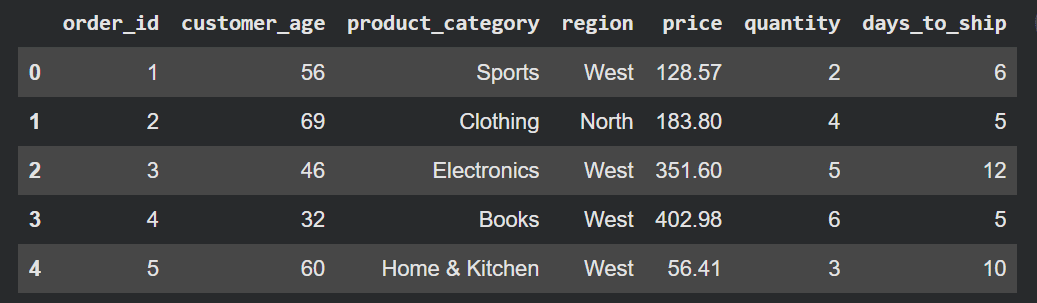
To provide a realistic context for demonstrating these performance optimizations, we will utilize a simulated e-commerce orders dataset. This dataset, comprising 100,000 rows, is sufficiently large to highlight the significant performance differences between looping and vectorized alternatives.
import pandas as pd
import numpy as np

np.random.seed(42) # For reproducibility
n = 100_000

categories = ['Electronics', 'Clothing', 'Home & Kitchen', 'Sports', 'Books']
regions = ['North', 'South', 'East', 'West']

df = pd.DataFrame(
    'order_id': range(1, n + 1),
    'customer_age': np.random.randint(18, 70, n),
    'product_category': np.random.choice(categories, n),
    'region': np.random.choice(regions, n),
    'price': np.round(np.random.uniform(5.0, 500.0, n), 2),
    'quantity': np.random.randint(1, 10, n),
    'days_to_ship': np.random.randint(1, 14, n),
)
# display(df.head()) # Output: A DataFrame with 100,000 rows, showing typical e-commerce order details.
This dataset structure provides diverse data types and columns, allowing us to illustrate various transformation scenarios—from simple arithmetic to complex conditional logic and string manipulations—making it an ideal testbed for showcasing the efficiency of loop alternatives.
Mastering Vectorization: Seven Pillars of Efficient Pandas
The following sections detail the seven key methods for circumventing loops, each offering distinct advantages for specific transformation patterns.
1. The Power of Direct Vectorized Arithmetic
For any operation involving arithmetic or direct comparison across an entire column, vectorized operations should be the primary approach. This method leverages NumPy’s underlying C implementations to perform calculations on all elements of a Series simultaneously.
Scenario: Calculate the total revenue per order by multiplying price and quantity.
A traditional, inefficient loop would iterate through each row, retrieve price and quantity, multiply them, and then assign the result. In contrast, vectorized arithmetic performs this operation in a single, highly optimized step:
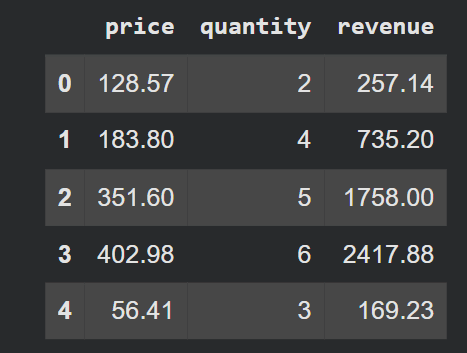
df['revenue'] = df['price'] * df['quantity']
# This operation is executed at the C level, significantly faster than any Python loop.
This approach is not only concise and readable but also orders of magnitude faster than a loop, especially for large datasets. It exemplifies the core principle of vectorized computing: operating on entire arrays (columns) rather than individual elements. Benchmarking studies consistently show vectorized arithmetic operations to be hundreds to thousands of times faster than explicit Python loops for large arrays.
2. Strategic Application of Functions with .apply()
When transformations involve custom logic that cannot be simply expressed as arithmetic or direct comparisons, the .apply() method provides a powerful and readable alternative to loops. It allows users to pass a function (either a lambda or a defined function) to be executed on each element, row, or column.
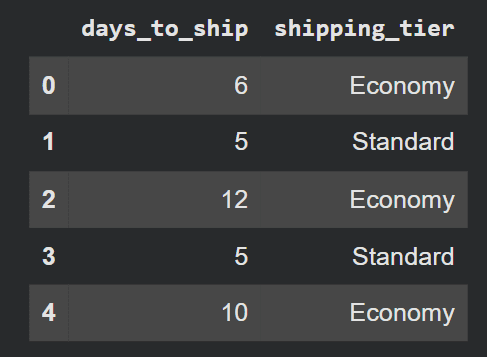
Scenario: Assign a shipping priority label based on days_to_ship.
def shipping_label(days):
    if days == 2:
        return 'Express'
    elif days == 5:
        return 'Standard'
    else:
        return 'Economy'

df['shipping_tier'] = df['days_to_ship'].apply(shipping_label)
While .apply() internally uses a Python loop, it is often faster than df.iterrows() because it can be optimized for specific internal data types and scenarios. Its primary strength lies in its flexibility and readability for encapsulating complex, non-vectorizable logic. It is particularly useful when the function applied is itself vectorized or relies on external libraries that benefit from vectorized operations. However, for simpler conditional logic, more specialized vectorized functions often outperform .apply().
3. Binary Decisions: The Efficiency of np.where()
For scenarios involving a straightforward binary condition (one outcome if true, another if false), NumPy’s np.where() function is the optimal choice. It offers a fully vectorized approach that is significantly faster than using .apply() for such simple conditions.
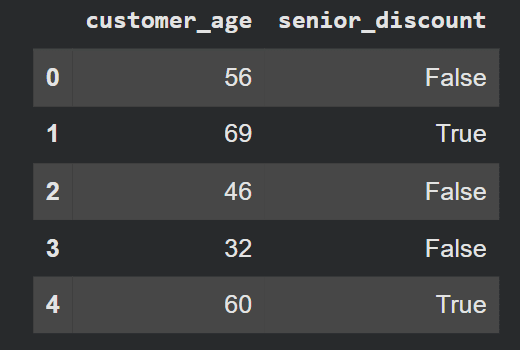
Scenario: Flag orders where the customer qualifies for a senior discount (age 60 or above).
df['senior_discount'] = np.where(df['customer_age'] >= 60, True, False)np.where() operates much like a vectorized ternary operator (condition ? value_if_true : value_if_false). It leverages NumPy’s C-level optimizations, making it incredibly efficient for conditional assignments across entire columns. Data engineers frequently employ np.where() for tasks like flagging anomalies, categorizing data into binary groups, or applying conditional masks, due to its speed and clarity.
4. Navigating Complex Conditions with np.select()
When data transformations require handling more than two conditions with distinct outcomes, np.select() provides an elegant and highly efficient solution, obviating the need for convoluted nested if/elif statements or chained np.where() calls.
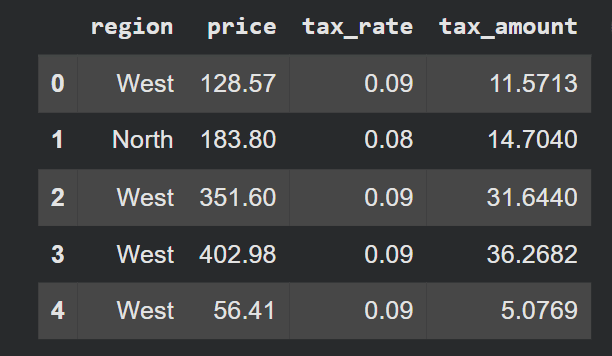
Scenario: Assign a region-based tax rate to each order.
conditions = [
    df['region'] == 'North',
    df['region'] == 'South',
    df['region'] == 'East',
    df['region'] == 'West',
]
tax_rates = [0.08, 0.06, 0.07, 0.09]

df['tax_rate'] = np.select(conditions, tax_rates, default=0.07)
df['tax_amount'] = df['price'] * df['tax_rate']
np.select() takes a list of boolean conditions and a corresponding list of values. It evaluates conditions in order and assigns the value from the first matching condition. A default parameter handles cases where none of the specified conditions are met, providing a robust safety net. This method is particularly valuable in financial analytics, categorisation tasks, and rule-based systems where multiple criteria determine an output. Its vectorized nature ensures superior performance compared to any loop-based or .apply() solution for multi-condition logic.
5. Streamlined Data Transformation: Dictionary Mapping with .map()
Translating values in a column—such as converting categorical names to numeric codes, or replacing short keys with descriptive labels—is a common task. Pandas’ .map() method, when used with a dictionary, offers an incredibly clean and fast way to perform these lookups.
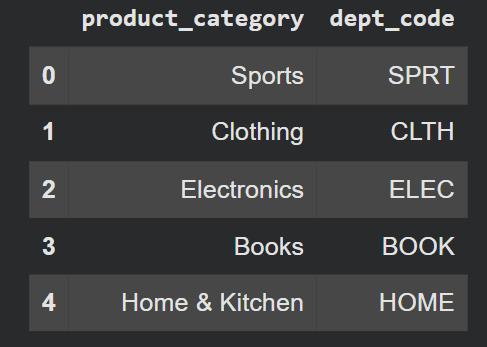
Scenario: Map product categories to internal department codes.
category_codes =
    'Electronics': 'ELEC',
    'Clothing': 'CLTH',
    'Home & Kitchen': 'HOME',
    'Sports': 'SPRT',
    'Books': 'BOOK',


df['dept_code'] = df['product_category'].map(category_codes)
The .map() method acts as an efficient lookup table, performing the substitution across the entire Series in a vectorized manner. It is often an underutilized gem in the pandas toolkit, with many developers defaulting to df['column'].apply(lambda x: my_dict.get(x)) which is significantly slower due to the Python function call overhead for each element. df.replace() can also achieve similar results but .map() is often preferred for simple one-to-one value substitutions using a dictionary, especially when dealing with potential NaN values (which map handles gracefully by default).
6. Precision String Operations with the .str Accessor
String manipulation is a frequent culprit for performance bottlenecks, as many developers instinctively revert to loops or .apply() with custom functions. Pandas, however, provides a dedicated .str accessor that exposes a suite of vectorized string methods, mirroring Python’s built-in string functions but operating efficiently across an entire Series.
Scenario: Extract the first word from the product_category column and convert it to lowercase.
df['category_slug'] = df['product_category'].str.split().str[0].str.lower()The .str accessor allows for chaining multiple string methods, just like with regular Python strings. It supports a wide array of operations, including str.contains(), str.replace(), str.extract() for regular expressions, str.startswith(), str.endswith(), and more. By using .str, operations like tokenization, cleaning, and pattern matching on textual data become remarkably efficient, avoiding the performance penalty associated with Python’s per-element string processing in a loop. This is invaluable in natural language processing (NLP) pre-processing, text analytics, and data cleaning pipelines where string operations are ubiquitous.
7. Aggregating Insights: The Strength of .groupby()
A very common pattern in data analysis involves iterating over subsets of data to compute group-level statistics. Pandas’ groupby() method is explicitly designed for this purpose, providing a highly optimized and expressive way to perform split-apply-combine operations.
Scenario: Calculate total revenue, average days to ship, and order count per product category.
summary = (
    df.groupby('product_category')
    .agg(
        total_revenue=('revenue', 'sum'),
        avg_ship_days=('days_to_ship', 'mean'),
        order_count=('order_id', 'count')
    )
    .round(2)
    .reset_index()
)
The .groupby() method, often combined with .agg(), is a cornerstone of data aggregation in pandas. It efficiently groups the DataFrame by one or more columns, then applies specified aggregation functions (like sum, mean, count, min, max, or custom functions) to each group. This process is internally optimized using C-level routines, making it vastly superior to manually looping through groups. For complex aggregations, groupby().apply() can also be used, but generally, named aggregations with .agg() are preferred for their clarity and performance. This is indispensable for generating summary reports, calculating key performance indicators (KPIs), and performing exploratory data analysis (EDA).
Beyond the Basics: A Framework for Choosing the Right Tool
Transitioning from row-by-row thinking to column-wise operations is a fundamental shift that unlocks the full potential of pandas. The table below, originally provided in the article, serves as a quick reference, but understanding the nuances is key.
| Operation / Method | Use Case / Description |
|---|